

Download Autodesk Vehicle Tracking 2027 – Vehicle Simulation and Road Safety Analysis Software
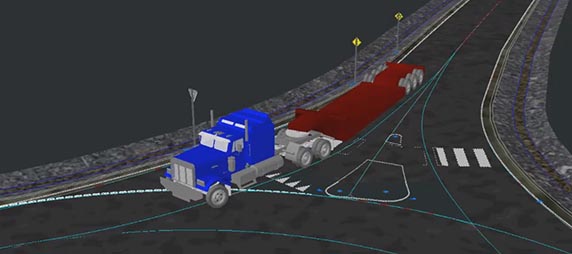
Autodesk Vehicle Tracking is a specialized civil engineering software developed by Autodesk, Inc. designed for detailed vehicle movement simulation and analysis. This tool is crucial for professionals in civil engineering, transportation, and urban planning who need to evaluate vehicle dynamics and their interaction with road infrastructure. By offering robust simulation modeling, it aids in designing safer and more efficient transportation systems.
Overview of Autodesk Vehicle Tracking
What is Autodesk Vehicle Tracking?
Autodesk Vehicle Tracking is a powerful application for simulating vehicle movements, enabling engineers and planners to analyze how vehicles interact with road designs and traffic conditions. It provides advanced tools to test diverse scenarios, assess potential safety issues, and optimize designs before construction. This facilitates a data-driven approach to transportation infrastructure development.
Key Applications in Civil Engineering
In civil engineering, Autodesk Vehicle Tracking is instrumental in analyzing the performance of new or existing road infrastructure. Engineers use its capabilities to conduct detailed road safety analysis, evaluating factors such as sightlines, clearances, and intersection efficiency for various vehicle types. The software helps forecast traffic flow and identify potential hazards, ensuring designs meet regulatory standards and improve overall road network performance.
Core Features and Capabilities
Vehicle Movement Simulation
The software offers comprehensive vehicle movement simulation functionalities. Users can define various vehicle types, speeds, and maneuvers to test different driving scenarios. The simulation outputs provide critical data on vehicle dynamics, clearances, and potential conflicts, supporting informed design decisions and risk assessment for transportation projects.
Integration with Autodesk Products
Autodesk Vehicle Tracking benefits from seamless integration with other Autodesk products, most notably AutoCAD. This connection allows users to import existing CAD designs and utilize them as the basis for vehicle movement simulations. Such integration streamlines workflows, ensuring that design changes in one application are reflected accurately across the connected tools for consistent project development.
Use Cases in Various Industries
The sophisticated simulation and analysis capabilities of Autodesk Vehicle Tracking find application across several sectors. In **urban planning**, it assists in designing effective traffic circulation for new developments and redesigning complex urban intersections. **Government transportation agencies** utilize it for road safety assessments, analyzing accident hotspots and proposing infrastructure improvements. Furthermore, the software can be applied in **vehicle design optimization** to understand how new vehicle types might interact with existing road networks.
Benefits of Using Autodesk Vehicle Tracking
Employing Autodesk Vehicle Tracking significantly enhances project forecasting and operational efficiencies for transportation-related projects. The ability to accurately simulate vehicle movements allows for early identification of design flaws, reducing the need for costly revisions during or after construction. This leads to improved project timelines, reduced expenditure, and the creation of safer, more efficient transportation infrastructure.
Getting Started with Autodesk Vehicle Tracking
To begin utilizing Autodesk Vehicle Tracking, users typically need a working installation of compatible Autodesk software, such as AutoCAD. The software is designed to leverage CAD models as its foundation, meaning that a prerequisite is having a road design or site plan created within AutoCAD or a similar compatible platform. Once installed and integrated, users can import their designs to start setting up and running vehicle movement simulations.
Frequently Asked Questions
What is the primary purpose of Autodesk Vehicle Tracking?
Autodesk Vehicle Tracking is designed to simulate vehicle movements on roadways, helping engineers analyze the effects of various road conditions and design factors on vehicle behavior. It provides insights into traffic flow, safety clearances, and intersection performance through detailed simulation modeling.
How does Autodesk Vehicle Tracking integrate with AutoCAD?
Autodesk Vehicle Tracking fully integrates with AutoCAD, allowing users to leverage CAD designs for more accurate vehicle movement analysis in their projects. This integration enables seamless data transfer and visualization of simulation results within the familiar AutoCAD environment.
In which fields is Autodesk Vehicle Tracking most commonly used?
The software is primarily used in civil engineering, urban planning, and transportation design to improve road safety and optimize vehicle movement designs. Its detailed analysis capabilities are essential for professionals focused on creating efficient and secure transportation infrastructure.




Reviews
There are no reviews yet.