

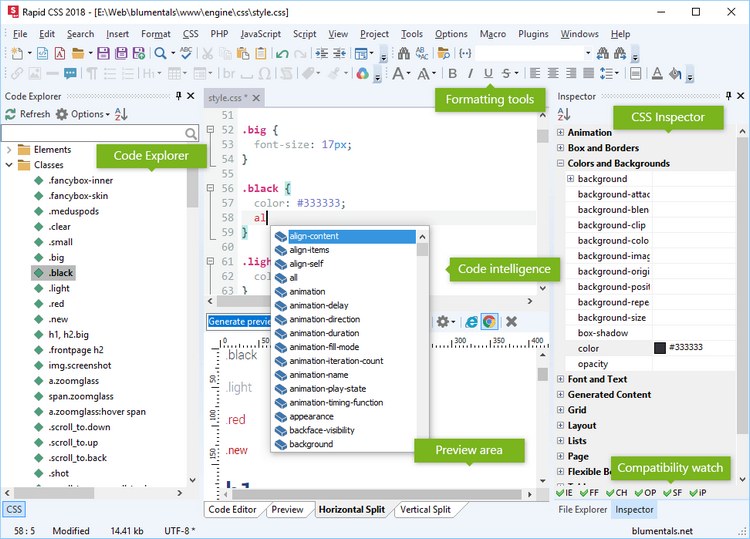
Download Blumentals Rapid CSS 2022 – A Comprehensive CSS and HTML Editing Tool
Blumentals Rapid CSS 2022 is an efficient HTML and CSS editor developed by Blumentals Software, designed to streamline the web development process. This programming software is tailored for web developers and front-end professionals, offering a lightweight yet powerful environment for coding, debugging, and previewing web projects. Its focus on speed and user-friendliness makes it a practical choice for creating modern web pages.
Introduction to Rapid CSS Editor
Blumentals Rapid CSS 2022 provides a comprehensive suite of features essential for front-end web development. It aims to enhance productivity by offering intuitive tools within a user-friendly interface, making it suitable for both new and experienced developers. The editor is built to support web standards and facilitate rapid code creation.
Overview of Features and Tools
Rapid CSS is recognized for its efficiency and user-centric design, providing a streamlined coding experience. Key features include:
- Intelligent code auto-completion that suggests relevant code snippets as you type.
- Real-time syntax highlighting for better code readability and error identification.
- Integrated validator for checking HTML and CSS code against web standards.
- A built-in preview pane that shows design changes instantly.
- Support for multiple documents and multitasking, allowing developers to work on various projects simultaneously.
Key Capabilities for Web Developers
This web development software equips developers with advanced tools to accelerate their workflow and ensure code quality. Its core capabilities are designed to simplify complex coding tasks and reduce the time spent on manual processes.
Automated Code Assistance
The software includes robust automated code assistance features, exemplified by its intelligent code completion and validation tools. As developers type HTML or CSS code, Rapid CSS suggests relevant commands, tag names, and property values, automatically inserting them to save time and minimize typographical errors. The integrated code validator checks for syntax errors and compliance with web standards, alerting developers to potential issues before deployment.
Preview Options Across Browsers
Ensuring a consistent user experience across different web browsers is a critical aspect of web development. Rapid CSS facilitates this by offering built-in preview capabilities. Developers can see how their HTML and CSS changes render in real-time, allowing for immediate adjustments to ensure cross-browser compatibility and a unified presentation on various platforms and devices.
System Performance and Suitability
Blumentals Rapid CSS 2022 is engineered for performance, ensuring that developers can work efficiently without system lag. Its design prioritizes resource management, making it a versatile tool for a wide range of development environments.
Lightweight Design for Efficient Coding
One of the standout characteristics of Rapid CSS is its lightweight design. Unlike larger, more feature-heavy integrated development environments (IDEs), this CSS editor consumes minimal system resources. This efficiency translates to faster loading times and a more responsive coding environment, even on older or less powerful hardware, allowing for quicker iteration cycles.
Cross-platform Support and Compatibility
While primarily focused on HTML and CSS, Rapid CSS extends its utility by supporting other essential web languages such as JavaScript, PHP, XML, ASP, and Perl. This broad compatibility ensures that developers can manage diverse web projects efficiently. The software is designed to align with current web standards and work harmoniously with various front-end frameworks and back-end technologies, providing a flexible development foundation.
Real-world Applications and Use Cases
The practical applications of Blumentals Rapid CSS 2022 are widespread within the front-end development landscape. Its efficiency and ease of use make it particularly suitable for specific project types.
Examples of its use include:
- Rapid development of static websites, such as personal portfolios or small business landing pages, where quick turnaround is essential.
- Creating and refining the visual styling for e-commerce platforms, ensuring an appealing and functional user interface.
- Building custom themes or templates for content management systems.
- Debugging and optimizing existing HTML and CSS codebases for better performance and browser compatibility.
- Prototyping new web designs and user interfaces quickly before full implementation.
Comparative Analysis
When compared to other comprehensive development suites or text editors, Blumentals Rapid CSS 2022 distinguishes itself through its specialized focus and agility. While some editors offer a vast ecosystem of plugins and extensions, Rapid CSS excels in providing a core set of intelligent tools optimized for HTML and CSS development.
Its key differentiators include a highly responsive interface, efficient resource utilization, and integrated features like real-time preview and code validation that are seamlessly combined. This approach allows developers to achieve faster coding speeds and more accurate results without the complexity often associated with feature-rich IDEs, making it an ideal choice for projects where speed and simplicity are paramount.
Frequently Asked Questions
What programming languages does Blumentals Rapid CSS support?
Blumentals Rapid CSS primarily supports HTML and CSS. However, it also offers robust support for JavaScript, PHP, XML, ASP, and Perl, making it a versatile tool capable of handling a wide range of web development tasks and project requirements.
How does the code auto-completion feature work in Rapid CSS?
The intelligent code auto-completion in Rapid CSS significantly accelerates the coding process. As you type HTML or CSS, the tool dynamically suggests relevant code snippets, keywords, and property values, automatically inserting them upon selection. This functionality not only speeds up typing but also helps reduce syntax errors and promotes adherence to coding standards.
Can I preview my design in different browsers using Rapid CSS?
Yes, Blumentals Rapid CSS includes integrated preview capabilities that allow you to see how your web pages will render across various browsers at any given moment. This feature is crucial for ensuring cross-browser compatibility and verifying that your design appears as intended, regardless of the viewing platform.






Reviews
There are no reviews yet.