

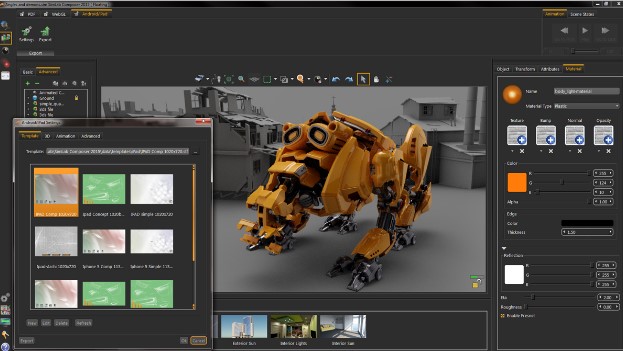
Download SimLab Composer 12.1 – The Premier 3D Modeling and Animation Software
SimLab Composer 12.1, developed by SimLab Engineering, is a powerful 3D modeling and animation software designed for professionals and enthusiasts alike. This application offers a comprehensive suite of tools for creating high-quality, realistic 3D scenes and animations, supporting versatile output formats. With an emphasis on ease of use and enhanced visual quality, SimLab Composer serves diverse industries including product design, architectural visualization, and game development.
Introduction to SimLab Composer
SimLab Composer stands out in the computer graphics field as a robust solution for 3D design and animation. It empowers users to build intricate 3D models, develop dynamic animations, and render scenes with remarkable realism. The software is engineered to simplify complex workflows, making advanced 3D capabilities accessible to a broader audience while meeting the stringent demands of professional projects. Its intuitive design philosophy ensures that users can achieve high-quality results efficiently.
Key Capabilities and Features
Real-Time Rendering and Animation Tools
SimLab Composer provides advanced real-time rendering capabilities, allowing users to visualize their scenes dynamically as they work. This feature significantly speeds up the design iteration process. Complementing its rendering power, the software includes a suite of animation tools that enable the creation of intricate motion sequences for models and scenes, enhancing narrative and visual storytelling. These tools are geared towards producing polished animated content for various applications.
3D Model Sharing and Output Options
A key strength of SimLab Composer lies in its extensive export options, facilitating broad accessibility for 3D creations. The software supports the export of models and scenes into standard formats compatible with other 3D applications. Notably, it offers specialized output options such as interactive 3D PDFs and WebGL, which allow for easy sharing and viewing of 3D content directly within web browsers or PDF readers without requiring specialized software. This enhances collaboration and presentation capabilities for users.
Material Editor and Customization Features
The software features a sophisticated material editor that provides users with granular control over the surface properties of their 3D models. This allows for the creation of highly realistic textures and materials, from simple plastics to complex, reflective surfaces. With a wide array of customization options, users can meticulously define aspects like color, reflectivity, and transparency, ensuring that their 3D scenes accurately reflect the desired aesthetic and material properties for product design or architectural visualization.
Applications in Various Industries
SimLab Composer finds extensive application across multiple professional sectors due to its versatile feature set. In product design, it is used for conceptualizing and rendering product prototypes with high fidelity. For architectural visualization, professionals leverage its rendering and animation tools to create immersive walkthroughs and realistic visual models of buildings and interiors. The game design industry benefits from its asset creation capabilities and efficient real-time rendering, aiding in the development of visually rich game environments.
Comparison with Similar Tools
When compared to other leading 3D modeling software, SimLab Composer distinguishes itself through its user-friendly interface and advanced real-time rendering capabilities, which are central to its design. While applications like Blender offer a vast array of features and a large open-source community, SimLab Composer often provides a more streamlined workflow for specific tasks, particularly in scene assembly and high-quality rendering for visualization purposes. Its specialized export formats, such as 3D PDF, also offer unique advantages for content sharing in professional contexts, differing from the primary outputs of tools like SketchUp.
User Experience and Interface Design
SimLab Composer is developed with a strong emphasis on user experience, featuring an intuitive user interface that aims to reduce the learning curve associated with complex 3D software. The design prioritizes efficient navigation and tool accessibility, enabling users to focus more on their creative work and less on mastering complicated commands. This approach makes the software suitable for both seasoned professionals seeking productivity and newcomers to 3D modeling and animation.
Community and Support Resources
SimLab Engineering provides users with a range of support resources to enhance their experience with SimLab Composer. This includes documentation, tutorials, and access to a community forum where users can exchange knowledge, share tips, and seek assistance from peers and experienced users. These resources are invaluable for troubleshooting issues, learning advanced techniques, and staying updated on the software’s capabilities, fostering a supportive environment for all users.
Frequently Asked Questions
What file formats does SimLab Composer support for exporting models?
SimLab Composer supports various file formats for exporting models, including 3D PDF, WebGL, and formats compatible with other 3D software. This versatility ensures that users can share their creations across different platforms easily, facilitating collaboration and presentation.
Can I create animations using SimLab Composer?
Yes, SimLab Composer allows users to create animations with its robust animation tools. These produced animations can be exported for use in specialized animation software or directly presented using supported formats, enhancing the user’s creative possibilities for dynamic visualizations.
Is there a learning curve for new users of SimLab Composer?
While SimLab Composer is designed with usability in mind and offers an intuitive interface, new users may experience a modest learning curve due to the software’s extensive features for 3D modeling and rendering. However, ample resources and tutorials are available to assist users in becoming proficient quickly.






Reviews
There are no reviews yet.