

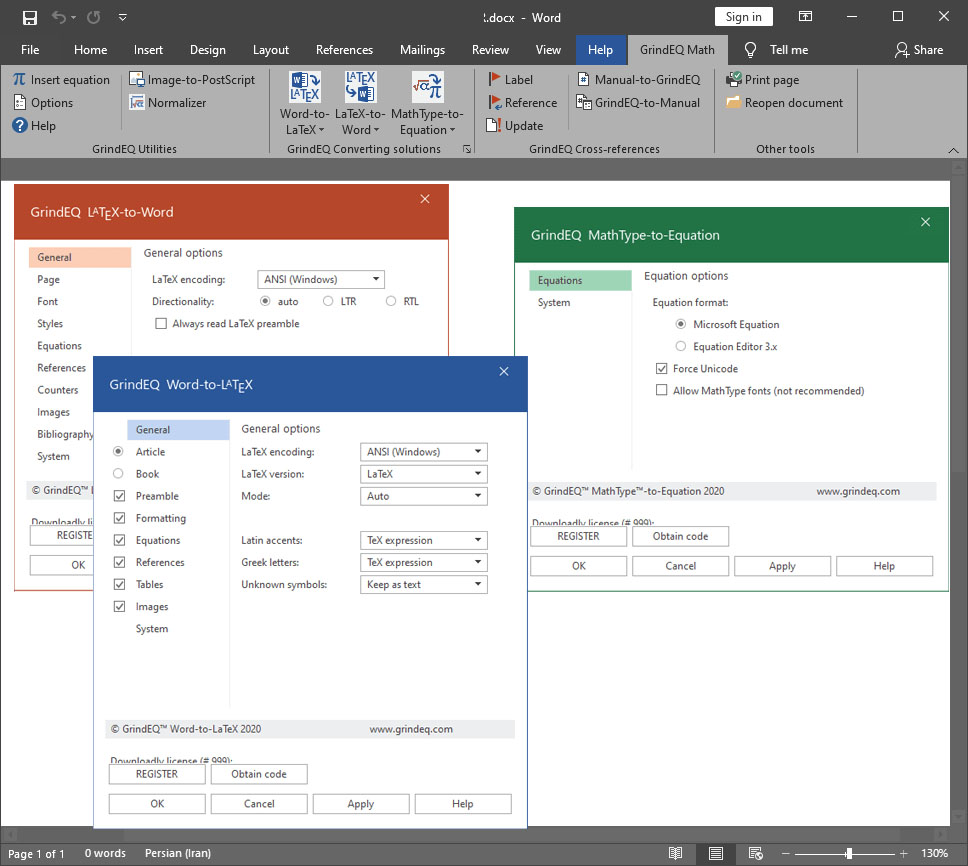
Download GrindEQ Math Utilities 2024 – Streamline Your Document Conversions
GrindEQ Math Utilities 2024 is a specialized mathematics software developed by GrindEQ, designed to facilitate seamless document conversion between Microsoft Word and LaTeX formats. This powerful tool is particularly valuable for professionals and academics in fields such as mathematics, engineering, and science who require precise formatting of mathematical content within their documents.
Overview and Applications in Mathematics
What is GrindEQ Math Utilities?
GrindEQ Math Utilities is a document conversion software focused on transforming Microsoft Word (.doc, .docx) files into LaTeX and AMS-LaTeX formats, and vice versa. Its core functionality is built around accurately preserving complex mathematical equations, symbols, and references during the conversion process, making it an essential utility for technical writers, researchers, and educators.
Key Conversion Features
Microsoft Word to LaTeX and AMS-LaTeX
The primary strength of GrindEQ Math Utilities lies in its robust conversion engine for transforming documents from Microsoft Word to LaTeX. It is engineered to meticulously convert mathematical expressions, including intricate formulas and scientific notation, into their LaTeX equivalents. This ensures that the fidelity of mathematical content is maintained, which is critical for academic papers, technical reports, and scientific publications.
Key aspects of this conversion include:
- Accurate rendering of mathematical equations and symbols.
- Support for both standard LaTeX and the more advanced AMS-LaTeX packages, which offer expanded mathematical typesetting capabilities.
- Preservation of document structure, such as headings, lists, and citations.
Reverse Conversion: LaTeX to Word
GrindEQ Math Utilities also supports the reverse conversion process, allowing users to convert LaTeX and AMS-LaTeX documents back into Microsoft Word format. This feature is invaluable for workflows where initial drafting or collaborative editing might occur in Word, but the final typesetting requires LaTeX, or when existing LaTeX documents need to be integrated into a Word-based workflow. The software aims to maintain readability and structure during this reverse transformation.
Efficiency and Performance Enhancements
Batch Conversion Capabilities
To enhance productivity for users dealing with numerous documents, GrindEQ Math Utilities offers powerful batch conversion capabilities. This feature allows multiple Word or LaTeX files to be processed simultaneously, significantly reducing the time and effort required for converting large collections of documents. The batch conversion is designed to maintain the same level of accuracy as single-file conversions.
Handling Large Documents
Processing extensive documents can sometimes lead to performance issues. GrindEQ Math Utilities provides guidance and optimized performance for handling larger files. While the software is capable of managing substantial document sizes, users are advised to break down exceptionally large files (e.g., exceeding 60 pages) into smaller, more manageable sections. This approach ensures a smoother conversion process, preventing potential strain on system resources like processor and RAM.
Supported Languages and Formats
GrindEQ Math Utilities is primarily designed for handling English language documents that contain mathematical content. The core supported input formats are Microsoft Word (.doc, .docx) and LaTeX (.tex). The output formats are LaTeX and AMS-LaTeX for Word-to-LaTeX conversions, and Microsoft Word (.doc, .docx) for LaTeX-to-Word conversions. While its primary focus is on mathematical and technical content, standard textual elements within these documents are also processed.
Real-World Use Cases
The utility of GrindEQ Math Utilities is evident across several professional and academic contexts:
- Academic Publishing: Researchers and students use it to convert theses, dissertations, and journal articles drafted in Word into the LaTeX format required by many academic publishers.
- Engineering Documentation: Engineers can leverage the software to prepare technical reports and manuals that require precise mathematical or scientific notation, ensuring consistency between drafting and final typesetting.
- Scientific Research: Scientists working on papers that involve complex formulas can use GrindEQ to streamline the transition from initial document creation in Word to a professionally typeset LaTeX document.
- Course Material Creation: Educators can convert lecture notes or textbooks originally created in Word into LaTeX for easier distribution or integration into online learning platforms that support LaTeX rendering.
Comparative Advantages
GrindEQ Math Utilities distinguishes itself through a combination of specialized features tailored for technical document conversion. Its key advantages over general-purpose converters include a dedicated focus on the accurate translation of complex mathematical expressions into LaTeX, reducing the manual correction often needed with other tools. Furthermore, the robust batch conversion capability allows for significant time savings on projects involving numerous files. The software’s specific recommendation for handling large documents also sets it apart by offering practical solutions to potential performance bottlenecks encountered in academic and engineering workflows.
Frequently Asked Questions
How does GrindEQ Math Utilities handle conversion from Word to LaTeX?
GrindEQ Math Utilities efficiently converts Microsoft Word documents into LaTeX and AMS-LaTeX formats, preserving complex mathematical equations and references. Users can then edit the LaTeX content as needed within their preferred editor, ensuring the fidelity of their mathematical expressions throughout the process.
Can I convert multiple documents at once using GrindEQ Math Utilities?
Yes, GrindEQ Math Utilities supports batch conversion, allowing users to convert several files simultaneously. This feature is particularly useful for users with extensive documentation needs, significantly streamlining workflows that involve processing a large volume of documents.
What should I do if my document is too large for conversion?
For very large documents, it’s advisable to break the file into smaller sections (e.g., 60 pages) before conversion to prevent potential strain on your processor and RAM. This approach facilitates smoother processing and ensures better performance during the conversion of extensive technical documents.








Reviews
There are no reviews yet.