
Download OkMap Desktop 19.6.4 – Advanced GPS Mapping Tool
OkMap Desktop 19.6.4 is a comprehensive GPS mapping software developed by OkMap s.r.l., tailored for cartography and GPS applications. This geospatial software empowers users to effectively utilize and edit both vector and raster maps, supporting a wide array of geographic data formats and integrating seamlessly with GPS devices. Professionals in environmental sciences and navigation can leverage its robust features for advanced mapping and analysis of outdoor activities, making it an essential tool for detailed project planning and execution.
Overview of OkMap Desktop
OkMap Desktop provides a robust suite of functionalities designed for professional cartography and GPS data management. The software is engineered to support complex mapping projects, offering detailed control over geographic data and an intuitive pathway for analyzing outdoor endeavors.
Introduction to Features
OkMap Desktop facilitates sophisticated GPS mapping and project management through a comprehensive set of tools. Key functionalities include:
- Advanced tools for editing and utilizing vector and raster maps.
- Capabilities for preparing and managing detailed project routes.
- Real-time GPS tracking for live data visualization during activities.
- Support for various geographic data formats to ensure compatibility.
- Integration with online mapping services for expanded visualization.
Utilization in Various Industries
The versatile nature of OkMap Desktop makes it highly applicable across several sectors, particularly those reliant on precise geographic data and navigation. Its capabilities extend from detailed environmental mapping to planning intricate outdoor expeditions.
- Environmental Sciences: Utilized for field data mapping, geospatial analysis of ecological zones, and monitoring environmental changes by scientists and researchers.
- Navigation and Exploration: Essential for hikers, bikers, and adventurers to plan routes, track progress, and analyze traversed paths with detailed GPS mapping features.
- Cartography: Professionals use OkMap for creating, editing, and managing digital maps, ensuring accuracy for various cartographic applications.
Integration with GPS Devices
OkMap Desktop is designed for seamless integration with a wide range of GPS devices, enabling efficient data transfer and real-time utilization of location information. This connectivity is crucial for accurate data collection and route planning.
The software supports common GPS data transfer protocols, allowing users to upload tracks, routes, and waypoints from their devices directly into OkMap. Conversely, users can also download prepared routes and maps to their GPS units for use in the field. This bidirectional data flow ensures that OkMap serves as a central hub for all GPS-related mapping activities.
Data Formats and Compatibility
A key strength of OkMap Desktop is its extensive support for a multitude of geographic data formats, enhancing its compatibility and utility for diverse mapping needs.
The software handles various map types, including:
- Raster Maps: Supports scanned maps, aerial imagery, and other image-based geographic data.
- Vector Data: Compatible with common vector formats for points, lines, and polygons, such as shapefiles and others.
- Digital Elevation Models (DEM): Enables the use of elevation data for terrain analysis and 3D visualization.
- GPS Data Formats: Integrates directly with standard GPS file types for tracks, routes, and waypoints.
Real-Time Mapping and Analysis Tools
OkMap Desktop offers advanced tools for real-time mapping and in-depth geospatial analysis, providing users with powerful capabilities for understanding and interpreting geographic data.
Key analytical and tracking features include:
- Live Tracking: Monitor your current position in real-time directly on the uploaded maps.
- Route Management: Create, edit, and optimize routes for various outdoor activities.
- Geospatial Analysis: Perform analyses that require vector data, raster data, and DEM information.
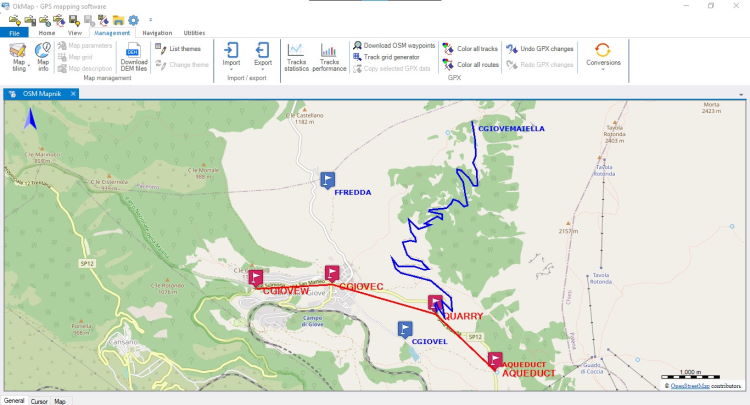
- Data Visualization: Visualize tracked data and prepared routes with detailed graphical representations.
Collaboration with Online Mapping Services
OkMap Desktop enhances its mapping capabilities by integrating with popular online mapping services, offering users expanded options for data visualization and context.
The software provides connections to services such as:
- Google Maps: Overlay your GPS data and custom maps onto familiar Google Maps backgrounds for contextual understanding.
- Google Earth: Visualize your tracks, routes, and map data in a 3D environment, offering a new perspective on terrain and locations.
User-Friendly Interface and Experience
Despite its extensive range of professional features, OkMap Desktop maintains a user-friendly interface that accommodates both novice and experienced users in the field of cartography and geospatial analysis.
The design prioritizes ease of navigation, enabling users to quickly access and utilize complex functionalities like route management and geospatial analysis without a steep learning curve. This approach ensures that professionals can efficiently manage their mapping projects and outdoor activities.
Frequently Asked Questions
What types of maps can I upload to OkMap?
Users can upload a variety of online and digital maps, including purchased maps, as well as vector data and Digital Elevation Models (DEM) in supported formats. This flexibility allows for the integration of diverse mapping resources into your projects.
How does OkMap help in live route tracking?
By connecting your GPS device to OkMap, you can see your routes in real-time on the map, allowing for immediate data visualization as you travel. This capability is invaluable for monitoring progress during outdoor activities like hiking or biking.
Can OkMap integrate with other mapping services?
Yes, OkMap can connect with services like Google Maps and Google Earth, providing enhanced visualization options for your mapped data. This integration allows for a richer contextual understanding and presentation of your geospatial information.






Reviews
There are no reviews yet.