

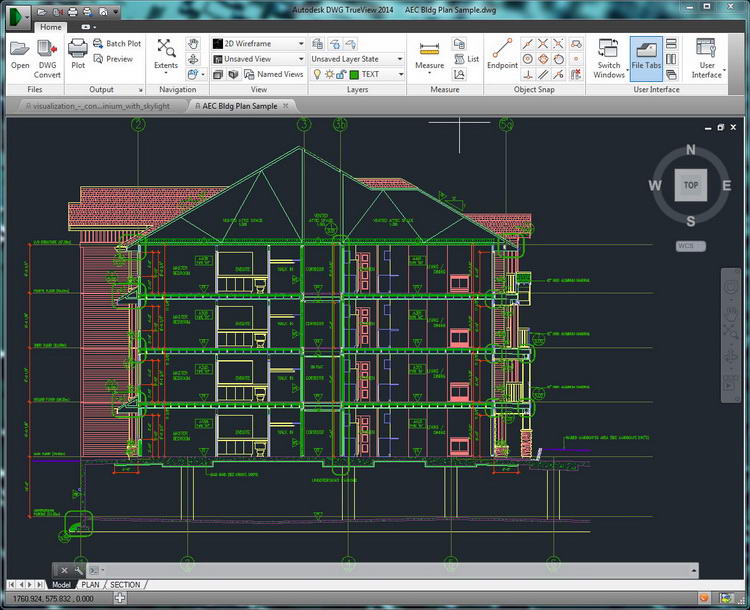
Download Autodesk DWG TrueView 2024 – Your Free Window into CAD Worlds
Autodesk DWG TrueView 2024 is a free application developed by Autodesk, Inc., designed to provide essential viewing, plotting, and sharing capabilities for DWG and DXF files. Within the architecture, engineering, and manufacturing sectors, this software serves as a crucial component for accessing and collaborating on CAD projects. It offers a streamlined experience for users who need to interact with drawings created in AutoCAD without requiring the full, advanced functionality of the professional design suite.
Introduction to Autodesk DWG TrueView 2024
Overview and Purpose
Autodesk DWG TrueView 2024 functions as a dedicated viewer for the industry-standard DWG file format, developed by Autodesk. Its primary purpose is to allow professionals across architecture, engineering, and manufacturing fields to easily open, review, and share CAD drawings. By providing this accessible viewing solution, DWG TrueView bridges the gap for stakeholders who need to understand design intent without engaging in complex design modifications.
Core Features and Functionalities
File Format Compatibility
This CAD software supports a wide array of file formats, ensuring broad compatibility within design workflows. Its core strength lies in its ability to render various versions of DWG files accurately, alongside DXF drawings. This extensive support ensures that users can view almost any drawing created with Autodesk’s CAD applications.
- Native support for the latest DWG file versions.
- Compatibility with older DWG formats to maintain project integrity.
- Full rendering capabilities for DXF files.
- Support for Autodesk’s trusted DWG technology for file verification.
Basic Editing and Markup Tools
While not a full-fledged design application, DWG TrueView provides essential tools for minor adjustments and collaborative feedback. These functionalities enable users to interact with drawings in a meaningful way, facilitating clearer communication among project teams.
- Tools for measuring distances, areas, and angles within drawings.
- Markup features allowing users to add text, revision clouds, and other annotations directly onto the drawing.
- Basic redlining capabilities for quick visual feedback.
3D Visualization Capabilities
Autodesk DWG TrueView 2024 offers robust 3D visualization tools, allowing users to navigate and inspect complex models. This capability is vital for understanding spatial relationships and design intent in three dimensions, enhancing review processes.
- Orbit, pan, and zoom functions for dynamic exploration of 3D models.
- View cube for quick navigation to standard 3D viewpoints.
- Support for different visual styles to represent model facets.
Conversion and Exporting Options
Beyond viewing, DWG TrueView enables users to convert their DWG files into other formats, primarily PDF, for easier sharing and archiving. This feature is particularly useful for generating distributable versions of drawings.
- Direct conversion of DWG files to PDF format.
- Options for plotting drawings to scale and to various paper sizes.
- Exporting capabilities to alternative formats for broader accessibility.
Benefits of Using DWG TrueView
Cost-Effectiveness and Accessibility
As a free application, Autodesk DWG TrueView 2024 significantly lowers the barrier to entry for accessing and collaborating on CAD designs. This cost-effectiveness makes it an invaluable tool for engineers, architects, manufacturers, and other professionals who need to interact with CAD files but do not require full design capabilities.
Cross-Platform Usage
This CAD software is designed to run on the Windows operating system, providing a reliable platform for viewing and interacting with DWG files. Its focused functionality ensures efficient performance on supported systems, making it a go-to viewer for many professionals.
Real-World Applications and Use Cases
Autodesk DWG TrueView 2024 finds extensive application across various industries. In architecture, it is used for reviewing construction drawings and client presentations. Engineers utilize it for inspecting mechanical designs and manufacturing blueprints. The manufacturing sector relies on DWG TrueView for quality control and assembly verification by viewing detailed part designs and assembly layouts. Its role as a CAD collaboration tool enhances communication between design teams and external stakeholders, ensuring everyone involved can access and understand critical project data.
Tips and Tricks for Maximizing DWG TrueView
Optimizing Your Workspace
Customizing the user interface and viewing preferences can significantly enhance the DWG viewing experience. Setting up display options and navigation aids to suit individual workflows can lead to more efficient file review.
- Adjust background colors and display settings for improved readability.
- Configure units and precision levels for accurate measurements.
- Set default navigation views that align with typical project reviews.
Shortcuts and Advanced Usage
Leveraging keyboard shortcuts can dramatically speed up common tasks when working with DWG files. Familiarizing yourself with these commands transforms DWG TrueView from a simple viewer into a more efficient workflow tool for engineers and designers.
- Utilize command-line shortcuts for actions like zooming and panning.
- Learn shortcuts for accessing measurement and markup tools rapidly.
- Master the use of the ViewCube for swift model orientation changes.
Conclusion
Autodesk DWG TrueView 2024 stands as an indispensable utility for anyone working with CAD data. Its commitment to providing free, reliable viewing of DWG and DXF files, coupled with essential markup and 3D visualization tools, makes it a cornerstone for collaboration in architecture, engineering, and manufacturing. For professionals seeking an accessible way to engage with CAD designs, DWG TrueView offers a powerful, no-cost solution.
Frequently Asked Questions
What is Autodesk DWG TrueView and what does it do?
Autodesk DWG TrueView is a free CAD viewer developed by Autodesk that allows users to open, view, plot, and share DWG and DXF files without the need for full AutoCAD software. It is particularly useful for professionals who need to access CAD files easily and verify design integrity.
Can I make edits to my DWG files using DWG TrueView?
While Autodesk DWG TrueView offers some basic editing tools for minor adjustments, such as measuring or adding markups, comprehensive editing of DWG files requires the full AutoCAD application. It is primarily designed for viewing and sharing, not for in-depth design modification.
Is DWG TrueView available for Mac users?
Autodesk DWG TrueView is developed for the Windows operating system and is not natively available for macOS. Users on Mac seeking to view DWG files may need to explore alternative viewing solutions or consider virtual machine setups.




Reviews
There are no reviews yet.