

Download Adobe Substance 3D Painter 11 – Advanced 3D Texturing Software
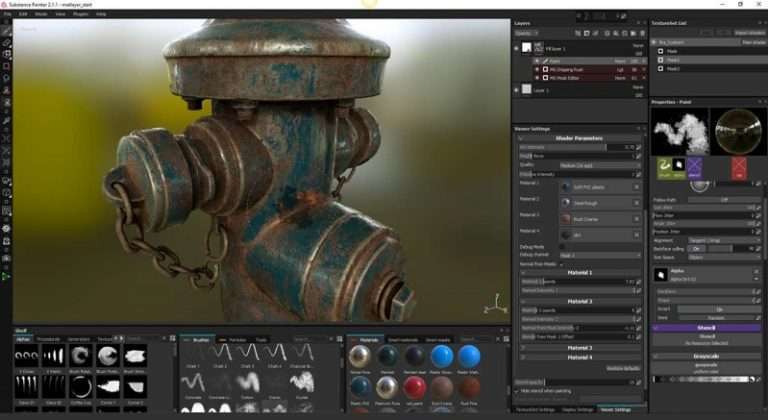
Adobe Substance 3D Painter 11 is a leading texturing software developed by Adobe Inc., designed for creating high-quality 3D assets. It is widely utilized in the video game development, VFX production, and graphic design industries. This powerful tool allows 3D artists to paint textures directly onto models, benefiting from real-time feedback through its robust physically-based rendering (PBR) engine.
Introduction to Adobe Substance 3D Painter
Overview and Industry Applications
Adobe Substance 3D Painter has seen significant advancements, evolving into a sophisticated texturing solution for digital artists. Its intuitive workflow and advanced features make it an indispensable tool in modern 3D content creation pipelines. The software’s capabilities are crucial for professionals aiming to produce visually stunning assets for diverse applications, from immersive video games to high-fidelity film productions.
Key Features of Substance 3D Painter
Advanced Texturing Capabilities
Substance 3D Painter offers a comprehensive suite of tools for creating intricate and realistic textures. Its PBR texturing capabilities ensure that materials behave realistically under different lighting conditions.
- Real-time PBR Painting: Artists can paint directly onto 3D models with immediate visual feedback, utilizing a physically-based rendering pipeline for accurate material representation.
- Smart Materials and Smart Masks: These features enable the creation of adaptive materials and masks that automatically adjust to a model’s geometry, significantly speeding up the texturing process and enhancing creative flexibility.
- Automatic Texturing: The software supports features that can procedurally generate texture maps based on material properties and model details, reducing manual effort.
- High-Resolution Support: It handles demanding projects with support for UDIM workflows and high-resolution textures up to 8K.
User Experience and Interface
Designed with artists in mind, Adobe Substance 3D Painter provides a user-friendly interface that facilitates efficient texturing workflows. The real-time rendering capabilities within the viewport allow artists to see the direct impact of their edits, fostering a more intuitive and productive creative process.
Integration with Other Tools
Substance 3D Painter integrates seamlessly into existing 3D production pipelines. Its compatibility with other Adobe Creative Cloud products enhances cross-application workflows, while robust export options ensure that created textures can be easily used in various game engines and rendering software.
- Adobe Creative Cloud Integration: Works harmoniously with applications like Photoshop and Unreal Engine for a cohesive workflow.
- Export Options: Supports numerous export presets for popular renderers and game engines, ensuring compatibility across different platforms.
- UDIM Workflow: Facilitates the use of UDIM tiles for complex models requiring extensive texture detail across multiple UV maps.
Real-World Applications in Gaming and VFX
Industry professionals rely on Adobe Substance 3D Painter for its ability to deliver high-quality assets for demanding projects. Its application in major video games and visual effects productions highlights its importance in creating realistic and compelling digital environments and characters.
- The software is a staple in the toolset for creating characters, props, and environments for AAA video games, contributing to the visual fidelity of titles across genres.
- In the visual effects industry, it is used to texture assets for blockbuster films and television shows, ensuring seamless integration of digital elements with live-action footage.
Conclusion and Additional Resources
Adobe Substance 3D Painter 11 empowers 3D artists with advanced capabilities for creating detailed and realistic textures. Its intuitive interface, powerful PBR painting tools, and seamless integration capabilities make it an essential asset for professionals in game development, VFX, and graphic design. For those looking to deepen their understanding, exploring official Adobe tutorials and community forums can provide further insights into its extensive features and practical applications.
Frequently Asked Questions
What platforms does Adobe Substance 3D Painter support?
Adobe Substance 3D Painter is available for Windows and macOS operating systems. Recent versions also include support for Linux, providing broader accessibility for users across different development environments.
Can I use Substance Painter for both games and film?
Yes, Substance Painter is a highly versatile texturing software that serves both the gaming and film industries effectively. Artists can create high-quality, production-ready textures suitable for diverse applications, ranging from interactive game environments to cinematic visual effects.
What are the benefits of using Smart Materials and Smart Masks?
Smart Materials and Smart Masks significantly streamline the texturing workflow by enabling users to create dynamic and adaptive textures. These features automatically adjust to a model’s surface properties and geometry, greatly improving efficiency and allowing for greater creative flexibility.





Reviews
There are no reviews yet.