

Download Scan2CAD – Leading Raster-to-Vector Conversion Software
Scan2CAD, developed by Avia Systems, is a specialized CAD application designed for engineering, design, and manufacturing professionals. As a leading commercial software, it excels in raster-to-vector and vector-to-vector conversion, enabling users to transform scanned drawings and images into editable, intelligent CAD data. Its robust capabilities make it an essential tool for digitizing legacy designs and integrating them into modern digital workflows.
Overview of Scan2CAD and Its Industry Applications
Scan2CAD offers a comprehensive solution for converting raster images into scalable vector graphics, a critical task in fields demanding precise digital representations. Since its initial release in 1993, the software has undergone continuous development under Avia Systems, maintaining a consistent focus on accuracy and user efficiency. This commitment has positioned Scan2CAD as a trusted tool for a wide range of users, from government agencies requiring accurate archival of technical drawings to small businesses enhancing their design processes. The software’s primary purpose is to bridge the gap between scanned paper documents and digital CAD environments.
Key Features and Functional Capabilities
Advanced Object Recognition
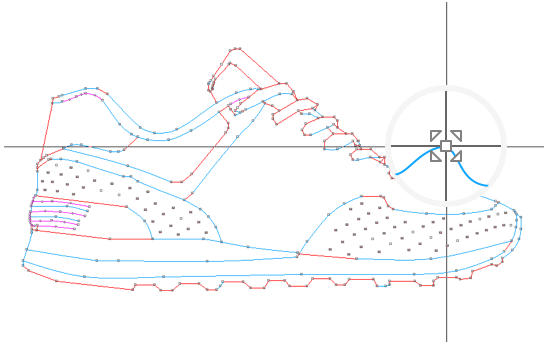
A core functionality of Scan2CAD is its advanced object recognition engine. This technology automatically identifies and classifies various graphical elements within a raster image, such as lines, arcs, circles, and polygons. Once recognized, these elements are accurately converted into their corresponding vector entities. This intelligent interpretation significantly reduces the manual effort typically required to trace over scanned drawings, enabling faster and more precise digital reproduction of designs.
Support for File Types and Formats
Scan2CAD distinguishes itself through its extensive support for a vast number of file formats, encompassing both raster and vector types. This broad compatibility ensures that users can import virtually any scanned drawing or existing vector file and export to formats widely used in the CAD industry. The software supports over 30 file formats, facilitating seamless integration into diverse project environments and simplifying the workflow for users dealing with various data sources.
Text Conversion and OCR Technology
Leveraging advanced Optical Character Recognition (OCR) technology, Scan2CAD excels in convertingscanned text within images into fully editable vector text. This feature is particularly valuable for digitizing technical documents, blueprints, and legacy drawings that contain essential textual information. The accurate text conversion streamlines the process of updating or extracting data from older documents, saving considerable time and minimizing data entry errors for design and engineering professionals.
Integration with CAD/CAM Systems
Scan2CAD is engineered for seamless integration with existing CAD/CAM workflows. The vector output files generated by the software are compatible with a wide range of popular CAD and CAM programs. Users can easily open and further edit these converted files in their preferred design environments, such as AutoCAD, MicroStation, and others. This direct interoperability ensures that digitized drawings can be immediately utilized for further design modifications, analysis, or manufacturing processes, enhancing overall project efficiency.
User Base and Real-World Applications
The capabilities of Scan2CAD make it an indispensable tool for professionals across various sectors. Engineering firms frequently use it to digitize legacy blueprints and architectural drawings, making them searchable and editable for renovation or expansion projects. In the manufacturing industry, Scan2CAD is applied to convert scanned product designs or tool plans into precise vector data for CNC machining or 3D modeling. Government agencies also rely on the software for archiving and managing vast collections of technical documentation, ensuring data integrity and accessibility.
Recent Developments and Version Updates
While specific details on all version updates are extensive, Scan2CAD continues to evolve, with version 10.6.1 representing the latest iteration of Avia Systems’ commitment to enhancing its conversion and editing capabilities. Recent developments typically focus on improving the accuracy of object and text recognition, expanding file format support, and optimizing the user interface for greater ease of use. User feedback consistently highlights the software’s reliability and the effectiveness of its advanced OCR and vectorization engines in handling complex drawings.
Frequently Asked Questions
What types of files can I convert using Scan2CAD?
Scan2CAD supports a wide array of file formats, including raster files like JPEG, PNG, and TIFF, and vector formats like DXF, DWG, and SVG. This versatility allows users to work with almost any design file, whether it’s a scanned image or an existing vector graphic.
How does Scan2CAD utilize OCR technology for text?
Scan2CAD employs Optical Character Recognition (OCR) technology to convert raster text into editable vector text, streamlining the design process for users needing to manipulate text in their CAD projects. It accurately recognizes characters and transforms them into true vector text objects.
What industries benefit from using Scan2CAD?
Scan2CAD is utilized across diverse industries such as engineering, manufacturing, and government organizations, making it essential for professionals who require high-precision conversion and editing of design images. Architects, mechanical designers, and infrastructure planners are among its key users.






Reviews
There are no reviews yet.