

Download Adobe DNG Converter 18.3.2 – Standardize Your Raw Image Workflow
Adobe DNG Converter is a utility application developed by Adobe Systems Incorporated that enables photographers and digital imaging professionals to convert proprietary raw image files from various digital camera models into the standardized Adobe Digital Negative (DNG) format. This process is crucial for ensuring broad compatibility, improving file management, and enhancing editing capabilities within a standardized digital photography workflow.
Overview of Adobe DNG Converter
The primary function of Adobe DNG Converter is to provide a straightforward method for transforming camera-specific raw image files, which can be difficult to manage and edit across different software platforms, into the universally compatible DNG format. This conversion process ensures that raw image data is preserved while offering a more versatile and efficient file structure for subsequent editing and archival purposes.
Key Features and Functional Capabilities
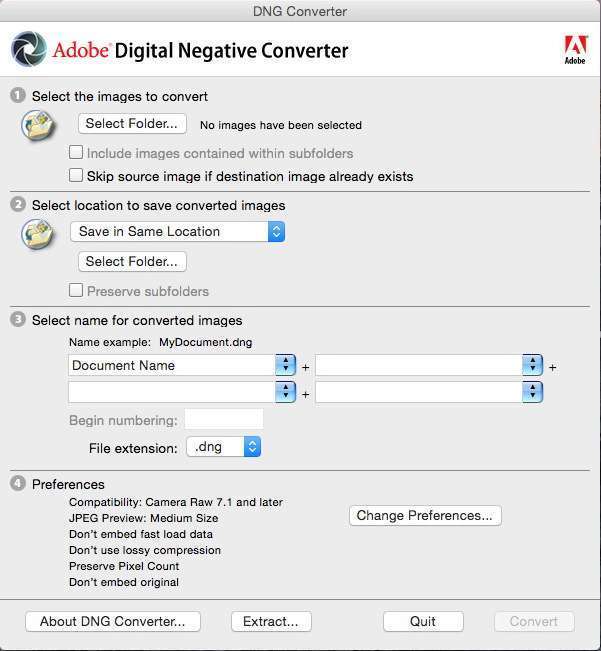
Adobe DNG Converter offers a user-friendly interface designed for efficient image processing. Its features are centered around simplifying the conversion workflow for a wide range of users.
- Simple Environment: The software provides a basic interface that guides users through the conversion process step-by-step, making it accessible even for those new to raw image conversion.
- Batch File Conversion: A significant capability is the ability to perform batch conversions, allowing users to process multiple raw image files simultaneously, saving considerable time and effort.
- File Naming Patterns: Users can define custom naming conventions for the converted DNG files, ensuring organized file management and easy identification post-conversion.
- Metadata Handling: The converter efficiently preserves and embeds existing metadata within the DNG files, maintaining crucial information about the images.
Benefits of Using DNG Format
Adopting the DNG format through conversion offers several distinct advantages for digital photography workflows, enhancing both file management and editing flexibility.
- Smaller File Sizes: DNG files can often be smaller than their proprietary raw equivalents, leading to more efficient storage space utilization without compromising image quality.
- Storage Efficiency: By standardizing formats, DNG helps reduce the complexity of managing diverse file types from different camera manufacturers.
- Ease of Editing: The DNG format is widely supported by industry-standard editing software, ensuring consistent performance and compatibility.
- Restoring Changes: DNG files have the unique capability to store editing adjustments within the file itself, providing a non-destructive editing environment and an easy way to revert to original states.
Supported Camera Formats
Adobe DNG Converter is continually updated to support a broad spectrum of digital cameras released by major manufacturers. This extensive compatibility ensures that photographers can convert raw files from most modern digital cameras.
- Canon: Supports a wide range of EOS and PowerShot series cameras.
- Nikon: Compatible with numerous DSLR and mirrorless camera models.
- Sony: Includes support for Alpha and Cyber-shot series cameras.
- Fujifilm: Covers various X-series and GFX digital cameras.
- Olympus: Supports OM-D and PEN series cameras.
- Panasonic: Compatible with Lumix G and S series cameras.
- Leica, Pentax, Samsung, and others: The converter includes support for many other camera brands, recognizing the diverse needs of photographers.
Practical Applications for Photographers and Designers
The Adobe DNG Converter serves several practical purposes within the daily routines of photographers and designers, streamlining various aspects of their digital imaging workflow.
- Raw Archival: Photographers often use the converter to archive their original raw photos in a standardized DNG format, ensuring long-term accessibility and compatibility for future projects.
- Post-Processing Preparation: Converting images to DNG before importing into Adobe Lightroom or Photoshop simplifies the editing process, as the software is optimized to work with this format.
- Cross-Platform Compatibility: For designers who collaborate with others or use multiple software applications, converting to DNG ensures that image files can be easily shared and edited without compatibility issues.
- Efficient Workflow Management: By batch converting large numbers of images, professionals can quickly prepare entire shoots for editing, improving overall project turnaround time.
How Adobe DNG Converter Compares to Other Raw Format Converters
While numerous third-party applications can convert raw image files, Adobe DNG Converter stands out due to its direct integration with Adobe’s ecosystem and its focus on industry standardization.
- Industry Standard: As an Adobe product, DNG is increasingly recognized as an industry standard, ensuring broad support across software and hardware, unlike some proprietary raw formats.
- Edit Preservation: The unique ability of DNG to embed editing instructions non-destructively is a key differentiator that many other converters do not offer.
- Simplicity vs. Complexity: Compared to some advanced raw editors, DNG Converter focuses solely on efficient and straightforward conversion, making it less resource-intensive and easier to use for bulk processing.
- Adobe Ecosystem Integration: Its seamless compatibility with Adobe Photoshop and Lightroom provides a cohesive workflow for users invested in the Adobe Creative Cloud suite.
Frequently Asked Questions
What is the purpose of Adobe DNG Converter?
Adobe DNG Converter is designed to convert raw image files from various cameras into the DNG format, which stands for Digital Negative. This conversion allows for easier editing, storage, and file management by standardizing the raw image data into a format that is more universally compatible with imaging software and hardware.
Can I batch convert images using Adobe DNG Converter?
Yes, Adobe DNG Converter supports batch conversion, allowing users to convert multiple images at once. This feature is invaluable for photographers who shoot in raw format and need to process large volumes of images from a single shooting session or event, thereby streamlining their workflow considerably.
What are the benefits of converting images to DNG format?
Converting images to DNG format provides several benefits, including the potential for reduced file size compared to proprietary raw files, which aids in storage efficiency. It also offers enhanced compatibility with various editing software, easier file management, and the unique ability to store all editing adjustments within the DNG file itself for non-destructive editing.




Reviews
There are no reviews yet.