

Download vMix 29.0 – Professional Live Video Mixing Software
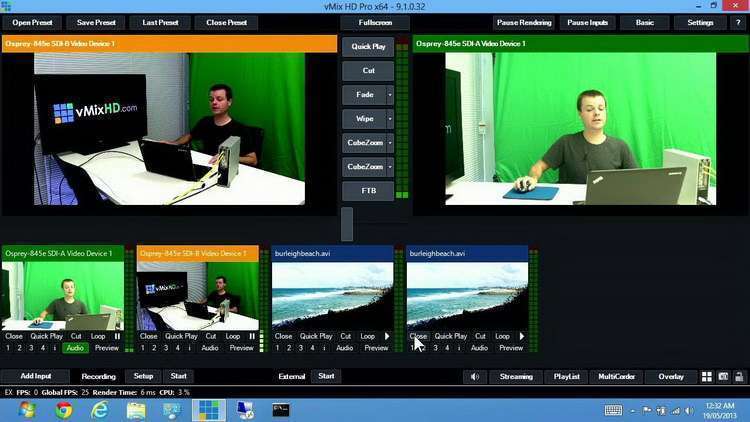
vMix 29.0 is a proprietary vision mixer software developed by StudioCoast PTY LTD, engineered for Windows operating systems to facilitate professional live video production. It empowers users across the broadcasting and event streaming industries to seamlessly mix diverse video and audio inputs, including live cameras, video files, and remote participants, for high-quality broadcasts. The software is particularly suited for professionals engaged in live production workflows, offering advanced features for creating engaging and dynamic live content.
Introduction to vMix
Overview of vMix 29.0
vMix is a comprehensive live video production and mixing application designed to bring professional broadcasting capabilities to Windows users. It excels in managing various video sources, from professional cameras and playback devices to web-based video conferencing, enabling complex productions with a single software solution. Developed by StudioCoast PTY LTD, vMix is a powerful tool for live video mixing and streaming, supporting high-definition output up to 4K resolutions.
Key Features of vMix
Live Video Mixing and Streaming
vMix enables users to create professional live video productions by mixing and switching between multiple video sources. This functionality includes live cameras, video files, audio files, presentations, and network device inputs. The software’s intuitive interface supports smooth transitions and real-time editing, allowing for dynamic content creation for live streaming and broadcasting purposes.
Advanced Video Conferencing with vMix Call
A standout feature of vMix is vMix Call, which facilitates high-quality video conferencing directly within the production environment. This integration allows remote guests to join a production using only a web browser, without requiring them to install any additional software. vMix Call is instrumental for interviews, co-host segments, and audience participation in live events.
Social Media Integration through vMix Social
vMix Social enhances live streams by integrating content directly from popular social media platforms. This feature allows users to capture and display comments, posts, and other content from platforms such as Facebook, Twitter, and YouTube Live in real time. Social media integration by vMix is crucial for increasing audience engagement during live broadcasts and interactive webcasts.
Instant Replay Features in vMix
The software incorporates robust instant replay capabilities, enabling producers to record multiple angles of live action and play them back during a broadcast. Users can control playback speeds, create slow-motion sequences, and add highlights on the fly. This feature is essential for sports productions, event coverage, and any scenario requiring immediate review of live footage.
System Resource Efficiency and Hardware Recommendations
vMix is engineered for efficiency, designed to handle demanding high-resolution streams with optimized GPU utilization. For optimal performance, especially with 4K streaming and complex productions, dedicated Nvidia graphics cards are highly recommended. Leveraging powerful GPUs ensures smooth operation, low resource consumption, and the capability to manage multiple demanding inputs simultaneously. This focus on efficient hardware integration makes vMix a practical choice for professional video environments.
Real-world Applications of vMix
vMix finds extensive application across various professional sectors. In live event production, it is used for concerts, conferences, and ceremonies, managing multi-camera setups and audience engagement. The broadcast industry utilizes vMix for news, sports coverage, and studio productions, benefiting from its live mixing and replay features. Furthermore, it serves effectively for webcasts, church services, and online educational content delivery, showcasing its versatility in diverse production scenarios.
Conclusion
vMix 29.0 stands as a powerful and versatile live video production software, offering an integrated suite of tools for mixing, streaming, conferencing, and social media engagement. Its efficient design and advanced features like vMix Call and instant replay make it an invaluable asset for professionals in broadcasting, event production, and beyond. For those seeking to enhance their live video capabilities, a vMix download provides access to a robust platform capable of delivering professional-quality productions.
Frequently Asked Questions
What is vMix and its primary purpose?
vMix is a proprietary software designed for live video mixing and streaming. It allows users to integrate multiple video and audio sources into a seamless production experience ideal for events, live broadcasts, and broadcasting needs.
Can vMix integrate with social media platforms?
Yes, vMix features an integration tool called vMix Social, which lets users capture and display comments and content from Facebook, Twitch, and YouTube Live directly into their live streams.
What are the hardware requirements for optimal vMix performance?
vMix runs best on dedicated Nvidia graphics cards and is optimized for performance on Windows systems. Users are recommended to ensure their setup meets appropriate GPU standards for high-resolution streaming.







Reviews
There are no reviews yet.