

Download Visuino Pro 8.0 – User-Friendly Arduino Circuit Design Software
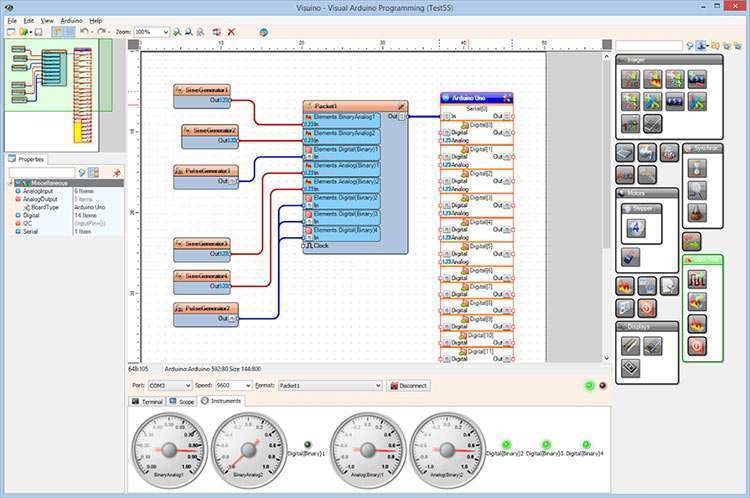
Visuino Pro 8.0 is a specialized software application developed by Mitov, designed to simplify the creation and management of electronic projects for Arduino platforms. It targets hardware developers, educational institutions, and Arduino enthusiasts by offering a visual programming environment. This tool empowers users to design complex circuits and Arduino applications without requiring extensive traditional programming knowledge, aligning with the needs of users seeking accessible embedded systems design solutions.
Introduction to Visuino Pro 8.0
Visuino Pro 8.0 provides a powerful yet intuitive platform for individuals looking to develop robust Arduino-based projects. Developed by Mitov, this software caters to a diverse user base, from students learning about electronics to experienced hardware professionals prototyping new devices. Its primary goal is to streamline the circuit design and programming process through a visual interface, making the complexities of embedded systems design more manageable and accessible.
Key Features of Visuino Pro 8.0
Visuino Pro 8.0 distinguishes itself through a set of carefully crafted features designed to enhance the user experience in electronic project development. The software emphasizes an intuitive approach to circuit design and logic implementation, supporting users with varying levels of technical expertise.
- A sophisticated drag-and-drop interface allows users to assemble project components visually, eliminating the need for manual coding for basic functionalities.
- Extensive support for a wide array of components and modules enables the creation of intricate electronic circuits and interactive applications.
- The software facilitates project simulation and debugging within the visual environment, allowing for early identification and resolution of design flaws before hardware implementation.
- Visuino Pro 8.0 manages project complexity by providing tools to organize and interconnect various functional blocks, ensuring logical flow and efficient operation.
Supported Arduino Boards and Compatibility
A key strength of Visuino Pro 8.0 is its broad compatibility with numerous Arduino boards and related hardware platforms. This extensive support ensures that users can leverage their existing development boards and adapt projects across different hardware configurations. The software is designed to work seamlessly with popular microcontrollers, facilitating a wide range of embedded systems design possibilities.
- Official Arduino boards (e.g., Uno, Mega, Nano)
- Teensy series microcontrollers
- ESP8266 and ESP32 development boards
- Various other boards supported through standard Arduino IDE compatibility
Applications in Education and Hardware Development
Visuino Pro 8.0 serves as a valuable tool in both educational settings and professional hardware development environments. For educators and students, it simplifies the introduction of complex electronic concepts and programming principles, making learning more engaging and less intimidating.
- In educational institutions, Visuino Pro 8.0 is utilized to teach foundational principles of electronics, circuit design, and microcontroller programming without the steep learning curve associated with traditional coding.
- Hardware developers and hobbyists employ the software for rapid prototyping, allowing them to quickly iterate on designs and test new hardware interfaces and functionalities.
- The software supports the development of diverse DIY projects, from simple automation systems to more intricate sensor-based applications, demonstrating its versatility in real-world scenarios.
Advantages of Visual Programming with Visuino
The adoption of a visual programming environment like Visuino Pro 8.0 offers distinct advantages over traditional text-based coding for certain types of projects and users. This approach democratizes the development process, making it accessible to a wider audience.
- Reduced learning curve: Users can grasp project logic and implementation more quickly through graphical elements and flowcharts compared to memorizing syntax and functions.
- Enhanced clarity and visualization: The visual representation of program flow aids in understanding complex logic and debugging by providing a clear overview of interconnections and data pathways.
- Faster development cycles: The drag-and-drop functionality and pre-built components significantly speed up the prototyping and development process.
- Accessibility for non-programmers: Individuals without a background in software engineering can successfully create functional electronic projects, fostering innovation across different disciplines.
User Community and Support
Users of Visuino Pro 8.0 can benefit from a growing community and various resources designed to aid in learning and problem-solving. The support infrastructure helps ensure that users can effectively utilize the software for their embedded systems design needs.
- Online forums and community platforms provide a space for users to share projects, ask questions, and receive assistance from fellow developers and enthusiasts.
- A range of tutorials, both official and community-created, are available to guide users through different features and project types, covering basic to advanced implementations.
- The developer, Mitov, offers support channels that cater to technical inquiries and software-related issues, ensuring users receive timely assistance.
Conclusion
Visuino Pro 8.0 stands out as an exceptionally user-friendly and powerful tool for anyone involved in Arduino circuit design and embedded systems development. By simplifying complex processes through its visual programming interface and extensive board support, it empowers users of all skill levels to bring their hardware projects to life. Whether for educational purposes, rapid prototyping, or hobbyist endeavors, Visuino Pro 8.0 offers a practical and efficient approach to creating sophisticated electronic solutions.
Frequently Asked Questions
What types of projects can I design using Visuino Pro 8.0?
Visuino Pro 8.0 allows users to design various projects including complex electronic circuits and Arduino applications without needing to write code. It is suitable for educational purposes, prototyping, and hobbyist electronics, enabling the creation of everything from simple sensor interfaces to more elaborate control systems.
Is Visuino Pro 8.0 suitable for beginners?
Yes, Visuino Pro 8.0 is specifically designed to be user-friendly, allowing individuals with no prior programming experience to create Arduino circuits easily using its intuitive visual interface and drag-and-drop components.
What are the hardware requirements for using Visuino Pro 8.0?
Specific hardware requirements are not detailed, but users are generally encouraged to use compatible Arduino boards for development purposes. The software’s design is optimized for efficiency and does not typically require extensive external computing resources, making it accessible for personal and educational use on standard computers.





Reviews
There are no reviews yet.