

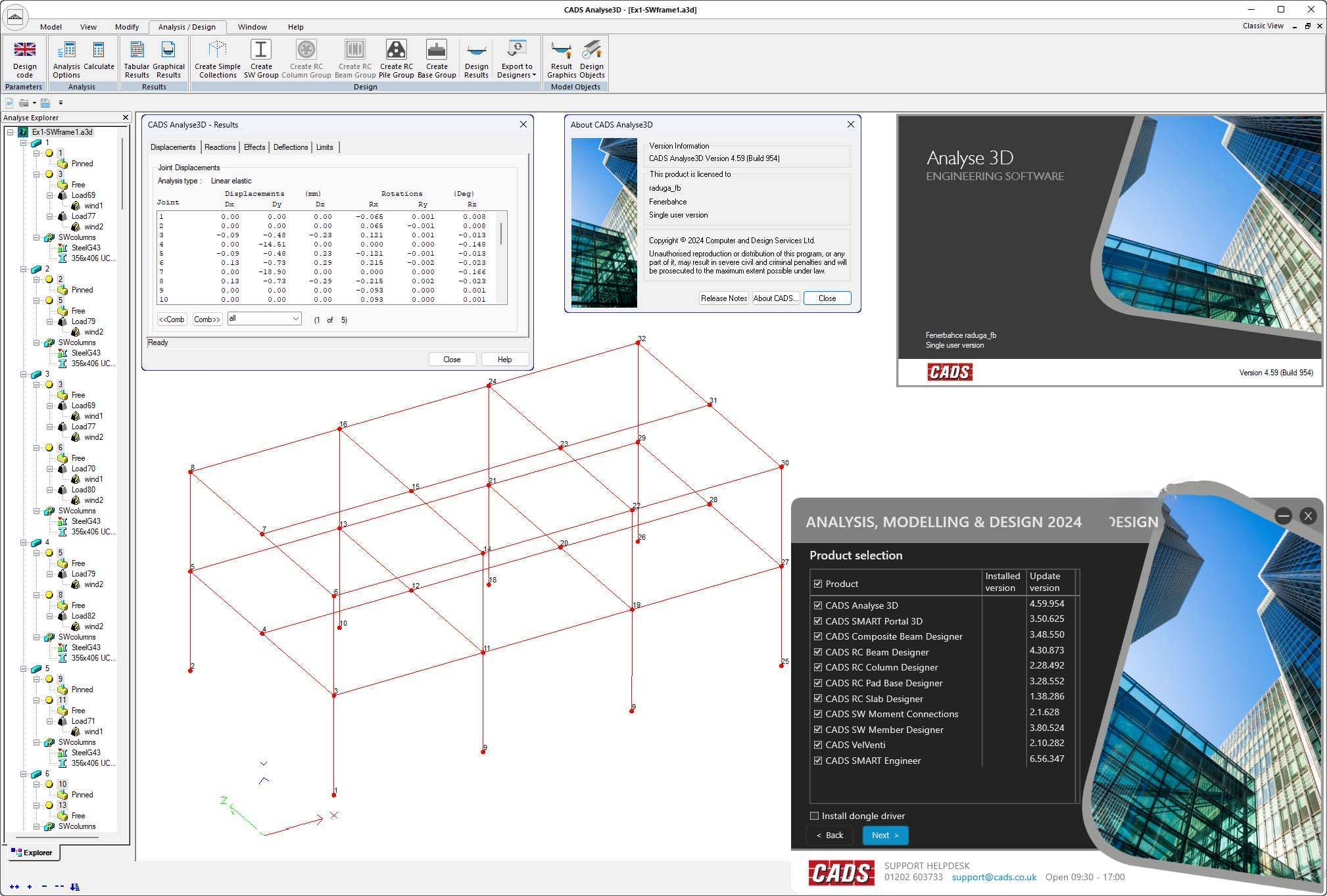
Download CADS Design 2024.0.2 – Advanced Structural Analysis and Design Software
CADS Design Software, developed by CADS Software Development, is a comprehensive suite of engineering applications tailored for structural and civil engineering professionals. This specialized software offers a diverse set of tools that facilitate the analysis and design of various structural elements, ensuring compliance with relevant industry standards and addressing complex engineering challenges.
Introduction to CADS Design
Overview of Features and Applications
CADS Design provides a powerful platform for structural engineers and designers, enabling them to perform detailed analysis and design tasks. The software integrates a variety of specialized modules, each focusing on specific aspects of structural engineering, from concrete element design to steelwork analysis. This cohesive suite allows engineers to manage different phases of a project efficiently, ensuring accuracy and adherence to stringent design codes.
Key Tools and Capabilities
Analyse 3D
The Analyse 3D module offers robust capabilities for both two-dimensional and three-dimensional structural analysis. It supports the assessment of various load types, including dead loads, live loads, and environmental forces, across different structural configurations. This tool is essential for understanding the behavior of complex structures under diverse loading conditions.
Composite Beam Designer
This tool facilitates the design and checking of composite beams, which are widely used in modern construction. Engineers can utilize the Composite Beam Designer to ensure that beam designs meet performance requirements, considering the interaction between steel beams and concrete slabs. The process is streamlined to align with established engineering standards for composite construction.
RC Beam and Column Designers
CADS Design includes dedicated designers for reinforced concrete beams and columns. The RC Beam Designer aids in the detailed design of concrete beams, taking into account reinforcement requirements and structural integrity. Similarly, the RC Column Designer focuses on ensuring that vertical load-bearing elements are adequately designed for stability and strength, drawing upon established principles of reinforced concrete design.
Designing With SMART Engineer and SMART Portal 3D
The SMART Engineer and SMART Portal 3D applications within CADS Design cater to specific civil engineering design workflows. SMART Engineer assists in applying engineering calculations and standards, while SMART Portal 3D enables the creation and analysis of 3D models for portal frames. These tools are designed to simplify complex calculations and geometric modeling according to engineering best practices.
Steelwork Design Tools: Member and Moment Connection Designers
For steel structures, CADS Design offers specialized tools for member design and connection detailing. The Steelwork Member Designer allows for the efficient analysis and sizing of steel structural members. Complementing this, the Moment Connection Designer focuses on the intricate design of moment connections, which are critical for structural stability in steel frameworks, ensuring compliance with standards like EC3.
VelVenti Application
The VelVenti application is dedicated to the precise calculation of wind loads on structures. Accurate assessment of wind forces is crucial for the safety and stability of buildings and other civil engineering projects, especially those exposed to significant atmospheric conditions. VelVenti provides engineers with reliable data to incorporate into their structural designs, adhering to standards like BS standards for wind loading.
Industry Applications of CADS Design
CADS Design finds application in a myriad of structural and civil engineering projects. It is instrumental in the design of residential and commercial buildings, assisting engineers in detailing concrete and steel elements. For infrastructure projects, such as bridges and industrial facilities, the software’s analytical capabilities help ensure structural integrity under demanding conditions. The integrated nature of its tools supports engineers in tackling complex real-world challenges, from assessing wind loads on tall structures to designing robust connections in steel frameworks.
Conclusion: The Benefits of Using CADS Design
Leveraging the comprehensive set of CADS Design tools offers significant advantages to structural and civil engineers. The software streamlines complex analysis and design processes, promoting accuracy and efficiency. By providing specialized modules for concrete and steel structures, and ensuring compliance with international design standards like Eurocodes and British Standards, CADS Design empowers professionals to deliver safe, reliable, and compliant engineering solutions. Its unified platform simplifies workflows, making it a valuable asset for modern engineering practices.
Frequently Asked Questions
What types of structures can CADS Design analyze?
CADS Design can analyze a wide range of structures, including residential buildings, bridges, and industrial structures, accommodating both concrete and steel elements. Its tools are designed for various load conditions and construction materials, supporting detailed structural assessments.
Is CADS Design compliant with international design standards?
Yes, CADS Design is developed to comply with various international design standards, including British Standards and Eurocodes, ensuring that structural designs meet required safety and performance criteria. This adherence to standards is fundamental to its utility in professional engineering practice.
Can CADS Design be integrated with other modeling software?
CADS Design offers compatibility with several modeling software, including Revit via IFC export, enhancing its usability in integrated design processes across various platforms. This interoperability allows for a smoother workflow within multidisciplinary project environments.


Reviews
There are no reviews yet.