

Download BiosCreator 2.1.22 – Essential Tool for BIOS and Firmware Management
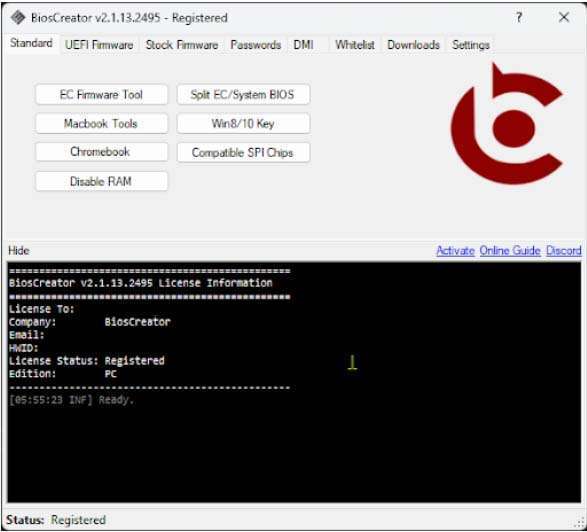
BiosCreator 2.1.22 is a specialized software application designed for the intricate tasks of managing and repairing BIOS and UEFI firmware, particularly within laptop hardware. This tool is indispensable for computer hardware technicians, firmware engineers, and UEFI specialists who require precise control over system boot processes and firmware integrity. BiosCreator facilitates advanced operations such as extracting and manipulating firmware images, repairing critical BIOS and ME regions, and managing Embedded Controller (EC) firmware, making it a vital resource for modern hardware maintenance workflows.
Introduction to BiosCreator and Its Applications
Overview of BIOS Technology
The Basic Input/Output System (BIOS) is fundamental firmware residing on a computer’s motherboard. Its primary function is to initialize hardware components during system startup and load the operating system. While legacy BIOS has been a staple for decades, it possesses limitations that led to the development of the Unified Extensible Firmware Interface (UEFI). UEFI offers enhanced security features, faster boot times, and support for larger storage devices, becoming the standard in modern computing. Understanding both BIOS and UEFI is now critical for professionals involved in firmware-level operations.
Powerful Features of BiosCreator
Repairing and Modifying BIOS and ME Regions
BiosCreator provides essential functionalities for technicians needing to address issues within the BIOS and Management Engine (ME) regions of firmware. Corrupted BIOS or ME regions can prevent a system from booting or cause significant hardware malfunctions. This tool enables users to analyze, extract, and modify these specific firmware sectors. For example, technicians can use BiosCreator to restore a corrupt BIOS region from a backup or re-flash a damaged ME region, which is crucial for restoring functionality in laptops that have encountered firmware-related failures or security lockouts.
Extracting and Handling EC Firmware
The Embedded Controller (EC) firmware manages various hardware functions on a laptop, such as keyboard input, battery charging, and thermal management. BiosCreator is equipped to extract this critical EC firmware, a capability not commonly found in general firmware tools. This feature is particularly valuable for laptop repair professionals who need to diagnose or replace faulty EC firmware to resolve issues like non-responsive keyboards or power management problems. Support extends across a variety of laptop manufacturers, underscoring the tool’s versatility.
Tech Capabilities and Supported Firmware Types
Firmware Image Handling
BiosCreator demonstrates robust capabilities in handling diverse firmware image types, including specialized formats like capsule files. Its extraction functionalities are geared towards providing comprehensive support for a wide range of laptop manufacturers. This allows technicians to obtain clean firmware dumps for analysis or modification, regardless of whether the system employs a traditional BIOS or a modern UEFI implementation. The software’s ability to work with various proprietary firmware structures aids in diagnosing and resolving complex hardware issues across different brands.
Real-World Use Cases of BiosCreator
In practical scenarios, BiosCreator empowers technicians to perform critical firmware operations that are essential for device repair and maintenance. Its utility is evident in several key applications:
- UEFI Unlocking: For laptops with restrictive UEFI settings, BiosCreator can assist in unlocking or modifying boot configurations to enable alternative operating systems or hardware configurations.
- EFI Lock Resetting: It aids in resetting various EFI locks that might prevent access to firmware settings or modifications, simplifying the repair process for technicians.
- Firmware Restoration: In cases of BIOS corruption due to failed updates or accidental misconfiguration, BiosCreator can be used to extract known good firmware or prepare files for recovery.
- Hardware Diagnostics: By extracting EC firmware, technicians can more accurately diagnose hardware faults related to keyboard, touchpad, or power management systems.
- Custom Firmware Integration: Advanced users may leverage BiosCreator’s capabilities to integrate custom firmware components, although this requires expert knowledge.
Comparison with Similar Tools in the Market
The landscape of BIOS and firmware modification tools includes various specialized applications. While some tools focus solely on BIOS flashing or specific manufacturer platforms, BiosCreator distinguishes itself through its advanced EC firmware extraction capabilities and broad support for multiple laptop brands. Its integrated approach to handling both BIOS/ME regions and EC firmware provides a more comprehensive solution for laptop technicians compared to single-function utilities. This makes BiosCreator a uniquely valuable asset for professionals dealing with a wide array of laptop repair and firmware management tasks.
Frequently Asked Questions
What types of devices can I use BiosCreator on?
BiosCreator is designed primarily for laptops and systems that use BIOS or UEFI firmware, supporting a wide range of manufacturers including Dell, HP, and ASUS. Its capabilities extend to various laptop models requiring specialized firmware manipulation.
How does BiosCreator differ from other BIOS repair tools?
Unlike many conventional BIOS repair tools, BiosCreator offers advanced features for handling EC firmware extraction and provides comprehensive support for multiple laptop brands, making it ideal for technicians. This dual focus on BIOS/ME regions and EC firmware sets it apart.
Is there a risk of damaging my BIOS when using BiosCreator?
While BiosCreator offers powerful functionalities, improper use always carries risks associated with firmware manipulation. It is crucial to follow guidelines, ensure correct firmware versions, and use the tool judiciously to avoid potential system bricking.






Reviews
There are no reviews yet.