

Download GradePlane LandGrading Design – Streamlined Land Grading Solutions
GradePlane LandGrading Design is a specialized software solution designed for agricultural and civil engineering professionals, particularly farmers and land levelers. Developed to simplify the complexities of land preparation, it offers practical functionalities for creating efficient land grading designs. The software aims to enhance land usability and drainage by providing intuitive tools and valuable outputs for both farming operations and construction projects.
Introduction to GradePlane LandGrading Design
Overview of the Software
GradePlane LandGrading Design addresses the critical need for effective land preparation in agriculture and civil construction. This software provides essential tools for professionals involved in land leveling and grading projects, enabling them to design optimized land layouts. By focusing on user-friendliness and incorporating advanced features, GradePlane supports farmers in preparing fields for better crop yields and assists engineers in laying the groundwork for construction. The primary goal is to facilitate precise land grading through accessible design capabilities and clear data interpretation.
Key Features of GradePlane
Design Capabilities
GradePlane offers robust design capabilities to accommodate various land contouring needs. Professionals can develop designs that incorporate varying slopes to suit specific field requirements or construction site layouts. The software supports the creation of grid-based designs for uniform land leveling and allows for the exploration of different design methodologies to achieve optimal results. These features ensure that users can implement precise land grading strategies tailored to their unique project demands.
- Support for designing fields with varying slopes.
- Capability to create grid-based land designs.
- Tools for developing multiple design methodologies for comparison.
Data Entry and Management
Ease of use is a cornerstone of GradePlane’s design, particularly in its data entry process. The software utilizes a straightforward spreadsheet format for inputting survey data, making it accessible even for users without extensive engineering backgrounds. This system efficiently accommodates rod readings and elevation data, streamlining the initial phase of land design. By simplifying data input, GradePlane ensures that land levelers and farmers can quickly proceed with designing their projects.
- User-friendly spreadsheet interface for survey data entry.
- Support for both rod readings and elevation data inputs.
- Streamlined workflow to reduce time spent on data preparation.
Practical Applications in Agriculture and Construction
GradePlane LandGrading Design finds relevant applications across both agricultural and civil engineering sectors. For farmers, the software is instrumental in designing fields for improved water management, preventing soil erosion, and optimizing irrigation. This leads to enhanced crop productivity and more efficient use of water resources. In civil engineering, GradePlane assists in the precise preparation of land for building sites, roads, and other infrastructure projects, ensuring proper drainage and stable foundations. The software’s ability to generate accurate cut/fill maps is vital for efficient earthmoving operations in any construction endeavor.
- Agricultural use cases include designing fields for optimal drainage and irrigation, leading to increased crop yields.
- Construction applications involve site preparation for buildings, roads, and infrastructure, ensuring stable foundations and proper water runoff.
- The software aids in earthmoving planning by providing detailed cut/fill mapping for construction projects.
Comparative Advantages of Using GradePlane
GradePlane LandGrading Design distinguishes itself through a combination of practical features and user-centric design. While many land grading tools exist, GradePlane emphasizes an intuitive user experience and unique automatic design functionalities that simplify complex tasks. Its key differentiators include the ability to generate an automatic best fit design that considers existing field slope trends, real-time cut/fill ratio checks, and versatile output options. These features collectively offer a more efficient and accessible solution for professionals in agriculture and civil engineering.
- Automatic best fit design generation simplifies the creation of optimal land contours.
- Real-time cut/fill ratio checks provide immediate feedback for design adjustments.
- User-friendly interface designed for farmers and land levelers, reducing the learning curve.
- Multiple output options including printed maps for site application.
Visual Representation and Output
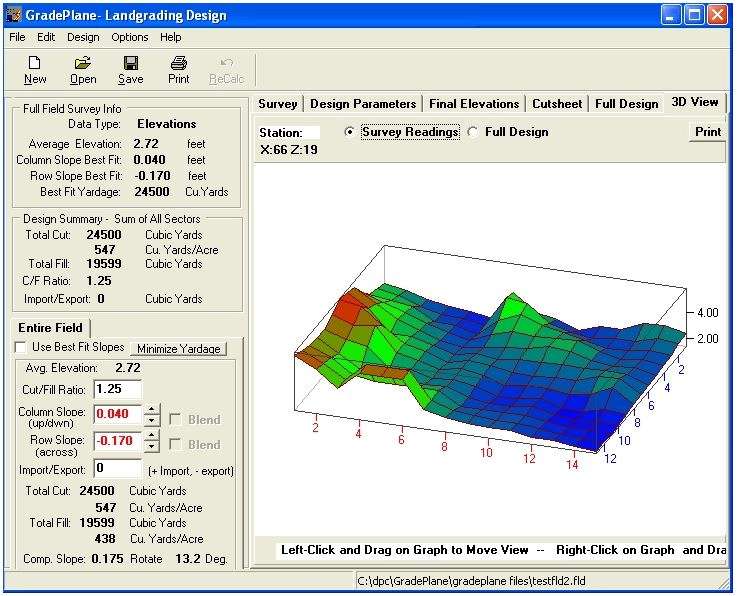
GradePlane LandGrading Design provides comprehensive visual outputs to aid in understanding and implementing land grading plans. The software features 3D graphics views that allow users to visualize the proposed land contours from multiple angles, offering a clear perspective on the design. Beyond digital visualization, GradePlane supports the generation of various printed maps. These detailed outputs are crucial for on-site execution, guiding land leveling operations accurately and ensuring that the final graded surface meets design specifications for both agricultural and construction purposes.
- Interactive 3D graphics views for an in-depth understanding of the land model.
- Generation of multiple printed map outputs for practical field application.
- Clear visualization of cut and fill volumes to support earthmoving strategies.
- Data analysis features that support informed decision-making for grading projects.
Conclusion and Call to Action
GradePlane LandGrading Design offers a powerful yet accessible solution for professionals in agriculture and civil engineering tasked with land grading and leveling. Its combination of user-friendly data entry, advanced design capabilities, automatic design features, and clear visual outputs makes it an invaluable tool for optimizing land use. By simplifying complex processes and providing practical insights, GradePlane empowers users to undertake projects with greater efficiency and precision. Download GradePlane LandGrading Design today to streamline your land grading projects and enhance productivity in your agricultural or construction endeavors.
Frequently Asked Questions
What is GradePlane LandGrading Design used for?
GradePlane LandGrading Design is used for creating cut/fill maps to efficiently grade land for agricultural and construction projects, helping land levelers and farmers optimize their fields. It aids in preparing land for better drainage, irrigation, and stability in construction applications.
How does GradePlane simplify data entry?
GradePlane allows users to enter survey data using a convenient spreadsheet format, supporting both rod readings and elevations, making it accessible for users without extensive engineering backgrounds. This streamlined process ensures quick and accurate preparation of project data.
What unique features does GradePlane offer for land design?
Unique features of GradePlane include automatic best fit design based on field slope trends, the ability to check cut/fill ratios in real-time, and support for multiple printed map outputs. These capabilities enhance design efficiency and provide practical guidance for fieldwork.






Reviews
There are no reviews yet.