

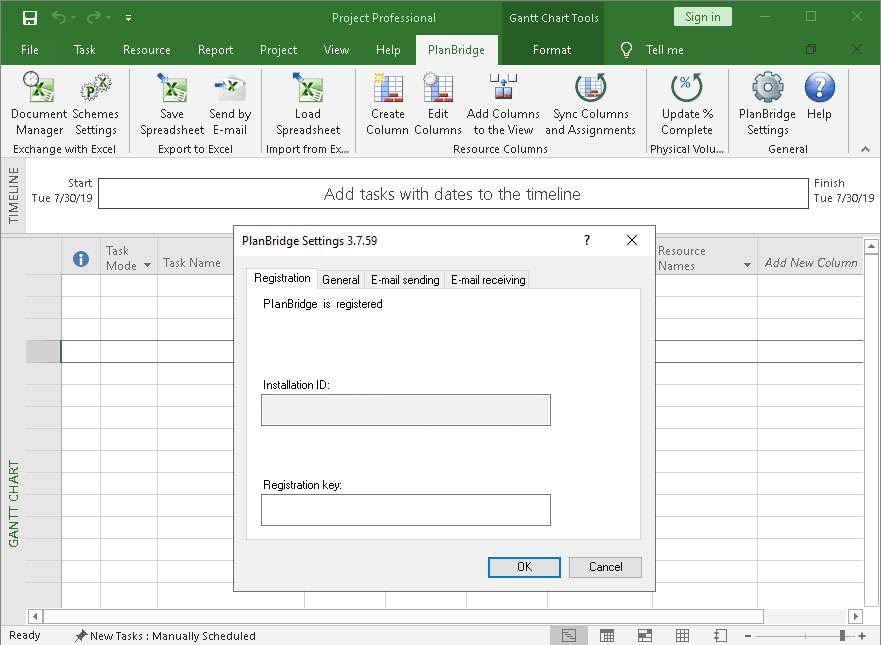
Download PlanBridge 3.7 for Microsoft Project – Enhanced Project Collaboration Tool
PlanBridge 3.7 for Microsoft Project is a specialized add-in designed to enhance project data management and collaboration for teams using Microsoft Project. Developed by PlanBridge, this tool is particularly beneficial for project managers in engineering, IT, and business management fields who require seamless data transfer capabilities, especially in environments with limited network infrastructure. It acts as a bridge between Microsoft Project’s robust scheduling and tracking features and the versatility of Excel for data analysis and communication.
Overview of PlanBridge
Introduction to the Add-in
PlanBridge serves as a critical extension for Microsoft Project, a leading application for project scheduling, resource management, and progress tracking. This add-in specifically addresses the need for efficient data sharing and management, enabling users to leverage Microsoft Project’s .mpp file formats alongside familiar Excel spreadsheets for enhanced project monitoring and team communication. Its primary purpose is to streamline workflows and improve data accessibility for project teams.
Key Features and Functionalities
Data Sharing Capabilities
PlanBridge excels in facilitating the transfer of project information between Microsoft Project and Microsoft Excel. This capability allows project managers to extract detailed project data, such as task lists, resource allocations, and progress updates, into Excel for more flexible analysis, reporting, and distribution. Conversely, it enables the import of data from Excel into Microsoft Project, simplifying the process of updating project plans based on external information or team input.
- Streamlined import and export functionalities for project data between Microsoft Project and Excel.
- Support for transferring critical project elements including tasks, resources, and dependencies.
- Facilitates the creation of custom reports and analyses using Excel’s advanced features on Microsoft Project data.
Collaboration Tools
By bridging Microsoft Project and Excel, PlanBridge inherently enhances team collaboration. It simplifies the process of distributing project plans, progress reports, and status updates to team members, stakeholders, or clients who may not have direct access to Microsoft Project. This ensures all parties are informed and can contribute effectively, regardless of their technical environment.
- Enables easier distribution of project information to team members not directly using Microsoft Project.
- Supports collaborative workflows by making project data more accessible and manageable.
- Facilitates consolidated input from various team members into a central project plan.
Security and Data Management
PlanBridge emphasizes secure data handling, particularly when transferring sensitive project information between applications. It is designed to ensure that data integrity is maintained throughout the import and export processes, safeguarding against accidental data corruption or loss. This focus on secure transfer is vital for maintaining accurate project records and ensuring stakeholder confidence.
- Ensures secure transfer of project data between Microsoft Project and Excel formats.
- Maintains data integrity throughout import and export operations.
- Supports controlled communication of project status and data.
Applications in Project Management
Industry Use Cases
PlanBridge finds its application across various sectors where effective project management and data collaboration are paramount. Its ability to integrate with accessible tools like Excel makes it invaluable for different project types and team structures.
- Construction Projects: Facilitates the sharing of schedules, resource needs, and progress reports with site teams and external contractors using familiar Excel spreadsheets.
- IT Project Management: Simplifies the dissemination of project plans, task assignments, and risk assessments among IT teams, especially in remote or hybrid work settings.
- Business Management: Aids in consolidating departmental project data for organizational-wide reporting and strategic planning, leveraging Excel for widespread access.
- Educational Management: Assists in managing academic projects and resource allocation by providing accessible data management for faculty and administrators.
Enhancing Microsoft Project Efficiency
PlanBridge addresses common challenges faced by Microsoft Project users, enhancing the overall efficiency of project management workflows. It mitigates issues related to data access limitations, manual data entry errors, and difficulties in communication, thereby optimizing the use of Microsoft Project’s powerful capabilities.
- Reduces manual data entry by enabling direct import/export between MS Project and Excel.
- Improves communication accuracy by providing a standardized method for sharing project data.
- Supports project managers in environments where direct MS Project access is not universally available.
- Streamlines project monitoring and status updates for distributed teams.
Comparison with Other Project Management Tools
PlanBridge differentiates itself by acting as a specialized add-in focused on augmenting Microsoft Project’s capabilities rather than replacing it. Unlike standalone project management software, PlanBridge leverages the widespread familiarity and accessibility of Microsoft Excel for enhanced data sharing and collaboration. This approach allows organizations already invested in Microsoft Project to improve their team coordination and data management without a complete system overhaul.
Real-world Applications and Success Stories
In practice, PlanBridge enables project managers to maintain project momentum even with distributed teams. For instance, a construction project manager can export task dependencies and resource assignments to Excel, allowing site supervisors to review and update progress using simple spreadsheets, which are then imported back into PlanBridge for consolidation within Microsoft Project. This workflow ensures all project data remains synchronized and accessible, facilitating timely decision-making and effective project oversight.
Conclusion
PlanBridge 3.7 for Microsoft Project stands out as a valuable tool for enhancing project collaboration and data management. By seamlessly integrating Microsoft Project with the widely used platform of Excel, it empowers project managers to overcome communication barriers and streamline data sharing, especially within complex team structures or remote work environments. Its specific focus on secure data transfer and user-friendly interface makes it an essential add-in for professionals looking to maximize their investment in Microsoft Project and improve project outcomes.
Frequently Asked Questions
What is PlanBridge used for?
PlanBridge is primarily used as an add-in for Microsoft Project that allows project managers to facilitate data sharing and collaboration using Excel, making it easier to communicate project statuses among team members. It bridges the gap between MS Project’s robust features and Excel’s accessibility for broader team engagement.
How does PlanBridge enhance collaboration with Microsoft Project?
PlanBridge enhances collaboration by simplifying the import and export of project data to and from Microsoft Project and Excel, which helps teams work together more effectively, especially in remote or network-limited environments. This ease of data exchange ensures better communication and coordination among team members.
What file formats does PlanBridge support?
PlanBridge supports data transfer primarily between Microsoft Project (.mpp format) and Excel (.xlsx format), allowing users to easily manage and analyze project data. This dual format support is key to its function as a collaborative bridge.






Reviews
There are no reviews yet.