

Download CADlogic Draft IT Architectural 5.0 – Advanced 2D Architectural CAD Software
CADlogic Draft IT Architectural 5.0 is a specialized 2D CAD drafting application developed for professionals in the architecture, civil engineering, and construction industries. This software is designed for architects, civil engineers, and building designers who require precise geometric drawing and editing capabilities for creating detailed architectural plans and construction layouts. It caters to users with existing CAD experience, offering robust tools for efficient 2D design workflows.
Overview of Draft IT Architectural in Civil and Construction Design
Draft IT Architectural is purpose-built for the demands of architectural and civil construction design, focusing on high-precision 2D geometric drafting. The software empowers professionals to create detailed plans, elevations, sections, and construction layouts with accuracy. Its user base typically includes architects, civil engineers, and building designers who need a reliable tool for their daily drafting tasks and are comfortable with intermediate-level CAD functionalities.
Drawing and Editing Tools Tailored for Architectural Plans
The software provides a comprehensive suite of tools specifically designed for architectural drafting. These features facilitate the creation and manipulation of precise geometric elements essential for building design:
- Specialized geometric shape tools including lines, arcs, circles, and rectangles for constructing accurate structures.
- Advanced drawing aids such as arc conversion, designated break points, and angle creation for complex detailing.
- Robust editing functions for moving, scaling, rotating, and resizing individual drawing elements and groups.
- Capabilities for filling shapes with a variety of patterns and colors to enhance visualization and clarity of architectural elements.
User Interface and Workflow Efficiency Features
Draft IT Architectural incorporates a user-friendly interface designed to boost efficiency for experienced CAD users. The layout prioritizes quick access to tools and flexible work environments:
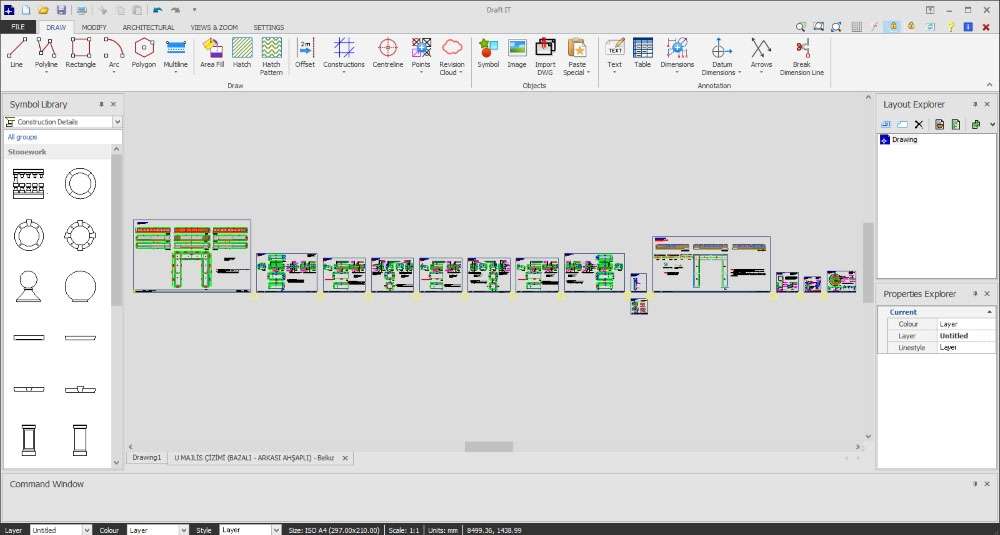
- A ribbon menu provides organized access to drawing, editing, and utility commands, streamlining tool discovery.
- Flexible window resizing options allow users to customize their workspace for optimal viewing and interaction with drawings.
- The interface supports multi-document handling, enabling users to work on and switch between multiple projects seamlessly.
- These features collectively support effective and productive drafting sessions for professionals engaged in building design.
File Management and Project Editing Capabilities
Managing and modifying existing architectural projects is a key function of Draft IT Architectural, ensuring continuity and ease of updates. The software is equipped to handle project files throughout their lifecycle:
- Users can open, edit, and save existing CAD projects, facilitating iterative design processes and revisions.
- While specific file compatibility details require direct verification, the software is designed to work within standard CAD workflows, supporting common project file management practices.
- Project layout tools, such as the insertion of rectangular layouts and guide points, aid in precise design placement and alignment, crucial for professional construction documentation.
Real-World Applications in Architectural and Construction Projects
Draft IT Architectural finds practical application across various stages of architectural and construction projects, serving as a dedicated tool for 2D design tasks. Its focused capabilities make it valuable for specific professional needs:
- Creation of detailed architectural floor plans, accurate building elevations, and precise section views.
- Development of construction layout drawings that guide the building process with specific measurements and placements.
- Generation of civil engineering diagrams and site plans requiring accurate geometric representation.
- Draft IT Architectural supports efficient collaboration and iterative design revisions within construction project teams, helping professionals streamline their drafting processes and deliver precise documentation.
Frequently Asked Questions
What kind of architectural drawings can I create with Draft IT Architectural 5.0?
Draft IT Architectural 5.0 allows users to create detailed 2D architectural drawings including floor plans, elevations, sections, and construction layouts using precise geometric tools and editing features. The software’s capabilities are focused on delivering accurate and clear visual representations necessary for building design and construction documentation.
Is Draft IT Architectural suitable for beginners or only experienced CAD users?
Draft IT Architectural is designed more for users who have basic knowledge of CAD software as it requires familiarity with standard drafting workflows and tools. While it offers efficient features, its depth of functionality and interface design are best suited for professionals who already possess a foundation in CAD principles, making it less ideal for complete beginners.
Can Draft IT Architectural handle editing existing CAD projects?
Yes, Draft IT Architectural supports opening and editing of previously created CAD projects, allowing users to modify drawings, add annotations, and update layouts efficiently. This capability ensures that professionals can integrate the software into their existing workflow and continue working on ongoing or legacy projects without disruption.



Reviews
There are no reviews yet.