

Download Mountain Duck 5.2.0 – Mount Cloud Storage and Servers as Local Drives
Mountain Duck 5.2.0, developed by iterate GmbH, is a specialized file transfer tool that allows users to mount cloud storage services and remote servers as local drives on their desktop operating systems, such as Windows and macOS. This capability is crucial for IT professionals, system administrators, developers, and designers who frequently manage files across multiple cloud platforms or servers. By integrating these remote locations directly into the local file system, Mountain Duck eliminates the need for traditional file synchronization or manual uploads, offering a more efficient workflow for managing distributed data.
Streamlining Cloud Storage Access for IT and Creative Professionals
Mountain Duck transforms the way professionals interact with remote file systems. Developed by iterate GmbH, the company also known for Cyberduck, this application enables users to treat cloud storage and remote servers as if they were local hard drives. This core functionality simplifies file management for users who deal with a variety of storage solutions, including FTP, SFTP, WebDAV, and numerous cloud storage providers. By presenting these as accessible local volumes, Mountain Duck streamlines workflows for tasks such as editing remote documents or transferring assets.
Comprehensive Protocol Support for Diverse Storage Needs
FTP, SFTP, and WebDAV Connectivity
Mountain Duck provides robust support for standard file transfer protocols. Users can mount servers using FTP, SFTP (Secure File Transfer Protocol), and WebDAV (Web Distributed Authoring and Versioning). This broad compatibility allows for seamless integration with a wide array of web servers, network-attached storage devices, and legacy systems, ensuring that essential infrastructure remains accessible and manageable directly from the desktop.
Cloud Storage Compatibility: Amazon S3, Microsoft Azure, Google Cloud, and More
Beyond traditional protocols, Mountain Duck offers deep integration with leading cloud storage platforms. It supports major services like Amazon S3, Microsoft Azure, Google Cloud Storage, Google Drive, Dropbox, Backblaze B2, and OpenStack Swift. This extensive cloud support allows professionals to consolidate their cloud-based data, treating diverse storage buckets and containers as unified local drives for effortless file interaction.
Working with Remote Files Like Local Drives
Seamless File Access via Finder and Explorer
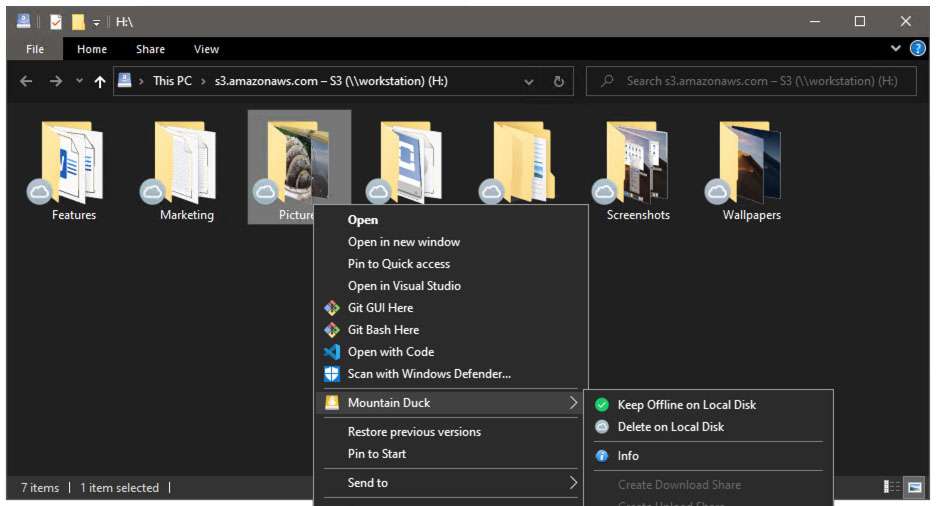
A key innovation of Mountain Duck is its ability to mount remote and cloud storage locations as local volumes, making them appear directly within the macOS Finder or Windows File Explorer. This integration allows users to interact with remote files using their preferred native applications. Files can be opened, edited, and saved directly on the remote storage without the need for manual synchronization, significantly enhancing productivity and reducing workflow friction.
Bookmark Management for Multiple Connections
Managing multiple remote connections can be complex. Mountain Duck addresses this through its intuitive bookmark feature. Users can save configurations for various cloud services and servers, creating a personalized dashboard of accessible drives. This bookmark system simplifies switching between different storage locations, ensuring that IT professionals, developers, and designers can quickly access and manage files across their diverse storage environments.
Performance and Workflow Enhancements
High-speed Transfers and Integration
Mountain Duck is designed for efficient operation. By leveraging optimized transfer protocols and background processing, it facilitates high-speed file transfers and operations. The software runs unobtrusively in the system tray or menu bar, minimizing its impact on system resources while ensuring constant access to mounted drives. This background operation allows users to continue working without interruption, even when transferring large files or managing complex directory structures.
Notification and Connection History Features
To further enhance user workflow, Mountain Duck provides helpful features such as connection history logs and status notifications. These elements offer visibility into recent activities and connection states, helping users track file operations and troubleshoot any issues. The notification system ensures that users are promptly informed about important events, such as successful transfers or connection changes, leading to a more controlled and informed user experience.
Use Cases Across Industries and User Profiles
Mountain Duck proves invaluable across various professional domains. Web developers frequently use it to manage website files on FTP or SFTP servers, editing code directly on the remote host. Designers and content creators leverage its capability to mount cloud storage like Google Drive or Dropbox, accessing and manipulating large project assets with their desktop applications. System administrators benefit from managing multiple cloud environments and server backups simultaneously, consolidating disparate storage solutions into a unified interface. This cross-industry applicability underscores Mountain Duck’s role in simplifying complex file management for a wide range of technical users.
Frequently Asked Questions
How does Mountain Duck differ from traditional FTP clients?
Mountain Duck mounts remote servers and cloud storage as local drives, allowing files to be accessed and edited directly through the native file system, unlike traditional FTP clients that require file synchronization or manual uploads.
Which cloud storage services are compatible with Mountain Duck?
Mountain Duck supports major cloud storage providers including Amazon S3, Microsoft Azure, Google Cloud Storage, Google Drive, Dropbox, Backblaze B2, and OpenStack Swift, enabling broad compatibility for users managing multiple cloud environments.
Can Mountain Duck handle multiple server connections simultaneously?
Yes, Mountain Duck’s bookmark system allows users to configure and access multiple cloud storages or servers at once, streamlining workflows that require frequent switching between different remote locations.


Reviews
There are no reviews yet.