

Download Trimble RealWorks 12.0 – Advanced 3D Point Cloud Processing Software for Surveying and Construction
Trimble RealWorks 12.0 is a specialized 3D point cloud processing and analysis software developed by Trimble Inc. for surveying, civil engineering, architecture, and construction professionals. This powerful application is designed to efficiently import, process, and analyze vast amounts of 3D laser scan data, transforming raw scans into actionable 3D models. Trimble Inc., a leader in positioning and geospatial technologies, provides RealWorks as a key solution for understanding complex environments and as-built conditions.
Transforming Laser Scan Data into Usable 3D Models for Surveying and Civil Engineering
Trimble RealWorks serves as a crucial tool for professionals engaged in projects requiring precise spatial data capture and interpretation. The software excels in managing and interpreting the dense point cloud datasets generated by 3D laser scanners. Its application spans multiple industries, enabling surveyors to accurately map terrain, civil engineers to verify infrastructure, and construction teams to monitor project progress with high fidelity. By leveraging advanced algorithms, RealWorks bridges the gap between raw scan data and tangible, valuable 3D deliverables.
Comprehensive Tools for Efficient Point Cloud Data Processing and Analysis
Data Import and Preprocessing
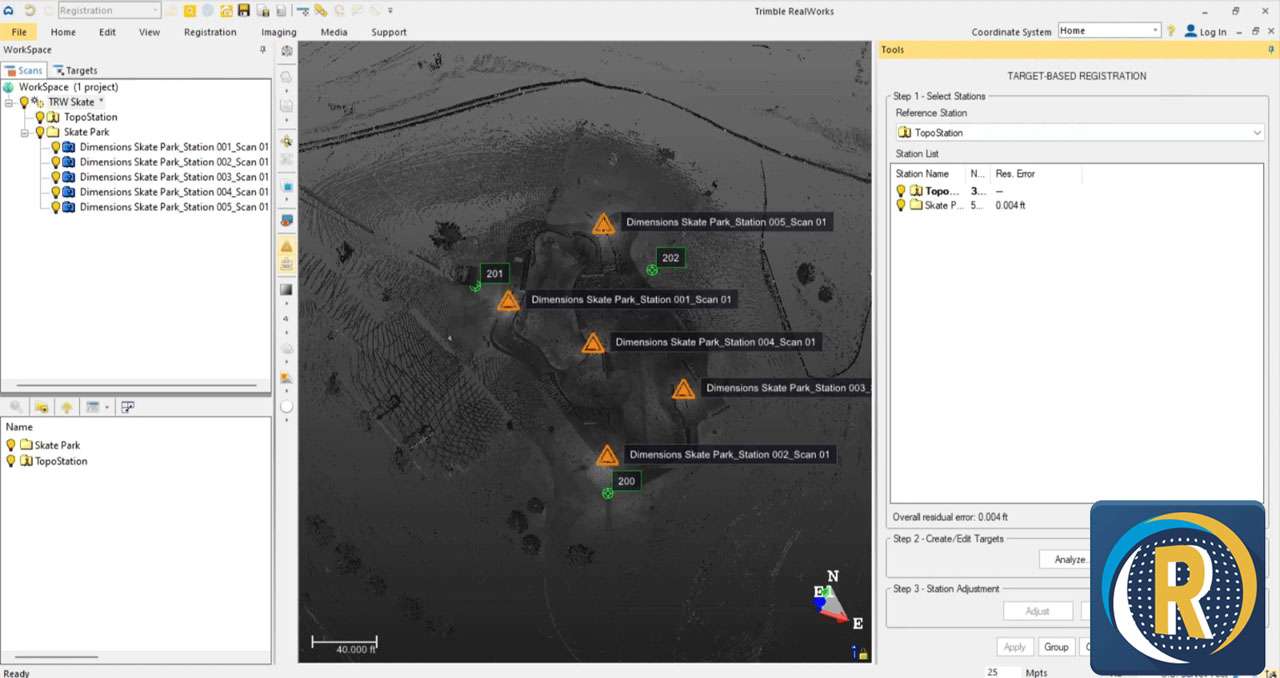
The initial stage of working with 3D scan data involves importing and preparing it for analysis. Trimble RealWorks provides robust support for a wide array of data formats originating from various 3D laser scanner manufacturers. The software automates critical preprocessing tasks, including the alignment of multiple scans through advanced registration algorithms. This capability ensures that disparate scans are accurately positioned relative to each other, forming a unified dataset. Furthermore, RealWorks includes sophisticated cleaning tools to remove noise, unwanted objects, and redundant data points, safeguarding the integrity and usability of the point cloud before further modeling or analysis.
3D Modeling and Result Generation
Once the point cloud data is cleaned and registered, Trimble RealWorks enables the creation of detailed 3D geometric deliverables. Professionals can generate accurate 3D meshes that represent surfaces and objects within the scanned environment. The software facilitates the creation of essential geospatial outputs such as contour lines, precise volume calculations for earthworks or material stock, and detailed cross-sections for analyzing ground profiles or structural elements. Additionally, it can produce orthophotos that provide georeferenced aerial imagery derived from the scan data, offering valuable context and a visual reference for project planning and documentation.
Integration and Interoperability with CAD and BIM Solutions
Seamless integration into existing project workflows is a cornerstone of Trimble RealWorks. The software is engineered to facilitate interoperability with a broad ecosystem of industry-standard CAD and BIM platforms. Users can readily export their processed point cloud data and generated 3D models into formats compatible with leading software solutions such as Tekla Structures, SketchUp, Autodesk Revit, AutoCAD, and Autodesk Navisworks. This connectivity ensures that the insights derived from laser scanning can be directly incorporated into design, modeling, and coordination processes, fostering collaboration and reducing data translation challenges across multidisciplinary teams.
Advanced Analysis Features for Construction Verification and Simulation
Trimble RealWorks goes beyond basic modeling to offer powerful analytical capabilities critical for construction and engineering projects. A key feature is its advanced clash detection functionality, which identifies interferences or discrepancies between the as-built reality captured in the point cloud and the proposed design models. This capability is invaluable for pre-construction planning and risk mitigation. The software also supports precise coordinate alignment, ensuring that scan data is accurately georeferenced, and aids in generating comprehensive project documentation through its analysis and visualization tools. These features support thorough project verification and validation throughout the construction lifecycle.
Industry Use Cases Highlighting Real-World Applications
The practical applications of Trimble RealWorks are diverse and impactful across various sectors:
- Site Surveying: Accurately capturing complex terrain, existing infrastructure, and environmental features for detailed topographic surveys and site planning.
- Construction Progress Monitoring: Regularly scanning construction sites to compare as-built progress against design plans, identify deviations early, and ensure project timelines are met.
- Architectural Restoration and Preservation: Documenting historic buildings and sites with high geometric accuracy to inform restoration efforts and create detailed digital records.
- Infrastructure Documentation: Creating precise digital models of bridges, roads, tunnels, and utilities for asset management, maintenance, and renovation planning.
- As-Built Verification: Confirming that constructed elements precisely match design specifications, identifying any necessary modifications or rework.
Frequently Asked Questions
How does Trimble RealWorks handle multiple point cloud data sources?
Trimble RealWorks supports importing point cloud data from virtually all major 3D laser scanning systems and formats. It automates processes like scan registration and cleaning to enable seamless integration of multiple scans into cohesive 3D models, providing a unified dataset for analysis.
Can Trimble RealWorks models be exported to other design software?
Yes, Trimble RealWorks allows exporting 3D models and data outputs to widely used CAD and BIM platforms including Tekla Structures, SketchUp, Revit, AutoCAD, and Navisworks, facilitating cross-software project collaboration and integration into larger workflows.
What types of analysis can be performed using Trimble RealWorks?
The software offers advanced analysis tools such as volume calculations, cross-section creation, contour mapping, and interference detection between point cloud data and design models, supporting detailed project assessments and pre-construction simulations.




Reviews
There are no reviews yet.