
Download 3D Space TransLT 17.2 – Advanced Land Surveying and Terrain Modeling Add-on
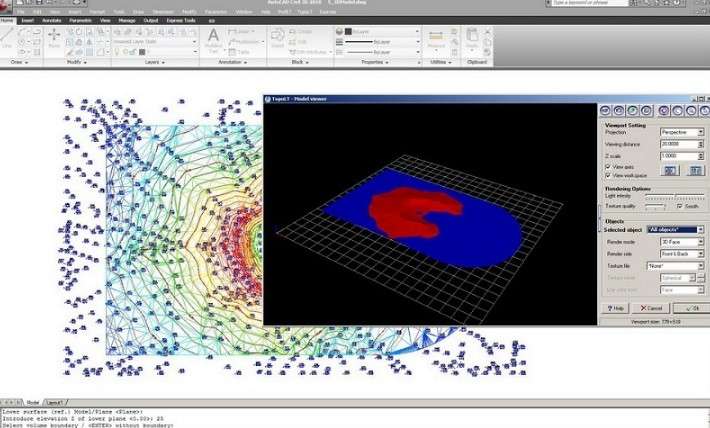
3D Space TransLT 17.2 is a specialized add-on software developed by 3D Space, designed to significantly enhance the functionality of host CAD platforms such as AutoCAD and IntelliCAD. This powerful tool caters to professionals in civil engineering, land surveying, and geological mapping, providing advanced capabilities for 2D and 3D land feature design and precise terrain modeling. By integrating seamlessly with familiar CAD environments, 3D Space TransLT enhances existing workflows for engineers and surveyors.
Enhancing CAD with Specialized Land Surveying Tools
3D Space TransLT functions as an essential plugin for users of AutoCAD and IntelliCAD who require dedicated land surveying and terrain modeling features. It integrates directly into these host platforms, expanding their native capabilities without requiring users to switch to separate applications. This add-on nature ensures that civil engineers and surveyors can leverage specialized tools within their preferred CAD interface, streamlining the design and analysis process for land-related projects.
Comprehensive Tools for 2D and 3D Land Feature Design
This software equips professionals with a robust suite of tools for detailed land feature design and terrain analysis. Its capabilities extend to creating intricate 2D maps essential for planning and documentation, as well as generating accurate 3D terrain models. Key functionalities include precise volume calculations, which are critical for quantities estimation in construction and earthworks. The software supports the creation of complex digital terrain models that accurately represent natural and man-made landscapes.
Output Quality and Customization for Professional Use
3D Space TransLT is engineered to produce high-quality outputs suitable for professional use, including detailed maps designed for printing and presentation. A significant benefit is the extensive customization available, allowing users to configure tools and settings tailored to specific project requirements. The software also supports the recall of these customizable settings, which is crucial for maintaining consistency and efficiency across various civil engineering and land surveying projects, minimizing repetitive tasks.
Compatibility and Integration with Leading CAD Platforms
Designed as an add-on, 3D Space TransLT offers seamless integration with widely adopted CAD platforms, primarily AutoCAD and IntelliCAD. This compatibility ensures that engineers and surveyors can incorporate its specialized land design and terrain modeling functions into their existing digital workflows. The integration facilitates a smooth transition, allowing for immediate application of its features to enhance project deliverables within a familiar software environment.
Practical Applications in Civil and Geological Engineering
The utility of 3D Space TransLT is evident across multiple practical applications within civil and geological engineering fields. In land surveying, it enables precise boundary definition and topographical mapping. For construction projects, its volume calculation software functionality is indispensable for accurate earthwork estimates. Geological mapping benefits from its advanced terrain modeling capabilities, aiding in subsurface analysis and site planning. Overall, it serves as a versatile tool for creating professional documentation and precise spatial analysis required in these demanding disciplines.
Frequently Asked Questions
How does 3D Space TransLT integrate with AutoCAD or IntelliCAD?
3D Space TransLT functions as an add-on that installs into AutoCAD or IntelliCAD, extending their capabilities with specialized tools for land design and terrain modeling directly within the host software interface. This integration allows seamless access to civil engineering features without leaving the CAD environment.
What types of terrain analysis can be performed with 3D Space TransLT?
The software supports both two-dimensional and three-dimensional land feature design, enabling accurate terrain modeling, volume calculations, and map generation essential for surveying and construction projects.
Can I customize settings for different projects in 3D Space TransLT?
Yes, the software offers extensive customization options allowing users to adjust tools and settings to specific project requirements, and easily recall these configurations to minimize repetitive work across projects.



Reviews
There are no reviews yet.