

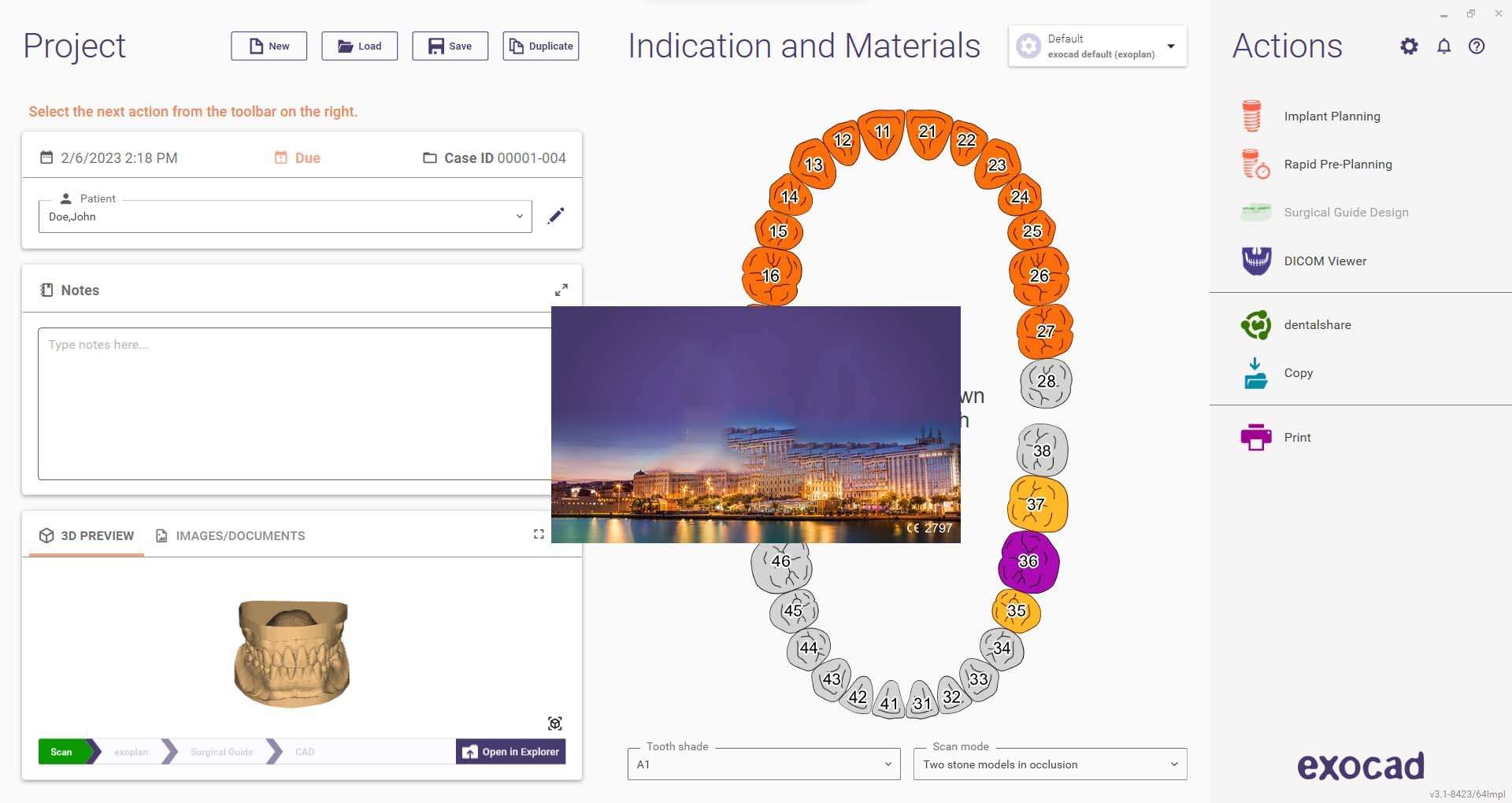
Download Exoplan 3.1 – Advanced Dental Implant Planning and Surgical Guide Software
Exoplan 3.1 is a specialized dental CAD software designed for advanced implant planning and the precise design of surgical guides. Developed by companies within the exocad ecosystem, it serves dental professionals including implantologists, oral surgeons, and prosthodontists. This software significantly contributes to the predictability and efficiency of dental implant procedures and full mouth rehabilitation workflows.
Transforming Implant Planning with Digital Precision
Exoplan 3.1 revolutionizes implantology by providing a digital platform for meticulous treatment planning. It enables dental professionals to transition from traditional methods to a highly precise, computer-aided approach. The software facilitates enhanced predictability in surgical outcomes and accelerates the overall workflow from initial patient consultation to final prosthesis fitting.
Innovative Features Facilitating Full Mouth Rehabilitation
The software incorporates several advanced features that streamline complex full mouth rehabilitation cases. Key capabilities include:
- Rapid pre-planning tools designed to quickly engage patients with proposed treatment plans.
- Simultaneous implant planning for both upper and lower arches, allowing for integrated assessment of occlusion and prosthetic relations.
- Instant Anatomic Morphing for efficient and accelerated tooth placement and setup, adapting anatomy in real-time.
- A comprehensive surgical protocol encompassing detailed drill sequencing for predictable surgical execution.
Enhanced 3D Scan Data Management and Visualization
Exoplan 3.1 offers robust tools for managing and editing patient scan data to ensure accuracy in treatment planning and surgical guide fabrication.
- Multiview adjustment capabilities for highly accurate CT alignment, correcting for positional discrepancies.
- Improved cross-sectional imaging visualization, including mesial/distal and buccal/lingual views, for detailed anatomical inspection.
- Tools designed to crop or smooth artifacts and meshes that might otherwise compromise the fit of surgical guides.
- Real-time adjustments to anatomical structures and precise measurement tools to ensure all parameters are met.
Seamless Component Selection and Compatibility
The planning process in Exoplan 3.1 is integrated to include component selection efficiently. Users can select implants, sleeves, prosthetic parts, and anchor pins within a single, cohesive step. The software supports extensive implant libraries, offering visual previews of components to confirm compatibility and ensure the final prosthetic outcome aligns with the restorative plan.
Optimized Communication and Documentation Features
Exoplan 3.1 prioritizes both patient data privacy and effective communication for treatment protocols. A dedicated incognito mode is available to hide sensitive patient information during planning sessions and when sharing treatment documentation. The software also allows users to measure critical distances and angles, capture annotated screenshots, and include safety warnings within planning protocols, thereby enhancing treatment safety and interdisciplinary communication.
Practical Applications and Industry Use Cases
This advanced software finds application in various complex clinical scenarios, particularly in implant dentistry. Its capabilities are well-suited for:
- Managing intricate full mouth rehabilitation cases that require precise planning across all dentition.
- Performing dual arch implant planning, enabling thorough checks of interarch relationships and occlusal schemes.
- Visualizing implant angulation and positioning to optimize prosthetic success and long-term restoration stability.
Integration Within the Digital Workflow of Modern Dental Practices
Exoplan 3.1 is a key component in the broader digital transformation of dental practices and laboratories leveraging CAD/CAM technology. By integrating Exoplan 3.1, professionals can benefit from a streamlined digital workflow. This approach significantly reduces the time and potential for errors associated with traditional prosthesis fabrication methods, leading to increased precision and efficiency. The software is designed to be compatible with other dental CAD/CAM systems, allowing for seamless integration into existing digital ecosystems.
Frequently Asked Questions
What new implant planning features does Exoplan 3.1 offer for full mouth rehabilitation?
Exoplan 3.1 introduces simultaneous implant planning and surgical guide design for both arches, allowing clinicians to manage full mouth rehabilitation cases more efficiently. The software also includes Instant Anatomic Morphing to speed up tooth setup and offers a full surgical drill sequence protocol for predictable execution.
How does Exoplan 3.1 improve scan data editing and visualization?
Exoplan 3.1 enhances editing of 3D scan data by providing multiview CT alignment adjustments, improved cross-sectional views, and tools to crop or smooth artifacts affecting guide fit. It also includes real-time anatomical adjustments and precise measurement tools for accurate planning.
Can Exoplan 3.1 protect patient privacy during implant planning?
Yes, Exoplan 3.1 includes an incognito mode that hides patient information, ensuring privacy during planning and communication while maintaining detailed and accurate treatment protocols.




Reviews
There are no reviews yet.