

Download Simplebim 11.0 – IFC-Centric BIM Data Management Software
Simplebim 11.0 is a specialized Building Information Modeling (BIM) data management and processing software developed by Trimble Inc., designed to work with Industry Foundation Classes (IFC) files. It functions as a data-centric tool, often described as a “BIM spreadsheet,” enabling professionals in Architecture, Engineering, and Construction (AEC) to import, validate, enrich, and export rich BIM data for various project workflows.
Overview of Simplebim and its Role in the BIM Workflow
Simplebim distinguishes itself in the BIM ecosystem by focusing exclusively on the data contained within IFC models, which is an open, ISO-standardized schema. Unlike traditional BIM authoring tools used for 3D model creation, Simplebim excels in manipulating and managing the semantic information inherent in these models. This makes it an invaluable asset for tasks such as ensuring model quality, preparing data for facility management, or extracting precise information for quantity takeoffs and digital fabrication, thereby complementing the design and modeling phases.
Deep Dive into Simplebim’s Data-Centric Tools and Model Editing Features
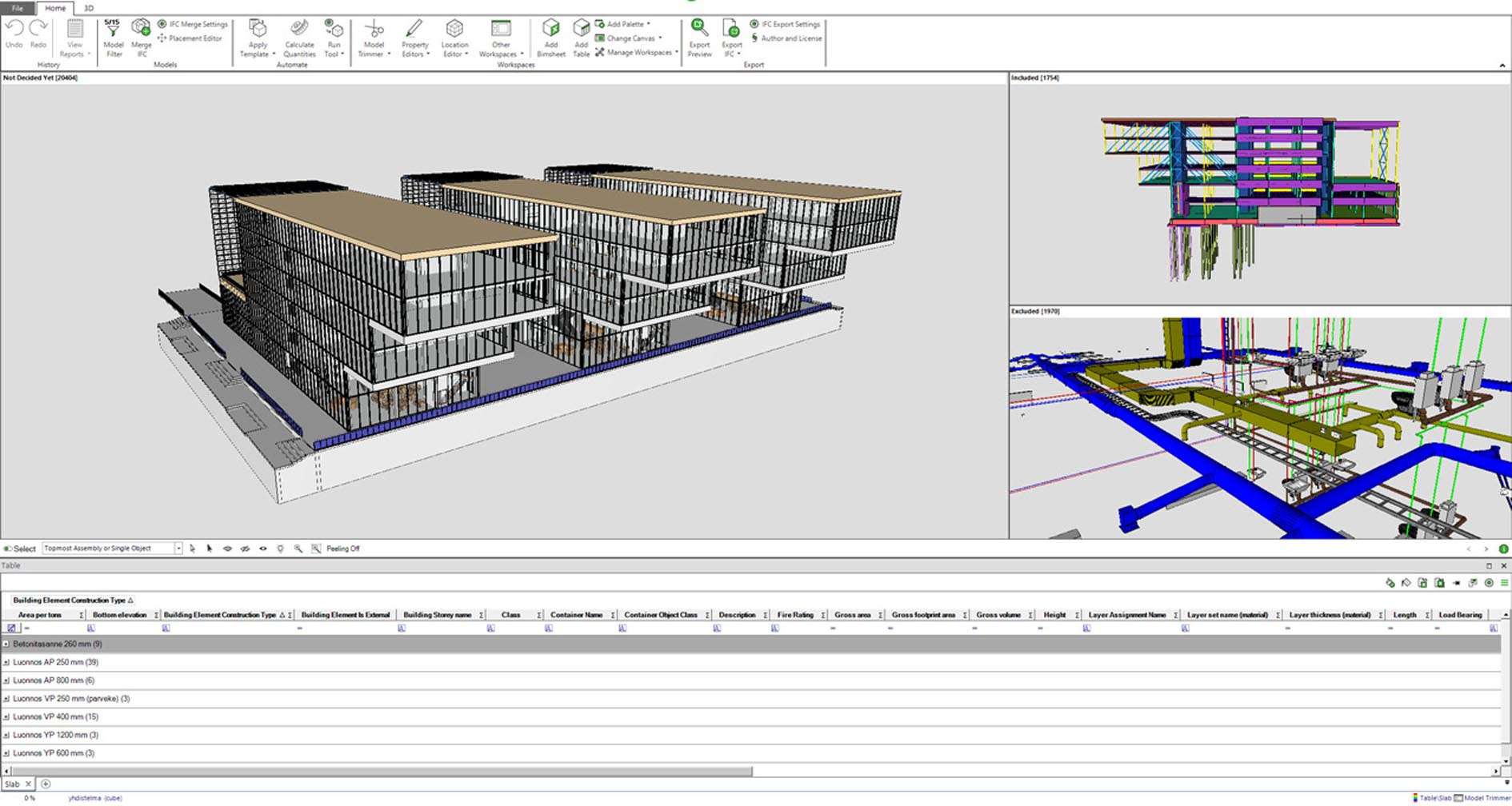
The software provides a unique, spreadsheet-like interface for accessing and managing the extensive data stored within IFC files. This approach allows users to efficiently view and edit model properties in a structured database format.
- Enables bulk editing of object properties, facilitating rapid updates across numerous components simultaneously.
- Supports advanced search-and-replace functionalities for precise data manipulation within the model.
- Allows for mapping and importing data from external sources like Microsoft Excel and CSV files, enriching existing IFC data.
- Facilitates the addition of custom properties, classifications (e.g., Uniclass, OmniClass), and company-specific data standards to BIM objects.
Advanced Model Validation and Rule-Based Quality Assurance
Simplebim offers robust tools for validating BIM model data against project requirements and industry standards, ensuring data integrity and compliance.
- Users can create and apply custom validation rules to check for critical data completeness and accuracy, such as ensuring that all doors have a specified fire rating.
- The software automatically detects and flags inconsistencies, errors, or missing information within the IFC model.
- Provides capabilities for automatic fixes, correcting identified errors programmatically to streamline the quality assurance process.
- Helps in adhering to BIM execution plan (BEP) requirements by verifying that model data meets defined project standards.
Powerful Filtering, Selection, and Reporting Capabilities
With advanced filtering and selection tools, users can isolate specific data sets within large and complex BIM models for analysis and reporting.
- Supports multi-criteria selection within both data tables and direct interaction with the 3D model view, enabling precise identification of objects.
- Allows for saving complex filter configurations, which can be reused to generate recurring reports or perform standardized data extraction.
- Streamlines quantity takeoff (QTO) processes by enabling the extraction of component data and quantities for cost estimation and material takeoffs.
- Offers versatile export options, including fully processed IFC files, structured data to Excel and CSV, and comprehensive PDF reports for documentation and sharing.
Integration and Practical Applications within Architecture and Construction
Simplebim plays a crucial role in interoperability within the AEC sector, bridging the gap between BIM authoring tools and downstream applications.
- Complements BIM authoring software by enabling data correction and enrichment without altering native models.
- Supports workflows for coordinating consultant models, consolidating data from various sources into a unified IFC structure.
- Facilitates the preparation of as-built models with enriched data for comprehensive facility management (FM) handover.
- Enables model simplification for improved collaboration and performance in project review platforms.
- Aids in preparing data requirements for digital fabrication processes, ensuring manufacturing accuracy.
- As part of Trimble’s integrated BIM software portfolio, Simplebim enhances end-to-end project data management capabilities.
Supported Formats, Compatibility, and System Optimization
Simplebim is built to handle the complexities of BIM data with support for industry-standard formats and optimized performance.
- Fully supports various versions of the IFC file format (e.g., IFC2x3, IFC4) for import and export.
- Offers flexible export functionalities to common formats such as IFC, Excel, CSV, and PDF, ensuring broad compatibility.
- The software is optimized to efficiently process and manage large-scale IFC files from complex projects, reducing performance bottlenecks.
- Recommended for professional AEC users who frequently manage, validate, or extract data from large BIM datasets, demanding system stability and responsiveness.
Frequently Asked Questions
How does Simplebim differ from traditional BIM modeling software?
Simplebim is focused on managing and processing BIM data within IFC files rather than creating or editing 3D models. It acts like a data spreadsheet for BIM, allowing bulk property editing, validation, and data extraction that complements authoring software.
Can Simplebim validate if a BIM model meets project-specific data standards?
Yes, Simplebim allows users to define custom rules to validate BIM data for completeness and compliance, such as ensuring attributes like fire ratings are present on all required objects. It flags inconsistencies for correction or automatic fixing.
What export formats does Simplebim support for reporting and data sharing?
Simplebim supports exporting IFC files, filtered data sets to Excel and CSV formats, as well as PDF reports. This flexibility allows users to share and analyze BIM data across platforms and for various project needs.




Reviews
There are no reviews yet.