

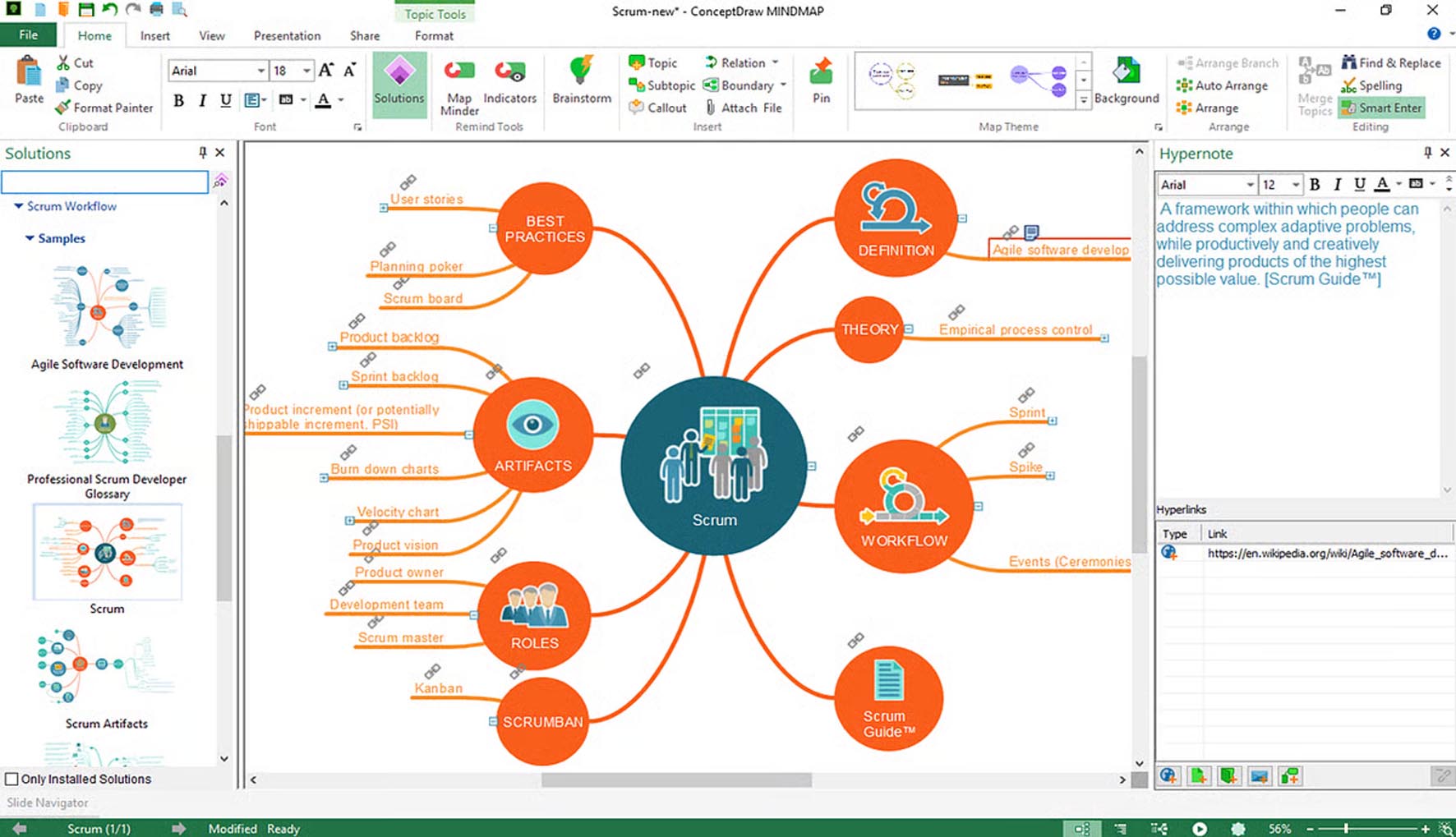
Download ConceptDraw MindMap 15 – Advanced Mind Mapping & Project Planning Software
ConceptDraw MindMap 15 is an advanced proprietary mind mapping and visual thinking tool developed by Computer Systems Odessa (CS Odessa), designed for professionals in business, project management, and education. As a key component of the ConceptDraw OFFICE suite, this software enhances creativity, brainstorming, and complex idea structuring by integrating robust mind mapping capabilities with powerful project planning features, offering cross-platform compatibility for both Windows and macOS users.
Unlocking Visual Thinking and Brainstorming Power
ConceptDraw MindMap 15 serves as a central hub for idea generation and organization, enabling users to capture, structure, and develop thoughts visually. It supports a wide range of applications, from complex professional brainstorming sessions and knowledge management to educational concept mapping and detailed project planning. Introduced as part of the ConceptDraw OFFICE suite, it leverages integrated functionality to enhance productivity and facilitate clearer communication of intricate ideas.
Flexible Diagramming and Visualization Tools for Complex Ideas
Beyond traditional radial mind maps, ConceptDraw MindMap 15 offers a versatile platform for creating various visual representations of information, making it a powerful productivity software for business and complex projects.
Multiple Layouts for Diverse Mind Maps
The software supports a variety of diagram types tailored to different informational needs, including classic radial mind maps, organizational charts, detailed fishbone diagrams, and hierarchical tree diagrams, allowing users to choose the most effective visualization for their specific content.
Rich Formatting and Multimedia Attachment
Users can enhance their mind maps with a comprehensive set of styling options, including custom colors, fonts, and shapes. The ability to attach notes, images, icons, callouts, and hyperlinks to topics adds depth and context, transforming simple maps into rich, informative documents.
Multiple Central Topics for Non-linear Idea Exploration
ConceptDraw MindMap 15 allows for the inclusion of multiple central topics within a single map. This feature is particularly beneficial for exploring complex subjects with different facets or for combining disparate ideas into a cohesive visual structure, supporting non-linear thinking and comprehensive content development.
Enhanced Project Management with Integrated Gantt Charts
A key differentiator of ConceptDraw MindMap 15 is its integrated project planning capabilities, seamlessly blending visual brainstorming with actionable project management.
Interactive Gantt Chart Conversion and Task Management
Mind maps can be dynamically converted into interactive Gantt charts. This feature allows users to assign tasks, set durations, define dependencies, establish priorities, and track project progress directly within the mind mapping interface, offering a fluid workflow from idea conception to project execution.
Seamless Integration with ConceptDraw PROJECT
For more advanced project management requirements, ConceptDraw MindMap 15 offers seamless integration with ConceptDraw PROJECT. This connection facilitates effortless export of mind map data into fully structured project plans, maintaining compatibility with Microsoft Project formats for broader project management workflows.
Transforming Maps into Professional Presentations & Documents
ConceptDraw MindMap 15 excels at transforming raw ideas and structured plans into polished documents and engaging presentations suitable for professional audiences.
Dynamic Presentation Mode for Engaged Audiences
The software features a dynamic presentation mode that allows users to navigate through map topics interactively. This creates visually engaging and informative presentations, enabling audiences to follow the presenter’s train of thought logically and intuitively.
Multi-format Export Options
To ensure broad applicability and easy sharing, ConceptDraw MindMap 15 provides extensive export options. Users can export their maps to common business formats such as MS Word, PowerPoint, PDF, HTML, and various graphic formats, as well as web pages, adapting the output to diverse communication needs.
Collaboration and Data Exchange in Team Environments
Facilitating teamwork and interoperability, ConceptDraw MindMap 15 includes robust features for sharing and exchanging information across different platforms and with team members.
Real-Time Cloud Collaboration via ConceptDraw Cloud
Leveraging ConceptDraw Cloud, the software enables real-time collaboration, allowing multiple users to co-edit and share mind maps simultaneously or asynchronously. This feature is crucial for teams working remotely or on concurrent project tasks, enhancing collective productivity and real-time feedback loops.
Import and Export Across Popular Formats and Applications
ConceptDraw MindMap 15 boasts extensive import and export capabilities, supporting formats like OPML, MS Office files, and competing mind mapping software formats such as MindManager, XMind, and FreeMind. It also integrates with cloud services and applications like Twitter, Evernote, MS Outlook, and OneNote, streamlining data exchange and workflow integration.
Latest Enhancements in ConceptDraw MindMap 15
ConceptDraw MindMap 15 builds upon its robust feature set with several key improvements focused on user experience and performance.
Updates include a modernized user interface for a more intuitive workflow, enhanced cloud collaboration features for better team synchronization, and various performance boosts for smoother operation. Additionally, the release offers expanded template libraries to expedite the creation of diverse diagrams and improved export filters for greater control over output formats, addressing the needs of professionals seeking efficient visual thinking and project planning tools.
Frequently Asked Questions
How does ConceptDraw MindMap 15 integrate project planning with mind mapping?
ConceptDraw MindMap 15 allows users to convert mind maps directly into interactive Gantt charts, assigning tasks, durations, dependencies, and tracking progress within the same environment. It also integrates closely with ConceptDraw PROJECT for advanced project management needs, offering a unified approach from idea generation to detailed project execution.
Can I collaborate in real-time with team members using ConceptDraw MindMap 15?
Yes, ConceptDraw MindMap 15 supports real-time collaboration through ConceptDraw Cloud, enabling team members to co-edit, share, and update maps asynchronously or simultaneously for enhanced teamwork and productivity. This facilitates seamless communication and coordinated efforts on shared projects.
What file formats can ConceptDraw MindMap 15 import and export?
ConceptDraw MindMap 15 supports importing and exporting a wide range of file formats including MS Word, PowerPoint, MS Project, OPML, MindManager, XMind, FreeMind, PDF, HTML, MP4, and various graphic formats, facilitating seamless data exchange across platforms and applications.






Reviews
There are no reviews yet.