

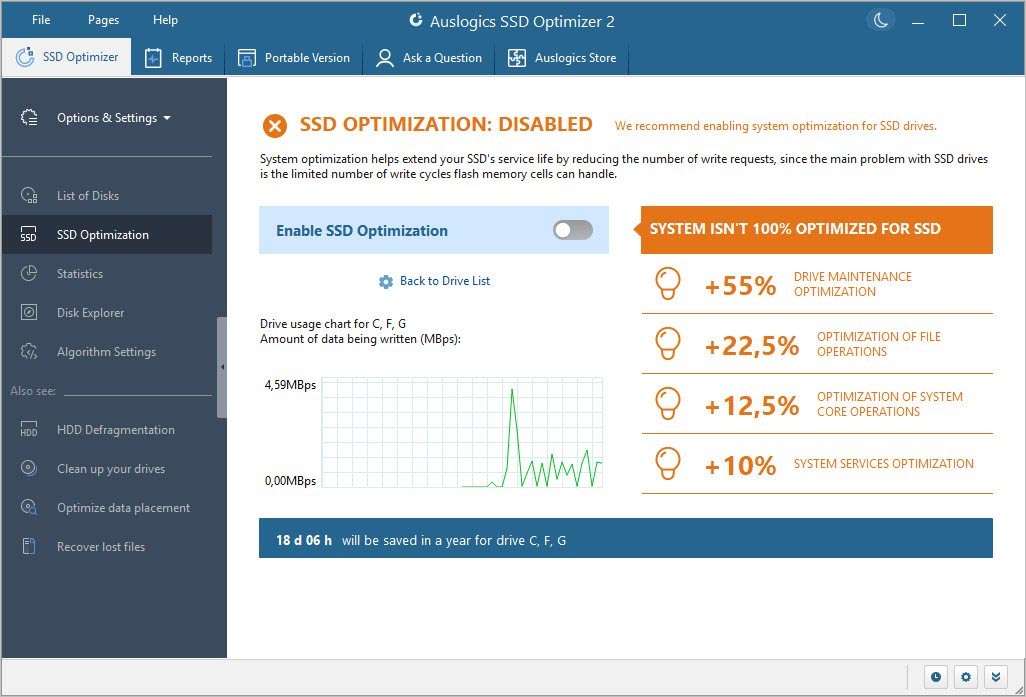
Download Auslogics SSD Optimizer Pro 2.1 – Advanced SSD Performance and Health Management
Auslogics SSD Optimizer Pro 2.1 is a specialized IT software developed by Auslogics Pty Ltd, designed to enhance the performance and longevity of Solid State Drives (SSDs). Unlike traditional disk defragmentation tools meant for Hard Disk Drives (HDDs), this application employs advanced techniques tailored for modern SSD technology, including NVMe PCIe 5.0 drives and compatibility with Windows 11 23H2. It serves IT professionals, PC power users, system administrators, and gamers who require precise control over their SSD health and performance.
Overview of Auslogics SSD Optimizer Pro and Its Role in SSD Maintenance
Solid State Drives operate on fundamentally different principles than HDDs, involving NAND flash memory cells with finite write cycles. To maximize their lifespan and maintain peak performance, SSDs require maintenance routines distinct from HDD defragmentation. Auslogics SSD Optimizer Pro addresses this need by providing a suite of tools focused on these specialized requirements, ensuring that modern SSDs, including the latest NVMe PCIe 5.0 interfaces, perform optimally and endure longer. This software is crucial for users looking to leverage the full potential of their SSD storage.
Advanced SSD Performance Enhancement Techniques
Optimizing an SSD involves more than just ensuring sufficient free space. Auslogics SSD Optimizer Pro utilizes specific methods to improve efficiency and reduce unnecessary wear on the drive.
TRIM Command Execution and Partition Alignment
The TRIM command is essential for SSD performance, allowing the operating system to inform the drive which blocks of data are no longer considered in use and can be wiped internally. Auslogics SSD Optimizer Pro ensures that the TRIM command is executed effectively, which is critical for maintaining write performance over time and preventing performance degradation as the drive fills up. Proper partition alignment is also vital, ensuring that data partitions align with the SSD’s internal erase block structure, thereby enhancing read/write speeds and contributing to the drive’s longevity.
Over-Provisioning and System Tweaks
Over-provisioning involves allocating a portion of the SSD’s storage capacity that is not accessible to the user or operating system. This dedicated space allows the SSD controller more flexibility for wear leveling and garbage collection, significantly improving performance and extending the drive’s lifespan. Auslogics SSD Optimizer Pro can assist in managing and configuring this valuable feature. Additionally, the software optimizes system services, such as the disabling of SuperFetch and Prefetch for SSDs, which are less beneficial on faster flash storage and can sometimes increase unnecessary I/O operations.
Comprehensive Health Monitoring with S.M.A.R.T. Analysis
Understanding the health status of an SSD is paramount for preventing data loss and ensuring consistent performance. Auslogics SSD Optimizer Pro leverages the Self-Monitoring, Analysis, and Reporting Technology (S.M.A.R.T.) system built into all modern SSDs.
The software provides detailed S.M.A.R.T. data, including critical parameters such as temperature, wear leveling count, reallocated sector counts, and total host writes. This analysis offers insights into the drive’s current condition and its remaining lifespan. By presenting this information through a user-friendly dashboard with trend graphs, Auslogics SSD Optimizer Pro empowers users to proactively identify potential issues, manage their SSD health, and anticipate future maintenance or replacement needs.
Secure Erase and Data Purging Capabilities
For users looking to restore an SSD to its factory default performance state or to prepare a drive for disposal or resale, Auslogics SSD Optimizer Pro offers a Secure Erase function. This feature utilizes the ATA Secure Erase command, a standardized method designed to securely and irrevocably wipe all data from an SSD. Executing a Secure Erase can significantly improve performance by resetting the drive’s internal state, similar to its condition when new. However, users must exercise extreme caution, as this operation results in the permanent loss of all data stored on the SSD, and a backup of critical information is strongly recommended before proceeding.
Performance Benchmarking and Scheduled Optimization
To quantify the impact of optimization routines and to track SSD performance over time, Auslogics SSD Optimizer Pro includes built-in benchmarking tools. These tools can measure key metrics such as read and write speeds, providing users with objective data to evaluate the effectiveness of the software’s operations. The software also features robust scheduling capabilities, allowing users to automate optimization tasks and health checks. This ensures ongoing SSD maintenance without manual intervention, supported by an alert system that notifies users of critical events or recommended actions.
Compatibility with Latest Hardware and Software Standards
Auslogics SSD Optimizer Pro is designed to remain relevant with the rapid evolution of storage technology and operating systems. The 2.1 version specifically introduces compatibility with Windows 11 23H2, ensuring users of the latest Microsoft operating system can benefit from optimized SSD performance. Furthermore, it includes support for detecting and optimizing newer NVMe drives utilizing the PCIe 5.0 interface, which represents the cutting edge in SSD speed and technology. This commitment to supporting the latest hardware and software minimizes compatibility issues and maximizes performance for a wide range of modern PC configurations.
Frequently Asked Questions
How does Auslogics SSD Optimizer Pro improve the performance of my SSD?
Auslogics SSD Optimizer Pro uses SSD-specific techniques such as TRIM command execution and partition alignment to enhance write efficiency and reduce wear. It also adjusts Windows services to optimize system interactions with SSDs, resulting in improved overall performance and lifespan.
Is Auslogics SSD Optimizer Pro safe to use on modern NVMe SSDs with PCIe 5.0 interface?
Yes, the latest version 2.1 has been updated to support the latest NVMe PCIe 5.0 drives, ensuring compatibility and optimized routines tailored to these high-speed SSDs.
What health monitoring features does Auslogics SSD Optimizer Pro provide?
The software provides detailed S.M.A.R.T. data analysis, including temperature, wear leveling, and reallocated sector counts. It offers a visual dashboard with trend graphs and lifespan estimates to help users proactively manage SSD health.






Reviews
There are no reviews yet.