
Download CyberLink PerfectCam Premium 2.3 – AI-Powered Webcam Enhancement and Virtual Camera Software
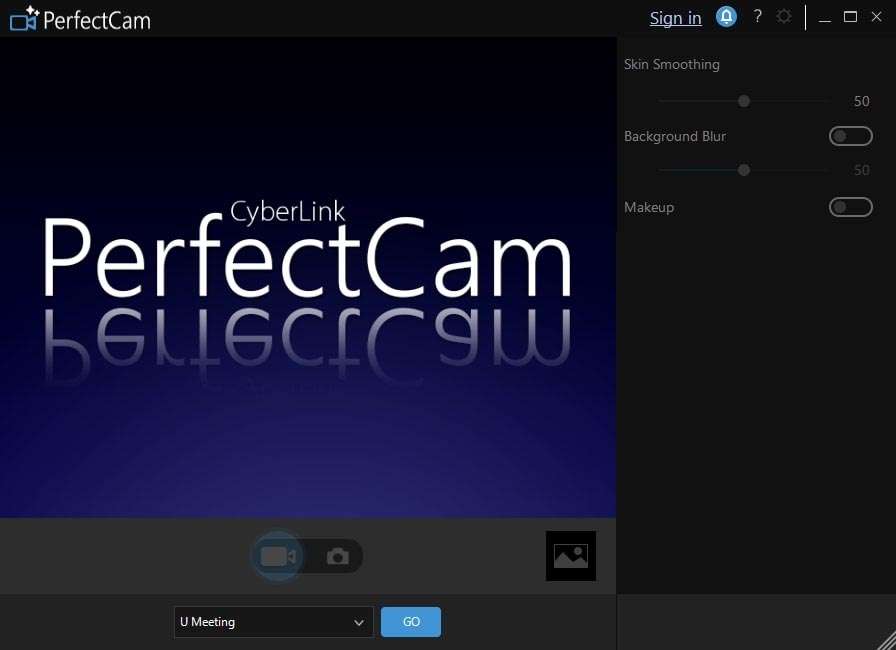
CyberLink PerfectCam Premium 2.3 is an advanced AI-powered webcam enhancement and virtual camera software developed by CyberLink Corp. Designed for professionals and content creators, it elevates video quality for a range of applications including video conferencing, livestreaming, and online education. This software leverages cutting-edge AI to provide real-time visual enhancements, allowing users to maintain a polished and professional appearance in any virtual setting.
Advanced AI Enhancements Tailored for Professional Video Quality
CyberLink PerfectCam Premium utilizes sophisticated AI algorithms to significantly improve webcam output. Core to its functionality are AI-powered beauty tools that offer real-time skin smoothing and blemish removal, providing a refined appearance. Complementing these features is an advanced real-time studio lighting simulation, which intelligently adjusts illumination to replicate professional lighting setups. These AI enhancements collectively ensure users present a polished, high-quality image, crucial for professional video conferencing and engaging live streams.
Dynamic Background Tools and Real-Time Visual Effects
This software offers robust tools for managing video backgrounds and adding real-time visual flair. Its AI background blur and replacement capabilities allow users to effectively obscure or substitute their surroundings, maintaining focus on the subject or creating a desired aesthetic. Beyond simple background manipulation, PerfectCam integrates a variety of augmented reality (AR) masks, frames, and animated elements. These features empower users to creatively customize their video environment and add an interactive dimension to their online presence.
Virtual Camera Integration and Multi-Source Video Composition
A key function of CyberLink PerfectCam Premium is its role as a virtual webcam, providing seamless integration with a wide array of popular video conferencing and streaming platforms. Applications such as Zoom, Microsoft Teams, OBS, Twitch, and YouTube can readily utilize PerfectCam as a video source. Furthermore, the software supports multi-source video composition, enabling users to combine feeds from their webcam, screen sharing, images, and other media into a single, cohesive video output for more dynamic presentations and broadcasts.
Interactive Streaming Features and Gesture-Triggered Effects
Tailored for content creators and educators, PerfectCam includes interactive features driven by motion and facial gesture recognition. Users can configure the software to trigger animations, filter changes, or other visual effects based on specific hand movements or facial expressions. This capability enhances audience engagement during live streaming sessions and online lectures. The platform also offers tools for customizable overlays, further allowing users to brand their streams and presentations with unique graphical elements.
Security and Privacy Features to Protect User Video Feeds
CyberLink PerfectCam Premium incorporates features designed with user privacy in mind. It provides webcam privacy alerts, notifying users if unfamiliar applications attempt to access their camera feed. Additionally, an avatar replacement feature allows users to substitute their live video with an animated avatar when they need to step away from the camera without interrupting a call or stream. These functionalities help safeguard user privacy and manage video presence effectively.
Performance Optimization for Smooth Operation on Various Systems
The software is engineered for efficient performance across a range of computer hardware. Through CPU and GPU usage optimizations, PerfectCam can execute demanding AI video effects and rendering at HD resolutions without placing an excessive burden on system resources. This focus on efficient execution ensures a smooth and responsive user experience, even on mid-range hardware, making its advanced features accessible to a broader user base.
Frequently Asked Questions
How does CyberLink PerfectCam Premium improve video quality during calls?
CyberLink PerfectCam Premium uses advanced AI algorithms to enhance your appearance by smoothing skin, removing blemishes, and simulating professional lighting effects in real-time, ensuring you look your best in video calls and streams.
Can I use CyberLink PerfectCam as a virtual camera on multiple video applications?
Yes, PerfectCam acts as a virtual webcam that can be selected in most video conferencing and streaming applications such as Zoom, Microsoft Teams, OBS, and Twitch, enabling you to use its AI effects and multi-source video feed across platforms.
What privacy features does CyberLink PerfectCam offer during video calls?
The software includes privacy alerts that notify you if other apps access your webcam and can replace your video feed with an avatar when you step away, helping protect your privacy during virtual meetings.



Reviews
There are no reviews yet.