
Download Gilisoft Image Editor 8.6 – Versatile Image Editing and Graphic Design Software
Gilisoft Image Editor 8.6 is a versatile graphics software developed by Gilisoft, catering to photography enthusiasts, social media content creators, and small business owners. This application is designed to offer a powerful yet accessible platform for both intricate image editing and graphic design tasks, bridging the gap between basic paint programs and high-end professional suites. With its latest update, it incorporates advanced AI features and streamlined workflows, making it an ideal solution for users seeking efficient photo enhancement and compelling graphic design capabilities without the steep learning curve.
Comprehensive Image Editing Tools for Everyday Use
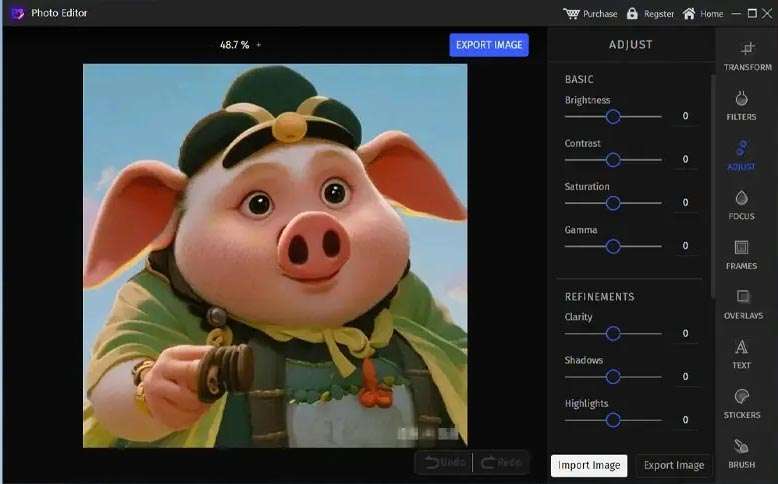
Gilisoft Image Editor provides a robust suite of tools essential for everyday photo manipulation and enhancement. Users can easily refine their images using fundamental adjustments such as cropping for better composition, rotating to correct orientation, and modifying brightness and contrast to achieve the desired visual impact. Beyond basic corrections, the software includes retouching capabilities to enhance portraits, such as blemish removal for clear skin and red-eye correction for more natural-looking photos.
Creative Graphic Design Features Tailored for Social Media and Print
This image editing software extends its functionality into graphic design, offering a variety of tools and assets suitable for diverse creative projects. It includes an array of design templates pre-configured for social media posts across various platforms and for common print media formats, simplifying the creation of professional-looking content. For more direct creative control, users can utilize the integrated drawing and painting tools, work with layers to build complex compositions, and incorporate vector elements to add polish to their designs.
Innovative AI-Powered Functionalities to Simplify Complex Tasks
Version 8.6 of Gilisoft Image Editor significantly enhances user efficiency through the integration of Artificial Intelligence. A standout feature is the AI background removal tool, which automates the often tedious process of isolating subjects from their backgrounds. This intelligent functionality streamlines image manipulation workflows, allowing users to quickly achieve clean cutouts for collage work, product mockups, or creative compositions, thereby improving overall productivity.
Efficient Workflow with Batch Processing and Screen Capture Utilities
To maximize efficiency, Gilisoft Image Editor incorporates batch processing capabilities, enabling users to apply the same edits or format conversions to multiple images simultaneously. This feature is invaluable for photographers and designers managing large volumes of photos. Additionally, the software includes an integrated screen capture utility, providing a convenient way to capture images directly from the screen for immediate editing or inclusion in design projects without needing separate screen capture software.
File Compatibility and Performance Enhancements in Version 8.6
Gilisoft Image Editor ensures broad usability through its support for a wide range of common image file formats, including JPG, PNG, BMP, GIF, and TIFF. Notably, it offers read-only support for Photoshop’s native PSD files, facilitating easier integration into workflows involving other design applications. Version 8.6 also brings notable performance improvements, including an optimized user interface designed for enhanced usability and quicker response times, alongside updated layer management features and blending modes for more sophisticated image compositing.
Real-World Applications: From Photography to Business Marketing Materials
The versatile toolset within Gilisoft Image Editor lends itself to numerous practical applications across different user needs. Photographers can utilize its enhancement and retouching features to perfect their shots. Small business owners can leverage the graphic design templates and tools to create marketing collateral, promotional social media posts, and advertising materials efficiently. For individuals, it serves as an accessible platform for personal photo editing and creating custom graphics for digital sharing.
Frequently Asked Questions
What new features does Gilisoft Image Editor 8.6 offer compared to previous versions?
Gilisoft Image Editor 8.6 introduces an AI-powered background removal tool, expanded social media templates including over 500 new assets, enhanced layer management with grouping and blending modes, faster performance, and a redesigned, more intuitive user interface.
Can Gilisoft Image Editor handle professional file formats like PSD?
Gilisoft Image Editor supports common image formats such as JPG, PNG, BMP, GIF, and TIFF. It offers read-only support for PSD files, allowing opening and viewing Photoshop documents with some limitations on editing.
Is Gilisoft Image Editor suitable for social media content creation?
Yes, the software provides numerous pre-designed templates specifically geared toward social media platforms such as Facebook, Instagram, and YouTube, along with various tools for creating engaging graphics and posts efficiently.





Reviews
There are no reviews yet.