

Download 3DSprint 2025.4 – Professional Additive Manufacturing Preparation Software
3DSprint 2025.4 is the official print preparation and slicing software developed by 3D Systems Corporation for their advanced additive manufacturing platforms. This professional tool is designed to streamline the workflow for engineers, dental and jewelry professionals, and rapid prototyping specialists working with 3D Systems’ SLA, SLS, and MultiJet Printing (MJP) technologies. It offers enhanced automation and tailored features essential for industries such as aerospace, automotive, healthcare, and consumer goods, enabling efficient production from design to finished part.
Streamlining the Additive Manufacturing Workflow
3DSprint 2025.4 serves as a crucial interface between digital design and physical production for users of 3D Systems’ additive manufacturing hardware. It is specifically engineered to optimize the preparation process for Stereolithography (SLA), Selective Laser Sintering (SLS), and MultiJet Printing (MJP) technologies. By providing advanced tools for model manipulation, support generation, and slicing, 3DSprint empowers manufacturing facilities and 3D printing service bureaus to achieve high-quality results, especially in demanding fields like aerospace, automotive, and healthcare.
Advanced Model Import, Repair, and Orientation
Comprehensive File Format Support
3DSprint 2025.4 ensures broad compatibility by supporting a wide array of common 3D file formats. This includes industry standards such as STL, OBJ, PLY, and the increasingly adopted 3MF format. Additionally, it handles many native CAD file types directly, minimizing the need for complex conversions and reducing potential errors during the import stage.
Automatic Mesh Healing and Optimal Orientation
The software incorporates sophisticated algorithms to automatically repair imperfections in imported 3D models. This includes tasks like filling holes, correcting inverted normals, and ensuring watertight meshes. Furthermore, 3DSprint offers automated mesh analysis and orientation optimization, intelligently positioning parts within the build volume to minimize support material, reduce print time, and enhance surface finish on critical features.
Intelligent Support Generation and Management
Automated Support Structures
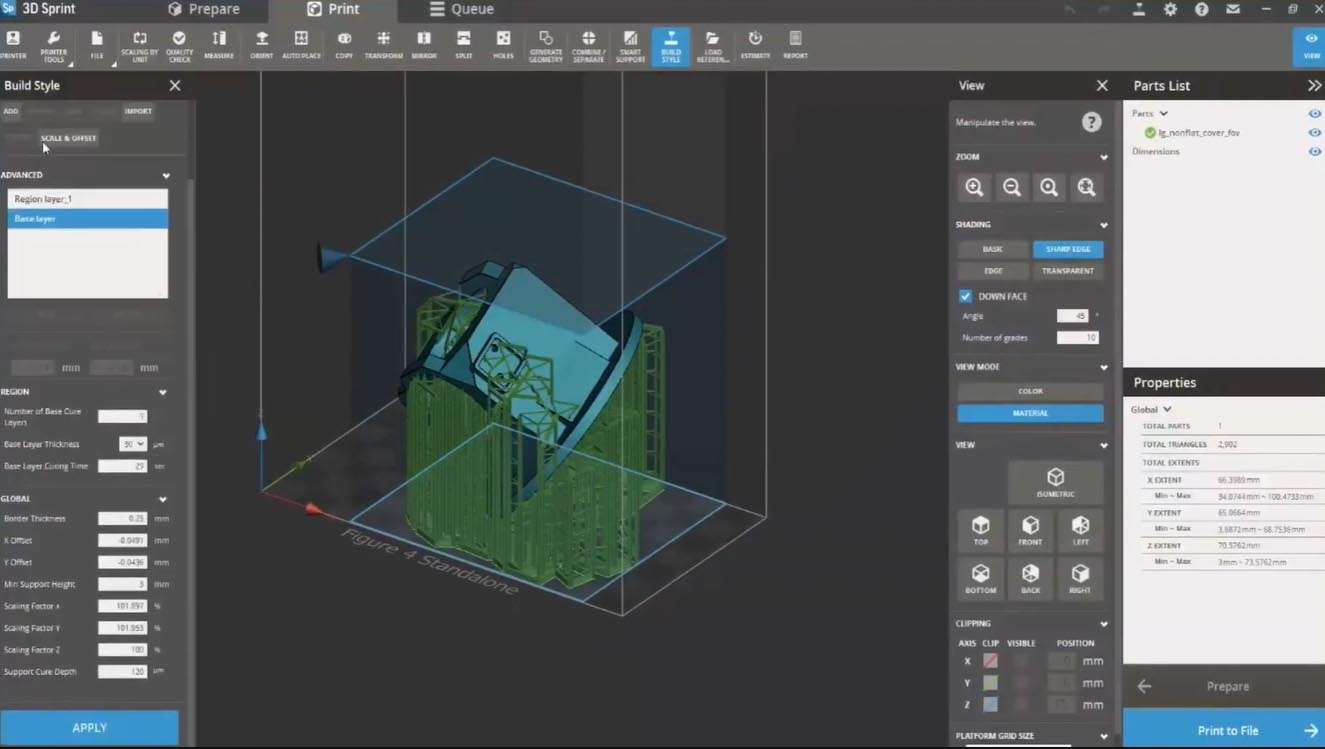
Leveraging advanced algorithms, 3DSprint 2025.4 automates the generation of support structures crucial for successful prints on SLA and MJP platforms. It offers intelligent, context-aware supports that adapt to model geometry, along with options for density control. The software also includes specialized tree-style support options, designed for efficient material usage and easier post-processing removal.
Manual Support Tools and Visualization
Complementing its automated capabilities, 3DSprint provides a robust set of manual tools for fine-tuning support structures. Users can add, remove, or modify supports with precision. Features like support brushing allow for targeted adjustments, and various preview modes enable clear visualization of support placement and potential contact points before initiating a print.
Precision Slicing and Real‐Time Preview
Adaptive & Multi‐Resolution Slicing
3DSprint 2025.4 employs adaptive slicing techniques, allowing for variable layer thickness across different regions of a single model. This capability enables higher resolution and surface fidelity on critical areas while maintaining efficiency for simpler geometries. The multi-resolution workflow ensures that the final print balances part quality with production speed.
Layer‐by‐Layer Slice Simulation
The software provides a real-time, layer-by-layer preview of the sliced model. This simulation allows users to visualize the exact toolpath and deposition strategy for each layer, enabling early detection of potential issues such as collisions, gaps, or unintended features before the build begins. This preview is essential for validating complex print jobs.
Print Simulation, Validation, and Cost Estimation
Before committing to a print, 3DSprint 2025.4 offers tools for build simulation and validation. Users can accurately estimate build times based on the selected printer and slicing parameters. The software also tracks material consumption, providing detailed insights into material usage and forecasting associated costs, which is vital for production planning and cost management in professional environments.
Production Optimization and Job Automation
Batch Processing & Queue Management
For high-volume production environments, 3DSprint 2025.4 includes robust batch processing capabilities. This allows users to queue multiple jobs, optimize build plate nesting for maximum efficiency, and manage print queues remotely. The software supports efficient scheduling and monitoring of production runs, enhancing overall throughput.
Material Profile Library & Tracking
The software integrates directly with 3D Systems’ extensive material library, offering pre-configured profiles for various resins and powders. These profiles ensure optimal print settings tailored to specific material properties. 3DSprint also provides features for tracking material usage, managing inventory, and monitoring material expiration dates to maintain print quality and reduce waste.
Integration with the 3D Systems Ecosystem
As the official preparation tool, 3DSprint 2025.4 offers deep integration with 3D Systems’ hardware ecosystem. This includes seamless network connectivity to compatible printers, ensuring efficient job transfer and remote monitoring. The software maintains job histories, facilitates easy reprinting of previous builds, and can integrate with broader production management systems for a cohesive manufacturing workflow.
What’s New in 3DSprint 2025.4
The 2025.4 release of 3DSprint introduces several key advancements aimed at increasing automation and user efficiency. These include enhanced automated orientation algorithms for even more optimal part placement and reduced support needs. Next-generation support generation routines provide improved stability and easier removal. Compatibility has been expanded with the latest Figure 4 production platforms, alongside specific enhancements for MultiJet Printing (MJP) technologies. The user interface has also undergone refinements for a more intuitive experience, and underlying performance optimizations ensure quicker processing of complex models and assemblies.
Frequently Asked Questions
What file formats does 3DSprint 2025.4 support?
3DSprint 2025.4 supports standard 3D printing formats including STL, OBJ, PLY, 3MF, as well as many native CAD file types. These options ensure seamless import and reduce conversion errors, making it versatile for various design inputs.
Which key enhancements are included in version 2025.4?
Version 2025.4 introduces improved automated orientation algorithms, smarter support-generation routines, expanded Figure 4 production platform compatibility, and performance optimizations for large assemblies. These updates focus on streamlining the print preparation process and improving output quality.
Is 3DSprint 2025.4 compatible with all 3D Systems printers?
Yes. 3DSprint 2025.4 provides native print-preparation support for 3D Systems’ SLA, SLS, and MultiJet platforms, including the latest ProX, ProJet, sPro, and Figure 4 series. This ensures optimized performance and reliability across their hardware range.






Reviews
There are no reviews yet.