

Download Ideate Software Revit Plugins 2023–2027 – Enhance Your BIM Workflows
Automation , BIMLink , Explorer , Sticky , StyleManager
& Apps: Align , Annotate , Clone , QuickSelect , ReNumber , SheetManager , SmartDelete , SpellCheck , ViewCreator , XRay
Ideate Software Revit Plugins 2023–2027 are a suite of specialized add-ins designed to enhance the productivity and data management capabilities of Autodesk Revit. Developed by Ideate Software, a company focused on Autodesk Revit productivity solutions, these plugins cater to professionals within the Architecture, Engineering, and Construction (AEC) industry, including BIM managers, architects, engineers, and contractors. They address common challenges in BIM workflows by offering advanced tools for data synchronization, automation, and model quality assurance.
Extending Revit for Real-World AEC Projects
The Ideate Software suite comprises six integrated Revit productivity plugins: BIMLink, Automation, Explorer, Sticky, StyleManager, and Apps. These tools are engineered to tackle specific pain points encountered in complex AEC projects, offering significant improvements for BIM managers, architects, structural and MEP engineers, contractors, and facility managers. By leveraging the extensibility of Autodesk Revit, these plugins provide advanced functionality for data management, quality assurance, and workflow automation, directly supporting the day-to-day demands of modern BIM environments.
Excel-Revit Data Synchronization with Ideate BIMLink
Ideate BIMLink provides a robust solution for managing and editing Revit model data through Microsoft Excel. This tool is instrumental in handling large datasets and performing bulk operations efficiently.
Bidirectional Data Exchange
Ideate BIMLink allows users to export comprehensive Revit model data into editable Excel spreadsheets. This exported information can then be modified in bulk, such as updating numerous parameter values simultaneously. The refined data can be precisely reimported into the Revit model, maintaining parameter integrity and ensuring consistency across project elements.
Advanced Filtering and Reporting
This capability enables users to perform targeted data extraction from Revit models for detailed analysis and reporting. BIMLink facilitates the creation of custom schedules and provides real-time project reporting, which is invaluable for quantity takeoffs, cost estimations, and project status tracking.
Background Automation and Batch Processing via Ideate Automation
Ideate Automation introduces the power of silent, background task execution within Revit. This plugin enables users to automate repetitive tasks without direct manual intervention, significantly improving efficiency and workflow scalability.
Ideate Automation allows for the silent execution of tasks such as running Ideate BIMLink exports, Ideate Explorer queries, or Ideate StyleManager cleanups. Users can schedule these operations to run during off-hours or in the background while continuing other modeling tasks. This capability is particularly useful for processing multiple Revit models overnight, performing regular quality assurance checks, or integrating with other Ideate tools for more complex automated workflows.
Model Quality and Navigation: Explorer & StyleManager
Ideate Explorer and Ideate StyleManager are designed to enhance model quality, performance, and adherence to office standards by enabling detailed inspection and cleanup of Revit models.
Ideate Explorer for Element Discovery
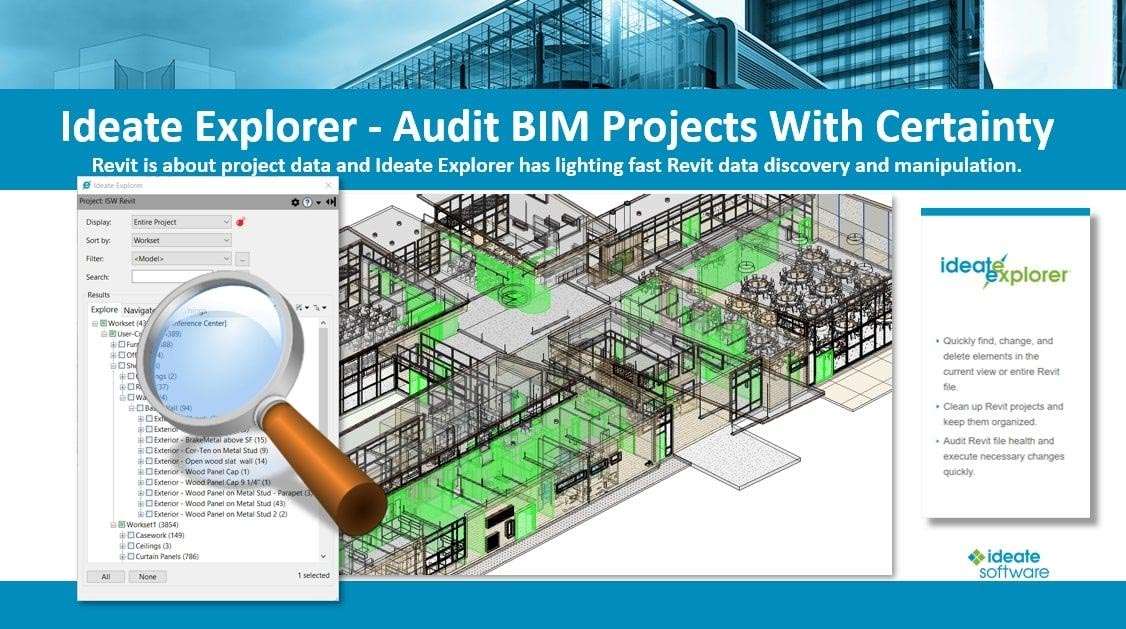
Ideate Explorer functions as a hierarchical element browser, offering advanced search and filter capabilities to discover and manage any element within a Revit model. It assists in identifying hidden or orphaned elements, analyzing model structure, and ensuring data integrity. This tool is critical for troubleshooting model issues and understanding complex project datasets.
Ideate StyleManager for Consistent Styling
Ideate StyleManager focuses on managing styles within Revit, including object styles, line patterns, and fills. It helps users detect unused styles, clean up duplicate entries, and enforce office BIM standards. By reducing redundant data and simplifying style management, StyleManager contributes to improved model performance and reduced file sizes.
Embedding Non-BIM Data and Task Shortcuts: Sticky & IdeateApps
Ideate Sticky and IdeateApps provide specialized solutions for integrating external data and automating common, everyday tasks within the Revit environment.
Ideate Sticky for Spreadsheet-Style Notes
Ideate Sticky allows users to embed spreadsheet-like notes and annotations directly into Revit views. This function is ideal for incorporating project information from Excel, such as schedules, checklists, or inspection reports, without altering the model’s geometric data. It ensures that structured text-based information remains accessible and visible within the BIM context.
IdeateApps for Common Task Automation
The IdeateApps tool consolidates several smaller, yet powerful, utilities that streamline everyday modeling and documentation workflows. These apps automate repetitive operations, such as placing annotations consistently or managing shared parameters, thereby improving documentation quality and reducing the time spent on routine tasks.
What’s New in Ideate Plugins for Revit 2023–2027
The Ideate Software Revit plugins are continuously updated to align with the latest Autodesk Revit versions and to incorporate user feedback for enhanced functionality and performance. The 2023–2026 releases focus on several key areas.
- Version Compatibility: Full support for Autodesk Revit 2023, 2024, 2025, and 2026.
- Performance Optimizations: Enhancements to background processing and data handling for faster operations.
- UI/UX Refinements: Improved user interfaces for more intuitive navigation and task execution across all plugins.
- New Scripting Options: Expanded scripting capabilities within Ideate Automation for greater workflow customization.
- Stability Improvements: Addressing identified bugs and enhancing the overall stability and reliability of the plugin suite.
Frequently Asked Questions
Which Autodesk Revit versions are supported by Ideate Software plugins?
Ideate Software’s suite is fully compatible with Autodesk Revit 2023, 2024, 2025, and the newly released 2026 editions, ensuring seamless adoption across multiple project versions. This broad compatibility ensures that teams can leverage these productivity tools regardless of their current Revit deployment.
How do Ideate BIMLink and Ideate Automation improve Revit productivity?
Ideate BIMLink streamlines large-scale parameter editing by exporting model data to Excel for rapid bulk updates, while Ideate Automation runs these and other plugin tasks silently in the background, automating repetitive processes and freeing users for design work. BIMLink facilitates efficient data manipulation, while Automation leverages this and other functions to execute tasks automatically, significantly boosting overall project efficiency.
How does Ideate Sticky integrate non-BIM data into Revit models?
Ideate Sticky embeds spreadsheet-style notes and annotations from Excel directly into Revit views, allowing teams to maintain structured project information—such as schedules or inspection checklists—within the BIM environment without altering geometric data. This feature bridges the gap between BIM data and essential documentation, keeping all project-related information accessible in one place.


Reviews
There are no reviews yet.