

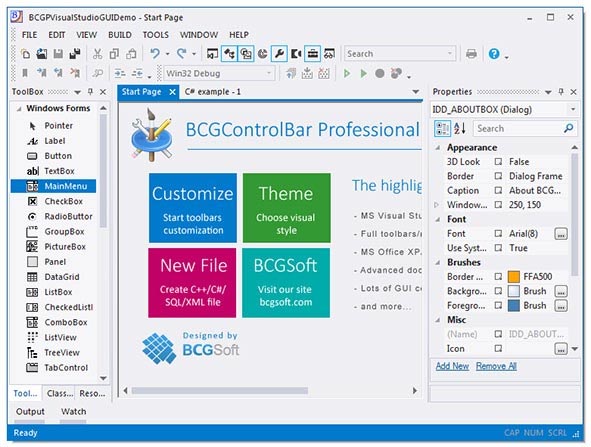
BCGControlBar Pro 31.3 for MFC: Professional MFC UI Library for Microsoft Office & Visual Studio-style Applications
BCGControlBar Professional Edition for MFC 31.3 is a comprehensive, professional-grade MFC extension library that empowers C++ developers to create sophisticated, modern Windows desktop applications with interfaces resembling Microsoft Office, Visual Studio, and other leading software products . With over 500 fully documented and tested classes, the library provides a complete set of user interface components, from customizable ribbons and menus to advanced tools like charts, calendars, and Gantt charts .
Version 31.3 continues the evolution of this industry-standard library, offering new controls, enhanced features, and improved compatibility with the latest development environments. The library is designed to integrate seamlessly with MFC applications, saving significant development time while ensuring professional, consistent, and visually appealing user experiences.
👥 Primary Users
This professional MFC UI library is designed for:
-
C++ Developers & Software Engineers building Windows desktop applications with Microsoft Office or Visual Studio-style interfaces using Microsoft Foundation Classes (MFC).
-
Enterprise Software Development Teams creating professional, modern, and customizable GUI applications for desktop environments.
-
ISVs & Commercial Software Vendors developing products for enterprise, financial, engineering, and management sectors.
-
Software Architects & UI/UX Designers implementing user-friendly, polished interfaces with minimal custom coding.
-
Legacy Application Modernization Teams updating older MFC applications to modern, professional user interfaces.
⚡ Key Features & Capabilities
🏗️ Core UI Components
-
Microsoft Office-style Ribbon Bar: Fully customizable ribbon interface with support for tabs, groups, galleries, and Quick Access Toolbars.
-
Visual Studio-style Docking Panels: Dockable, floatable, and auto-hideable panes similar to Visual Studio 2022 .
-
Customizable Toolbars & Menus: Full support for customizable toolbars, menus, and shortcut menus with drag-and-drop functionality.
📊 Advanced Controls
-
Chart Control: Feature-rich charting for data visualization (bar, line, pie, area, and other chart types).
-
Gantt Chart: Comprehensive project management visualization with task scheduling, dependencies, and milestones.
-
Calendar Control: Professional calendar with date selection, appointment management, and scheduling features.
-
Grid Control: Excel-like grid with in-place editing, sorting, and filtering .
-
Property Grid: Visual Studio-style property editing control with categorized display.
🎨 Visual & Theming
-
Multiple Visual Themes: Support for Office 2019/365, Office 2016, Office 2013, Visual Studio 2022, Windows 11, and custom themes.
-
High-DPI Support: Full support for high-DPI displays (4K monitors) with scaling for modern Windows versions.
-
Modern Look & Feel: Built-in support for modern visual styles and animation effects.
-
Customizable Appearance: Fine-grained control over colors, fonts, and visual elements.
🛠️ Tools & Utilities
-
Over 500 Professional Classes: Comprehensive library of UI components, controls, and utilities.
-
Fully Documented: Complete documentation with code samples and usage guides.
-
Source Code Available: Full source code included for debugging and customization .
-
Professional Support: Access to technical support, updates, and detailed documentation .
🔧 Additional Components
-
XLS (Excel) Parser: Read and write Microsoft Excel files without external dependencies .
-
Web Browser Control: Embedded browser control based on Chromium/Edge WebView2 for modern web content integration .
-
Color Picker: Professional color selection dialog with palette and custom color support.
-
Progress Controls: Advanced progress bars and status indicators.
-
Editor Controls: Syntax-highlighting editors, rich text editors, and more.



Reviews
There are no reviews yet.