

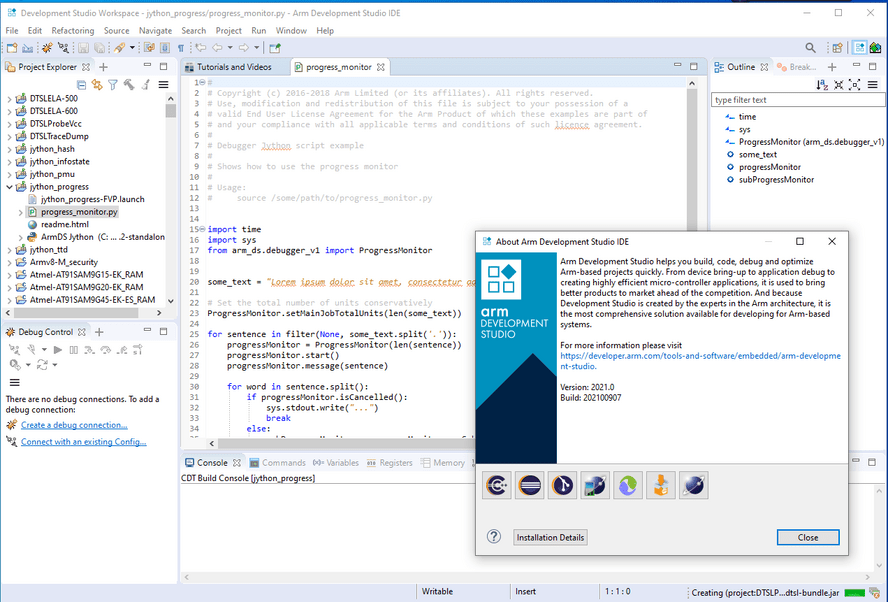
Download ARM Development Studio 2025.1 – Comprehensive IDE for Embedded Systems
ARM Development Studio 2025.1 is a sophisticated integrated development environment (IDE) developed by ARM Holdings, specifically engineered for the intricate needs of embedded systems development on ARM architecture processors. This comprehensive tool suite is designed to empower electrical and electronics engineers by providing advanced capabilities for coding, debugging, and optimizing software for a wide range of embedded applications, from IoT devices to complex automotive systems.
Overview of ARM Development Studio
Introduction to ARM and Its Development Studio
ARM Development Studio represents a significant evolution in embedded software development tools. It is dedicated to providing a unified environment for tackling the complexities of programming for ARM processors, which are ubiquitous in modern embedded systems. Building upon the foundations of previous ARM development tools, this latest version aims to enhance developer productivity and streamline the workflow from initial coding to final deployment of embedded applications.
Key Features of ARM Development Studio
Advanced IDE and Debugging Tools
ARM Development Studio 2025.1 offers a robust integrated development environment tailored for embedded systems. Its features are designed to support the entire development lifecycle:
- A comprehensive IDE that provides a centralized platform for all development tasks.
- Advanced debugging capabilities enabling in-depth code analysis and issue resolution.
- Sophisticated tracing features to monitor and understand program execution flow in real-time.
- Integrated project management tools to handle complex embedded projects efficiently.
- Support for multi-core scalability common in modern System-on-Chip (SoC) designs.
Programming Capacities
C/C++ Development and Supported Libraries
The core of embedded software development often relies on C and C++, and ARM Development Studio 2025.1 provides extensive support for these languages. Developers can leverage the IDE for writing, managing, and compiling C/C++ code targeted at ARM processors.
- Full support for C and C++ programming languages, including modern standards.
- Efficient syntax highlighting and code completion to improve coding speed and accuracy.
- Facilitates the integration and use of various external libraries, allowing developers to extend functionality and accelerate project completion.
- Tools optimized for debugging C/C++ code within the constraints of embedded environments.
Industry Applications
The versatility and power of ARM Development Studio 2025.1 make it indispensable across numerous industries that depend on ARM processor-based embedded systems. Its ability to handle complex SoC architectures makes it suitable for a wide array of applications.
- Internet of Things (IoT): Developing firmware for smart devices, sensors, and connected appliances.
- Automotive: Creating control units, infotainment systems, and advanced driver-assistance systems (ADAS).
- Consumer Electronics: Programming processors for smartphones, wearables, and home entertainment systems.
- Industrial Automation: Building embedded controllers for manufacturing equipment and robotics.
- Aerospace and Defense: Developing specialized embedded systems requiring high reliability and performance.
Integration with Other Tools
ARM Development Studio 2025.1 is designed to work harmoniously within the broader ARM ecosystem, enhancing overall developer productivity. Its integration capabilities ensure a seamless workflow for engineers using multiple ARM development solutions.
- Complements tools like Keil MDK, providing a unified approach to development across different scales of embedded projects.
- Enhances productivity by allowing developers to transition smoothly between high-level IDE features and low-level debugging.
- Leverages ARM-based software package developments for optimized performance and functionality.
- Offers compatibility that streamlines the integration of various ARM development tools and middleware.
Real World Use Cases
Engineers and developers utilize ARM Development Studio 2025.1 in practical scenarios to bring complex embedded projects to fruition. Its advanced features are critical for overcoming the challenges inherent in embedded system design.
- A firmware engineer uses the debugging and tracing tools to identify and resolve race conditions in a multi-core SoC for a smart home device.
- An automotive software developer employs the C/C++ programming features and library support to implement a new feature for an in-car infotainment system.
- An IoT solutions architect integrates custom drivers and libraries using the IDE to ensure efficient power management for a battery-operated sensor network.
- A system-on-chip (SoC) design team uses the studio to validate hardware/software co-design, ensuring optimal performance before mass production.
Frequently Asked Questions
What is ARM Development Studio used for?
ARM Development Studio is an integrated development environment designed specifically for programming ARM architecture-based embedded systems, offering powerful coding, debugging, and project management tools. It facilitates the development process for a wide range of embedded devices, from simple microcontrollers to complex multi-core processors.
How does ARM Development Studio facilitate debugging for embedded systems?
The software provides advanced debugging tools that allow developers to trace code execution and identify issues efficiently, which is crucial for debugging complex embedded applications. Features include real-time variable inspection, breakpoints, and detailed execution flow analysis, enabling thorough problem diagnosis on target hardware.
Can I use external libraries in ARM Development Studio?
Yes, ARM Development Studio supports the inclusion of external libraries, making it easier for developers to expand functionality and speed up development processes. This flexibility allows developers to integrate existing codebases or utilize specialized third-party libraries to meet project requirements.





Reviews
There are no reviews yet.