

Download Autodesk HSMWorks Ultimate 2026 – Advanced CAM Software for SolidWorks
Autodesk HSMWorks Ultimate 2026 is a sophisticated CAM software solution developed by Autodesk, Inc., designed to streamline and optimize CNC machining operations. Integrated directly within the SolidWorks environment, this software empowers manufacturing and engineering professionals to enhance toolpath efficiency and respond dynamically to design modifications, making it an essential tool for modern CNC machining workflows.
Overview of Autodesk HSMWorks Ultimate 2026
What is HSMWorks?
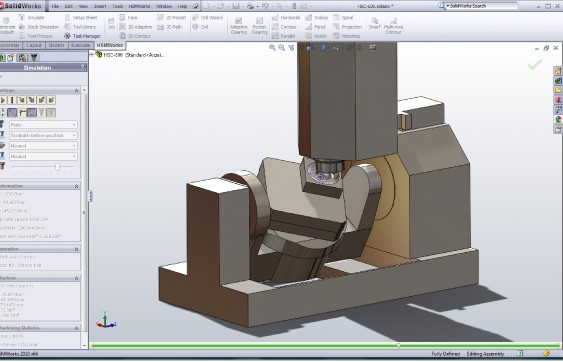
Autodesk HSMWorks Ultimate 2026 is an advanced Computer-Aided Manufacturing (CAM) software that leverages the familiarity and power of SolidWorks. It is specifically engineered to improve the efficiency and precision of CNC machining processes. By providing intelligent toolpath generation and real-time synchronization with design changes, HSMWorks enables manufacturers to reduce programming time, minimize errors, and achieve higher quality finished parts across various industrial applications.
Key Capabilities of HSMWorks
Advanced Machining Strategies
HSMWorks Ultimate 2026 offers a comprehensive suite of machining strategies to address diverse manufacturing needs. Its capabilities extend from fundamental 2D and 2.5D operations to intricate 3D milling. Professionals can utilize advanced features for 3+2 axis positioning and full 5-axis simultaneous machining, enabling the production of complex geometries and components with a single setup, thereby increasing operational efficiency and accuracy.
Benefits of Integration with SolidWorks
Real-time Design Updates
A significant advantage of Autodesk HSMWorks Ultimate 2026 is its seamless integration as a native add-in within SolidWorks. This tight coupling ensures that any modifications made to the CAD model in SolidWorks are immediately recognized and reflected in the CAM programming. Toolpaths are automatically updated, maintaining synchronization between design and manufacturing, thus eliminating manual reprogramming and reducing the risk of errors caused by design revisions.
Optimizing CNC Machining Processes
Efficiency through Parallel Processing
HSMWorks Ultimate 2026 is engineered for high performance, utilizing multi-core processing capabilities to accelerate complex calculations. This parallel processing allows for faster toolpath generation, especially for intricate models and advanced machining strategies. The optimized calculations lead to reduced computation times, enabling engineers to iterate designs and machining strategies more rapidly, enhancing overall productivity in the manufacturing cycle.
Applications in the Manufacturing Industry
Case Studies and Use Cases
Autodesk HSMWorks Ultimate 2026 finds extensive application across various sectors within the manufacturing industry. In the automotive sector, it is used for prototyping and production of complex engine components. The aerospace industry benefits from its precision for creating critical aircraft parts with tight tolerances. General manufacturing also utilizes HSMWorks for producing intricate jigs, fixtures, and custom components, demonstrating its versatility and reliability in demanding production environments.
Supported CNC Codes and Format Compatibility
Ensure Seamless Operations
To facilitate seamless integration with a wide range of CNC machinery, Autodesk HSMWorks Ultimate 2026 supports a broad spectrum of common CNC codes and machine configurations. This compatibility ensures that generated toolpaths can be efficiently translated into machine instructions for various controllers. The software works inherently within the SolidWorks file structure, ensuring compatibility with SolidWorks’ robust CAD data management and model analysis tools, further streamlining the manufacturing workflow.
Frequently Asked Questions
What types of machining can HSMWorks Ultimate 2026 perform?
HSMWorks supports various machining types, including 2D, 2.5D, and 3D milling, as well as advanced capabilities for 3+2 and 5-axis machining. This flexibility allows users to tackle a broad range of manufacturing tasks with efficiency and precision.
How does HSMWorks integrate with SolidWorks?
HSMWorks operates as a plug-in within SolidWorks, allowing for real-time updates to toolpaths when design changes are made. This integration ensures CNC programming remains aligned with the latest design specifications, simplifying the workflow.
Can HSMWorks help minimize machining costs?
Yes, HSMWorks incorporates strategies designed to optimize cutting paths and reduce material waste. By improving toolpath efficiency and minimizing errors, it ultimately leads to lower machining costs and enhanced productivity in production environments.




Reviews
There are no reviews yet.