

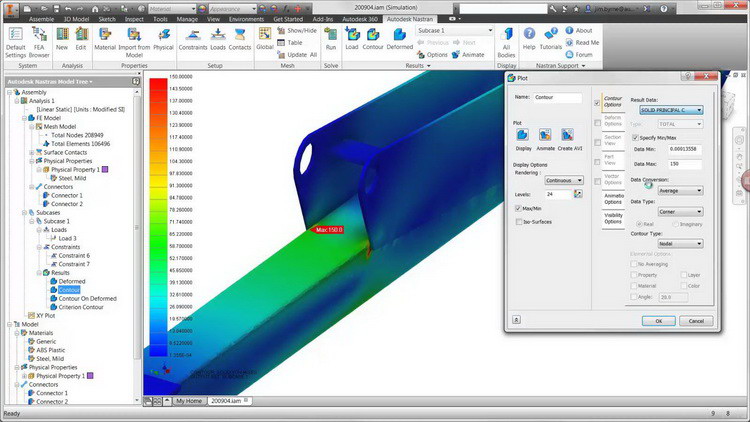
Download Autodesk Inventor Nastran – Advanced Finite Element Analysis Software
Autodesk Inventor Nastran is an advanced structural analysis application developed by Autodesk, Inc. designed for performing complex finite element analysis (FEA). It supports mechanical and structural engineers by enabling detailed simulations directly within their CAD workflow. This software is instrumental in the mechanical and manufacturing sectors for evaluating product performance and structural integrity.
Introduction to Autodesk Inventor Nastran
Autodesk Inventor Nastran provides engineers with powerful tools for mechanical simulation and structural analysis. By integrating sophisticated finite element analysis capabilities directly into the design environment, it allows for comprehensive testing of components and assemblies under various conditions. This seamless integration streamlines the engineering workflow, enabling rapid design iteration and validation.
Key Features of Autodesk Inventor Nastran
Finite Element Analysis Capabilities
This software offers a robust suite of FEA capabilities essential for modern engineering design and validation.
- Linear and Nonlinear Static Analysis: Evaluate stress, strain, and deformation under static loads, including complex material behaviors and large displacements.
- Dynamic Simulations: Perform modal, transient, and spectral analyses to understand the response of structures to time-varying forces and vibrations.
- Thermal Simulation: Analyze heat transfer and thermal stress to predict performance in temperature-sensitive applications.
- Structural Durability: Assess fatigue life and predict component failure under cyclic loading, ensuring long-term reliability.
Integration with CAD Software
Autodesk Inventor Nastran is built for deep integration with CAD, enhancing productivity and simplifying the simulation process.
- Native CAD Integration: Works seamlessly with Autodesk Inventor, allowing engineers to directly leverage their 3D design models for analysis without costly data translation.
- Streamlined Workflow: The simulation environment is accessed directly from within the CAD interface, reducing the number of steps required to set up and run analyses.
- Design Validation: Enables engineers to validate multiple design iterations quickly, ensuring that designs meet performance requirements early in the development cycle.
Material Simulation and Analysis
The software supports advanced material models crucial for simulating a wide range of engineering materials and behaviors.
- Composite Materials: Advanced tools for defining and analyzing layered composite structures, including anisotropic properties.
- Hyperelastic Materials: Capable of simulating the behavior of rubber and other elastomeric materials under large deformations.
- Material Libraries: Access to a comprehensive library of engineering materials, with the ability to define custom material properties.
Applications of Autodesk Inventor Nastran
Autodesk Inventor Nastran is applied across numerous industries where reliable engineering analysis is critical.
- Mechanical Component Testing: Analyzing stress, strain, and fatigue in parts like gears, brackets, and engine components to ensure they withstand operational loads.
- Structural Integrity of Assemblies: Evaluating the performance of complex assemblies under static or dynamic conditions, identifying potential failure points in designs ranging from automotive to aerospace.
- Thermal Management: Simulating heat dissipation in electronic enclosures or mechanical systems to prevent overheating and ensure optimal operating temperatures.
- Product Durability and Reliability: Assessing the long-term performance and lifespan of products through fatigue analysis, vital for consumer goods and industrial machinery.
Comparative Analysis with Other FEA Tools
Autodesk Inventor Nastran distinguishes itself through its deep integration within the Autodesk ecosystem and its robust feature set derived from Nastran technology.
Compared to standalone FEA packages, Autodesk Inventor Nastran offers a more streamlined workflow for users already invested in Autodesk Inventor. This native integration reduces the data transfer and setup time, allowing for faster design-to-analysis cycles. While specialized high-performance computing FEA solutions might offer broader scalability for extremely large or complex simulations, Inventor Nastran provides a comprehensive and accessible analysis environment for a wide range of mechanical engineering tasks, supported by decades of Nastran development originating from aerospace applications.
Conclusion and Further Resources
Autodesk Inventor Nastran stands as a powerful and integrated solution for mechanical engineers requiring sophisticated finite element analysis within their CAD workflow. Its advanced simulation capabilities, including static, dynamic, and thermal analysis, coupled with its seamless integration with Autodesk Inventor, make it an indispensable tool for design validation and product development.
For users seeking to deepen their understanding or explore advanced applications, resources such as Autodesk’s official documentation, online technical forums, and specialized engineering simulation training courses can provide further insights into leveraging the full potential of Autodesk Inventor Nastran and FEA methodologies.
Frequently Asked Questions
What is Autodesk Inventor Nastran used for?
Autodesk Inventor Nastran is utilized for finite element analysis (FEA), allowing engineers to evaluate stress, strain, and thermal performance of components and structures. It integrates directly with CAD environments, enabling users to conduct simulations effectively.
How does Autodesk Inventor Nastran integrate with CAD software?
Autodesk Inventor Nastran provides seamless integration with CAD software like Autodesk Inventor, allowing users to perform FEA simulations directly within their design environment, thus streamlining workflows.
What types of analyses can be performed with Autodesk Inventor Nastran?
Users can perform linear and nonlinear static analysis, dynamic simulations, and thermal evaluations, making it a versatile tool for mechanical and structural engineering applications.





Reviews
There are no reviews yet.