

Download Autodesk Navisworks Manage – Advanced Project Coordination Software
Autodesk Navisworks Manage is a comprehensive project review and coordination platform developed by Autodesk, Inc., specifically tailored for the Architecture, Engineering, and Construction (AEC) industry. It serves as a critical tool for project managers and teams involved in complex construction projects, enabling enhanced collaboration and visualization through Building Information Modeling (BIM) and advanced simulation techniques. Its positioning within the Autodesk suite highlights a commitment to integrated workflows across various design and engineering disciplines.
Introduction to Autodesk Navisworks Manage
Autodesk Navisworks Manage functions as a powerful software solution designed to aggregate design and construction data into a single, coherent model. This allows project stakeholders to gain a deeper understanding of project scope, identify potential issues, and optimize workflows before construction begins. By supporting BIM processes, Navisworks Manage is essential for improving project outcomes in the construction and engineering fields, offering capabilities that extend beyond traditional 3D modeling.
Key Features and Capabilities
Advanced Project Management and Coordination
Navisworks Manage provides an extensive set of tools for project review and coordination, central to efficient construction management. It empowers teams to combine architectural, engineering, and construction data into a unified model for comprehensive clash detection and interference analysis. This capability is fundamental for ensuring that project designs are buildable and align with project requirements.
- Facilitates detailed project review and quantification.
- Enables clash detection and interference checking across disciplines.
- Supports project collaboration through shared model reviews.
- Optimizes construction sequencing and planning.
Integration with Other Autodesk Tools
A significant advantage of Autodesk Navisworks Manage is its seamless interoperability with other Autodesk products. This integration simplifies the process of bringing together data from various sources, such as Revit for architectural and structural design, AutoCAD for 2D drafting, and others within the Autodesk ecosystem. This ensures that project data flows smoothly between different stages and disciplines, enhancing overall project efficiency and data integrity.
- Connects model data from Revit, AutoCAD, and other design software.
- Enables a unified model for review across multiple applications.
- Supports the aggregation of project data for comprehensive analysis.
5D Simulation Tools
Navisworks Manage incorporates sophisticated 5D simulation capabilities, which extend project visualization beyond three spatial dimensions to include time and cost. This feature allows project teams to animate the construction sequence and associate costs with project elements, providing a dynamic view of the project schedule and budget. The 5D simulation is critical for advanced project planning, resource allocation, and stakeholder communication, offering clear insights into project phasing and financial projections.
- Visualizes project timelines and construction sequencing.
- Integrates cost estimation and financial planning with the project model.
- Aids in identifying schedule-related clashes and optimizing phasing.
- Improves communication of project plans to stakeholders.
Application in the Construction Industry
In the construction industry, Autodesk Navisworks Manage is indispensable for implementing Building Information Modeling (BIM) workflows effectively. It acts as a central platform for aggregating model information from various consultants and contractors, enabling thorough review processes prior to the commencement of physical work. This proactive approach helps in managing complex projects, reducing rework, and ensuring that construction activities proceed according to plan and budget.
- Enhances the BIM coordination process for large-scale construction projects.
- Supports pre-construction planning by visualizing project phasing.
- Facilitates clear communication among multidisciplinary project teams.
- Aids in risk mitigation through early identification of potential issues.
Working with Multiple File Formats
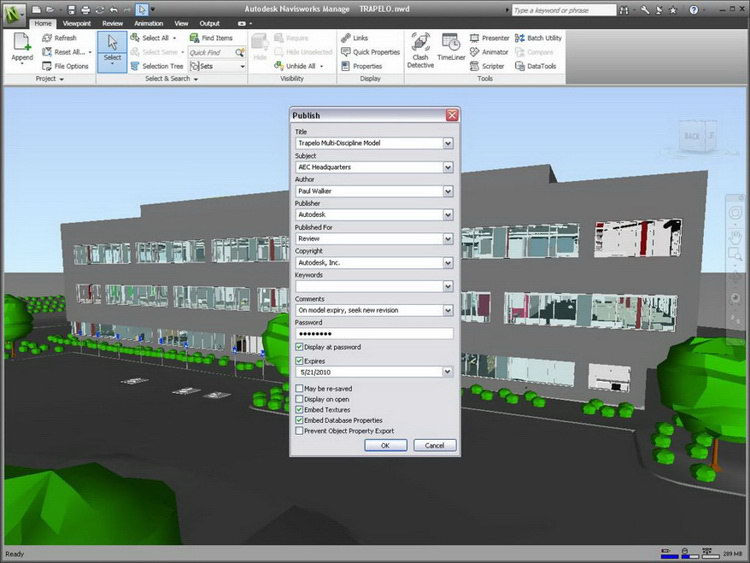
Autodesk Navisworks Manage is designed for broad compatibility, supporting a wide array of file formats crucial for collaborative project environments. While it can open and combine files from numerous authoring tools, its native formats like NWD (Navisworks Document) and DWF (Design Web Format) are particularly important for sharing aggregated project data. NWD files provide a publishable, lightweight format for comprehensive project review, embedding all aggregated model, review, and measurement data, while DWF is useful for sharing design information across different platforms.
- Supports import from over 60 data sources and file formats.
- NWD files offer a consolidated package for review and collaboration.
- DWF format allows for easy sharing of design information.
- Ensures interoperability across different software and user access levels.
Use Cases and Success Stories
Autodesk Navisworks Manage has been instrumental in the successful execution of numerous large-scale and complex industrial and construction projects worldwide. By utilizing its advanced coordination and simulation features, project teams have been able to address potential clashes early, optimize construction schedules, and manage project costs more effectively. These successful implementations underscore the software’s value in delivering projects on time and within budget, enhancing overall project predictability and reducing costly errors during construction phases.
- Enables the planning and coordination of massive infrastructure projects.
- Facilitates clash detection in complex building designs for improved constructability.
- Supports the visualization of phased construction for advanced project management.
- Aids in identifying and resolving site-specific challenges before they occur.
Conclusion and Further Learning Resources
Autodesk Navisworks Manage stands as a pivotal software for professionals in the AEC industry, offering unparalleled capabilities in project review, coordination, and 5D simulation. Its ability to integrate data from diverse sources and facilitate seamless collaboration makes it an essential tool for optimizing construction workflows and ensuring project success. For those looking to deepen their understanding and leverage its full potential, exploring Autodesk’s official resources and training materials is highly recommended.
Frequently Asked Questions
What is Autodesk Navisworks Manage used for?
Autodesk Navisworks Manage is primarily used for project review and coordination in construction and industrial projects, facilitating Building Information Modeling (BIM) and helping project teams visualize and optimize workflows. It aggregates design data from multiple disciplines into a unified model to identify clashes and plan construction sequences effectively.
How does Navisworks integrate with other Autodesk tools?
Navisworks offers seamless integration with other Autodesk products such as Revit and AutoCAD, enhancing collaborative workflows and allowing users to manage multi-disciplinary projects effectively. It can import and aggregate data from these tools, creating a combined model for comprehensive review and analysis.
What are the benefits of utilizing 5D simulation in Navisworks?
The 5D simulation functionality in Navisworks allows users to incorporate time and cost dimensions into their models, providing deeper insights into project progress and resource management, which ultimately leads to better decision-making. This feature helps in visualizing the construction schedule and associated costs, improving project planning and control.





Reviews
There are no reviews yet.