

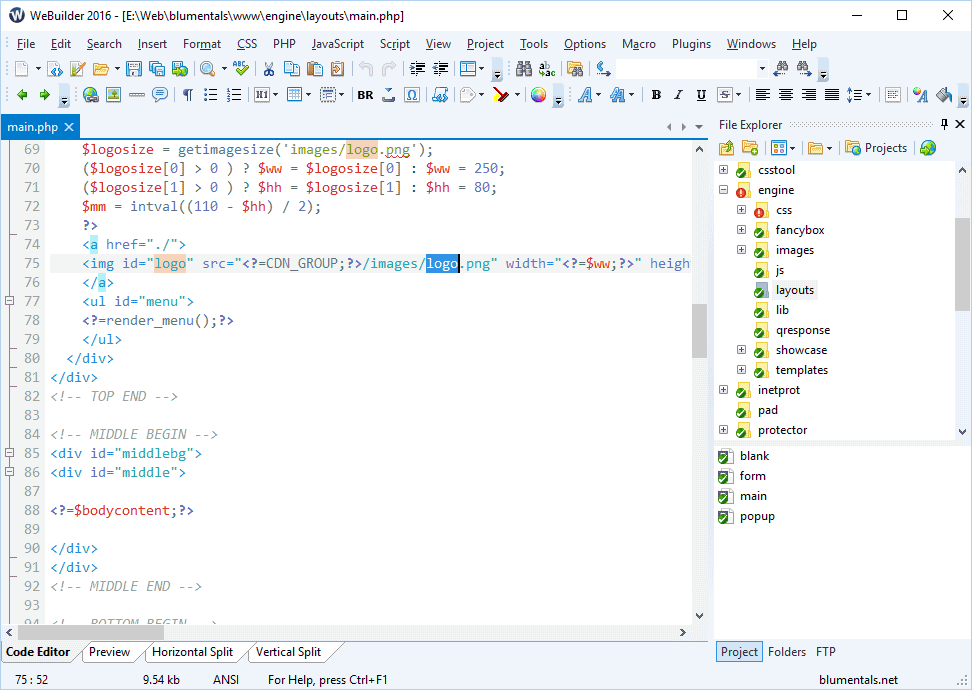
Download WeBuilder 2022 – Advanced Web Development & Code Editing Tool
WeBuilder 2022 is a versatile web code editor developed by Blumentals Software, designed to streamline the process of website creation and maintenance. This comprehensive tool caters to professionals in web development and software programming, offering a robust environment for writing and managing code across a multitude of languages. It integrates essential development functionalities, making it a go-to solution for efficient web project execution.
Overview of WeBuilder 2022
Introduction to WeBuilder Software
WeBuilder 2022 serves as a powerful all-in-one web code editor, engineered by Blumentals Software to assist developers in building modern websites and web applications. It supports a wide array of programming languages and integrates numerous tools to enhance the development workflow. The software aims to boost developer productivity by providing a fast, responsive, and feature-rich coding environment.
Supported Programming Languages
The significance of supporting a wide range of programming languages cannot be overstated for modern web development. WeBuilder 2022 excels in this area, offering comprehensive support for:
- HTML, CSS, JavaScript, PHP
- Ruby, Python, ASP, Perl
- Additional support for SQL, ASP.NET, SASS, LESS
This broad compatibility ensures that developers can work on diverse projects without needing to switch between multiple editors, maintaining consistency and efficiency in their coding practices.
Key Features of WeBuilder 2022
WeBuilder 2022 is equipped with a suite of features designed to enhance user productivity and ensure high code quality:
- Fast loading and responsive code editing for quick project turnaround.
- Multi-language syntax highlighting that improves code readability and reduces errors.
- Built-in tools for validation and troubleshooting, including W3C compliance checks for HTML and CSS.
- Macro recording capabilities allow for the automation of repetitive tasks, saving valuable development time.
- Version control integration with popular systems like SVN and Git, facilitating team collaboration and code management.
- An extensive template and code snippet library to accelerate development and promote standardized coding practices.
Real-World Applications of WeBuilder
WeBuilder 2022 finds application across various professional scenarios in the web development landscape. Freelancers can leverage its integrated tools to efficiently manage client projects, from simple landing pages to complex web applications. For small business owners, it provides the necessary capabilities to manage their online presence with custom-coded solutions. Tech companies and development teams benefit from its robust features, including version control integration, which is crucial for collaborative environments and managing large-scale projects. Students in web development courses can also utilize WeBuilder to learn and practice coding in a professional environment.
Comparison with Other Code Editors
While many code editors are available, WeBuilder 2022 distinguishes itself through its comprehensive, integrated approach. Unlike some editors that focus on a single language or require extensive plugin installations for basic functionality, WeBuilder offers a broad spectrum of language support out-of-the-box. Its fast performance and responsive interface, coupled with built-in validation and debugging tools, provide a seamless experience. The inclusion of direct SVN and Git integration also positions it as a strong contender for developers who prioritize efficient version control management within their primary coding environment.
Getting Started with WeBuilder 2022
New users can maximize their experience with WeBuilder 2022 by exploring its core functionalities. Begin by familiarizing yourself with the syntax highlighting for your primary programming languages to enhance readability. Utilize the built-in validation tools early in the development process to catch errors and ensure W3C compliance. Experiment with creating custom code snippets or recording simple macros for frequently performed tasks to discover the software’s automation potential. For collaborative projects, setting up SVN or Git integration through the Version Control menu will be a key step toward efficient codebase management.
Frequently Asked Questions
What programming languages does WeBuilder support?
WeBuilder supports a variety of programming languages including HTML, CSS, JavaScript, PHP, Ruby, Python, ASP, and Perl among others, making it a versatile tool for web developers. It also offers additional support for languages and preprocessors like SQL, ASP.NET, SASS, and LESS, catering to a wide range of web development needs.
How does WeBuilder assist with code validation and troubleshooting?
WeBuilder includes built-in validation tools that automatically check your HTML, CSS, and PHP code against W3C standards and identify errors, enhancing code accuracy quickly. These features help developers pinpoint syntax issues and potential bugs early in the development cycle, ensuring cleaner and more reliable code.
Can I use version control with WeBuilder?
Yes, WeBuilder is integrated with popular version control systems like SVN and Git, allowing developers to manage their codebase effectively during collaborative projects. This integration enables seamless committing, updating, and branching operations directly within the editor, streamlining workflow for team-based development.








Reviews
There are no reviews yet.