
Download Web CAD SDK 14.0 – Advanced CAD File Viewing for Web Applications
Web CAD SDK 14.0, developed by CADSoftTools, is an advanced software development kit designed for integrating CAD file viewing capabilities into web applications. This tool caters to professionals in engineering, architecture, and construction, enabling seamless access to CAD data directly through web browsers. Its primary purpose is to provide developers with the components needed to build robust, browser-based CAD solutions without requiring end-users to install desktop CAD software.
Introduction to Web CAD SDK
Overview and Core Functionality
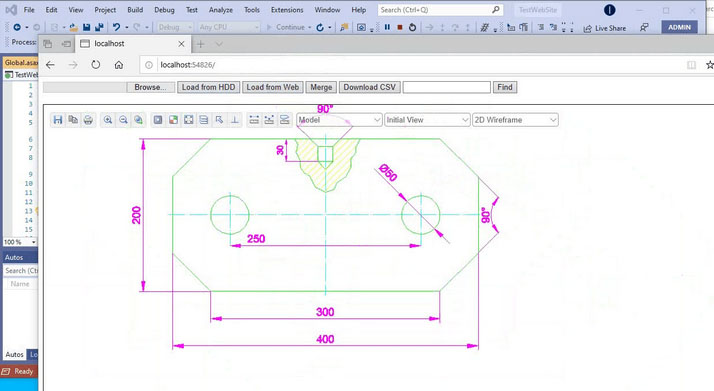
Web CAD SDK empowers developers to embed a powerful CAD file viewer into their web applications, leveraging ASP.NET technology. It facilitates the display and interaction with a wide array of CAD and vector file formats directly within an internet browser. This functionality is crucial for streamlining workflows in industries that rely heavily on design and technical drawings, making CAD files accessible across different devices and platforms.
Key Technologies and Compatibility
Supported Platforms
This SDK is built with modern web development in mind, offering robust integration capabilities. It supports key platforms and frameworks commonly used in enterprise environments, ensuring a flexible deployment.
- ASP.NET and ASP.NET MVC
- SharePoint integration
- Office 365 compatibility
Browser Compatibility
Web CAD SDK utilizes HTML5 technology to ensure broad compatibility across leading web browsers. This allows for consistent rendering and user experience, regardless of the browser choice.
- Full HTML5 browser support
- Cross-browser rendering capabilities
File Formats and Rendering Capabilities
Supported CAD and Vector Formats
The SDK provides comprehensive support for a wide range of industry-standard file formats, facilitating a unified viewing experience for diverse project assets.
- CAD Files: DWG, DXF
- 3D Formats: 3DS, STEP, IGES
- Vector Formats: PDF, SVG, CGM, EMF, WMF
2D and 3D Rendering Performance
Web CAD SDK is optimized for quick and efficient rendering of both 2D drawings and complex 3D models. This ensures that users can navigate and inspect designs without significant loading delays, enhancing productivity.
- Fast rendering of 2D drawings from various formats.
- High-performance 3D model visualization and manipulation.
Features and Tools for Users
Measuring and Management Tools
Beyond simple viewing, Web CAD SDK includes essential tools that enhance user interaction with CAD documents directly in the browser.
- Precision measurement tools for distances, angles, and areas.
- Layer management features to control visibility of design elements.
- Annotation capabilities for adding notes and comments to drawings.
Export and Data Interaction
The SDK allows for versatile data handling, enabling users to export viewed content and interact with drawing data programmatically.
- Export drawings to common formats such as DXF and PDF.
- Access and manipulate underlying drawing data for custom applications.
Real World Applications and Use Cases
Industry Applications
Web CAD SDK addresses the critical need for accessible CAD data across multiple sectors, streamlining collaboration and information sharing.
- Engineering: Providing engineers with web access to schematics and technical drawings for project reviews.
- Architecture: Enabling architects to share and view floor plans and building designs with clients and collaborators online.
- Construction: Facilitating site access to project blueprints and models through web-enabled devices.
- Document Management: Integrating CAD viewing into enterprise content management systems for centralized project documentation.
Project Examples
This SDK is ideal for developing specialized web portals and enterprise solutions.
- Custom web portals for clients to review project designs.
- Internal SharePoint sites for engineering teams to access and manage CAD documents.
- Cloud-based document management systems that include CAD visualization.
Frequently Asked Questions
What file formats does Web CAD SDK support?
Web CAD SDK supports a variety of file formats including CAD files like DWG and DXF, as well as vector formats such as PDF, SVG, and 3D formats like STEP and 3DS. This broad compatibility ensures that most common design files can be viewed effectively.
Can I use Web CAD SDK with SharePoint?
Yes, Web CAD SDK is designed to work seamlessly with SharePoint, allowing users to view and manage CAD files directly within SharePoint environments. This integration enhances document management capabilities for organizations using SharePoint as a collaboration platform.
Does Web CAD SDK require AutoCAD installation?
No, Web CAD SDK operates independently without the need for AutoCAD or other CAD software installations. It provides a streamlined user experience by rendering CAD files directly in the browser, eliminating the dependency on desktop applications.






Reviews
There are no reviews yet.