

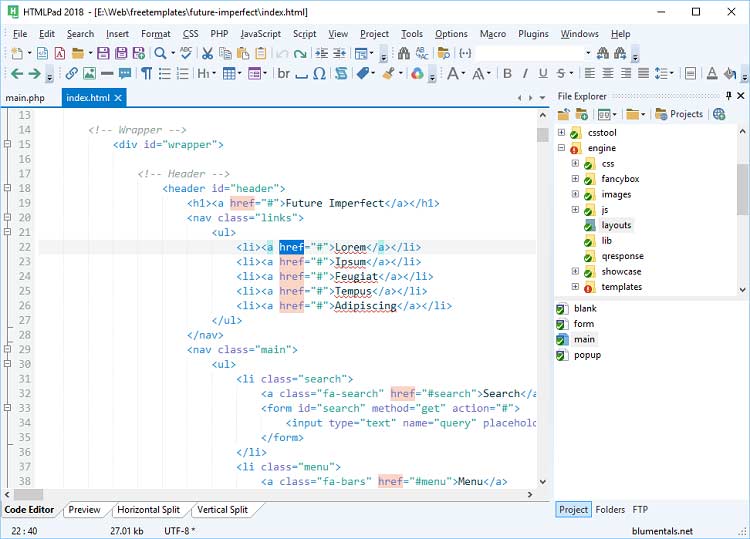
Download Blumentals HTMLPad 2022 v17.1.0.241 – A Powerful Web Development IDE
Blumentals HTMLPad 2022 v17.1.0.241 is a specialized HTML, CSS, and JavaScript editor developed by Blumentals Software, designed to streamline the process of web development. This integrated development environment (IDE) provides web programmers with a robust platform to enhance coding speed and productivity. HTMLPad equips developers with features such as IntelliSense, live preview, and AI assistance, making it a versatile tool for professionals in the software development field.
Overview of HTMLPad and Its Applications
HTMLPad serves as a comprehensive code editor tailored for modern web development. It aims to simplify the creation and maintenance of websites and web applications. The software facilitates rapid coding through intelligent features and a user-friendly interface, designed to minimize errors and accelerate the development cycle. Its applications range from small website updates to the development of complex, dynamic web projects.
Features that Enhance Your Coding Experience
HTMLPad incorporates several features focused on improving the developer’s workflow and efficiency. These functionalities are designed to make coding faster, more intuitive, and less prone to errors.
- Smart Code Reusability: Integrates features that allow developers to save and reuse code snippets, significantly reducing redundant typing and improving consistency across projects.
- Customizable Environment: Offers a flexible interface that can be tailored to individual developer preferences, including options for themes, layouts, and keyboard shortcuts.
- Speed and Efficiency: Built for performance, HTMLPad launches quickly and operates responsively, even with large codebases, ensuring that development tasks are completed without unnecessary delays.
- AI Coding Assistance: Leverages artificial intelligence to provide intelligent code suggestions, auto-completions, and error detection, supporting developers in writing cleaner and more accurate code.
Supported Languages and Technologies
HTMLPad’s versatility is demonstrated through its extensive support for a wide array of web development languages and technologies. This broad compatibility ensures that developers can manage diverse projects within a single, integrated environment.
- HTML: Comprehensive support for all HTML versions, including advanced features like HTML5.
- CSS: Includes advanced support for CSS, CSS2, CSS3, and preprocessor languages like SASS and LESS, facilitating sophisticated styling and responsive design.
- JavaScript: Full support for JavaScript, including modern ECMAScript standards, enabling the development of interactive and dynamic web interfaces.
- Other Technologies: Additionally, it provides syntax highlighting and editing support for related web technologies such as PHP, Python, Ruby, Perl, and more, enhancing its utility as a general-purpose web programming tool.
Live Preview and Smart Coding Tools
The integration of live preview and smart coding tools is central to HTMLPad’s design, offering immediate feedback and intelligent assistance to developers.
The live preview feature allows developers to instantly view the rendered output of their HTML, CSS, and JavaScript code directly within the editor. This real-time feedback loop is invaluable for quickly identifying visual flaws, testing responsiveness across different screen sizes, and iterating on design elements without the need to constantly switch between the editor and a web browser.
Complementing the preview is the AI coding assistance. This system offers intelligent code completion, suggests relevant syntax, and helps in debugging by identifying potential errors as code is written. This not only speeds up the coding process but also helps maintain code quality and adhere to best practices, making it a powerful ally for both novice and experienced programmers.
Comparative Analysis with Other Web Development Editors
When compared to other web development editors, HTMLPad distinguishes itself through a specific combination of speed, integrated features, and user-centric design, prioritizing efficiency in core web programming tasks.
While many editors offer extensive plugin support, HTMLPad provides a streamlined, built-in experience focusing on HTML, CSS, and JavaScript. Its standout feature is the highly integrated live preview, offering immediate rendering of changes without requiring complex setup. Furthermore, its emphasis on code reusability and built-in AI coding assistance differentiates it from editors that might rely more heavily on external tools or manual configurations for similar functionality. This makes HTMLPad a strong choice for developers who value a fast, integrated, and efficient editing environment for their web projects.
Real-World Applications and Use Cases
HTMLPad is utilized across various scenarios in the field of web development, empowering professionals to create and refine web content efficiently.
- Developing Responsive Web Designs: Developers use HTMLPad’s live preview and CSS editing tools to craft websites that adapt seamlessly to different devices, from desktops to mobile phones.
- Quick Website Edits and Updates: Its speed and straightforward interface make it ideal for making prompt changes to existing websites, ensuring timely updates to content or functionality.
- Building Interactive Web Applications: The robust JavaScript editing capabilities, combined with AI assistance, support the creation of dynamic and interactive user experiences.
- Learning and Prototyping: For individuals new to web programming, HTMLPad’s user-friendly design and instant feedback mechanisms provide an effective learning environment for exploring HTML, CSS, and JavaScript.
Final Thoughts on Blumentals HTMLPad
Blumentals HTMLPad 2022 v17.1.0.241 represents a powerful and efficient solution for modern web development. Its focus on speed, combined with intelligent features like live preview and AI coding assistance, significantly enhances developer productivity. By providing a comprehensive set of tools for HTML, CSS, and JavaScript within a user-friendly interface, HTMLPad empowers developers of all skill levels to build, refine, and maintain high-quality web projects more effectively.
Frequently Asked Questions
What programming languages does HTMLPad support?
HTMLPad supports HTML, CSS, and JavaScript, among other core web technologies. It provides specialized editing tools and syntax highlighting for each language, which significantly enhances the user experience and efficiency when developing web applications.
How does the live preview feature work in HTMLPad?
The live preview feature in HTMLPad allows developers to see the direct impact of their coding changes in real-time as they are made. This instant feedback loop, displayed within the editor, aids in quickly identifying and resolving issues, as well as refining designs effectively.
Is HTMLPad suitable for beginners?
Yes, HTMLPad is designed to be accessible and beneficial for both novice and expert web developers. Its intuitive, user-friendly interface, coupled with smart coding features that simplify complex tasks, makes it an excellent choice for individuals beginning their journey in web programming.






Reviews
There are no reviews yet.