

Download Winmail Mail Server 6.7 Premium – Secure and Flexible Email Management Solution
Winmail Mail Server is a comprehensive email server software developed by Winmail, designed to provide robust email communication and management solutions for IT infrastructure. It caters to various organizations, from corporations managing internal communications to ISPs offering email hosting services, and freelance professionals requiring reliable client communication tools. This software aims to offer a secure, flexible, and manageable email environment.
Overview of Winmail Mail Server
Background and Development
Winmail Mail Server has evolved to become a versatile tool in the realm of email server software. While specific historical details are beyond the scope of readily available information, its development has focused on integrating essential communication protocols and advanced management capabilities. The software is designed to meet the demands of modern digital communication, adapting to network environments and user requirements.
Key Features and Capabilities
Email Protocol Support
A cornerstone of Winmail Mail Server’s functionality is its comprehensive support for standard email protocols. This ensures broad compatibility and flexible access to email services for users across different platforms and applications. Key protocols include:
- SMTP (Simple Mail Transfer Protocol): Essential for sending emails between mail servers and to client mail applications. This includes support for ESMTP extensions, enabling more advanced sending capabilities.
- POP3 (Post Office Protocol version 3): Allows users to download emails from the server to their local device, typically for offline access.
- IMAP (Internet Message Access Protocol): Provides access to emails stored on the server, synchronizing messages across multiple devices and clients for a consistent experience.
Security Measures
Ensuring the security and integrity of email communications is a primary focus for Winmail Mail Server. It implements a multi-layered approach to protect against threats and unauthorized access. Notable security features include:
- SSL/TLS Encryption: Secures the connection between the mail server and email clients, encrypting data in transit to prevent eavesdropping.
- Spam Protection: Utilizes advanced filtering techniques and real-time blackhole lists (RBLs) to identify and block unsolicited commercial email, reducing inbox clutter and potential threats.
- Antivirus Integration: Scans incoming and outgoing emails for malicious software, providing an additional layer of defense against viruses and malware.
- User Authentication and Access Controls: Implements strong authentication mechanisms and granular access controls to manage user permissions and prevent unauthorized access to mailboxes.
Management Tools
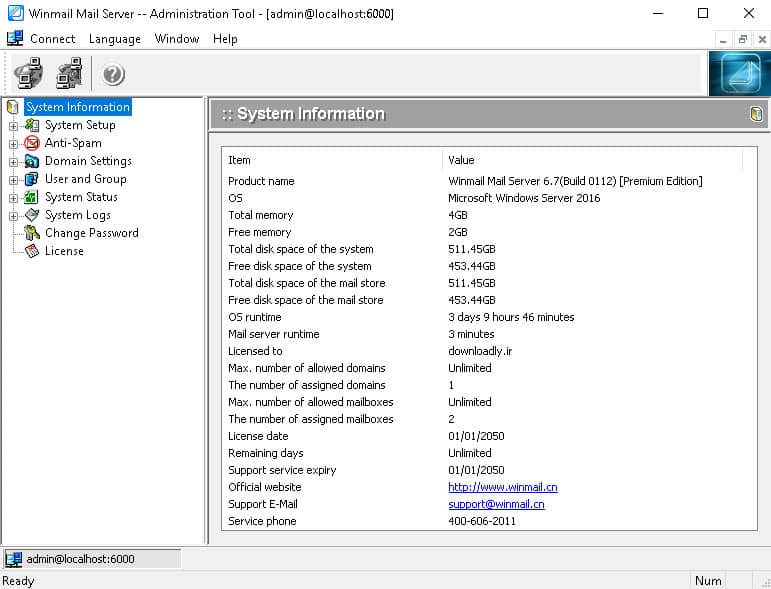
Winmail Mail Server is equipped with a robust set of management tools designed for efficient administration and user control. These tools are accessible via a web-based interface, simplifying day-to-day operations.
- Webmail Interface: Provides users with a browser-based email client, enabling access to their mailboxes from any internet-connected device without requiring dedicated software.
- User and Domain Management: Allows administrators to easily create, modify, and delete user accounts and email domains, facilitating scalable email infrastructure management.
- Email Archiving: Offers capabilities for archiving email messages, which is crucial for compliance, record-keeping, and data backup purposes.
- System Monitoring and Reporting: Provides tools for monitoring server performance, email traffic, and security alerts, offering insights for system optimization and troubleshooting.
Supported Environments and Compatibility
Network and Software Compatibility
Winmail Mail Server is engineered for broad compatibility across various network configurations and email clients. This ensures seamless integration into existing IT infrastructures and flexibility for end-users. The software supports diverse network environments and works with popular email clients, enabling users to access their emails using their preferred applications.
Multilingual Support and Usability
Recognizing the global nature of communication, Winmail Mail Server offers multilingual support. This feature enhances usability for a diverse user base and multinational organizations, making email management more accessible across different linguistic preferences. The interface and features are designed to be intuitive, catering to both technical administrators and regular users.
Real-World Applications and Use Cases
Winmail Mail Server is implemented in various scenarios, demonstrating its adaptability and value across different organizational types. Its comprehensive feature set makes it suitable for managing email communications effectively in diverse operational contexts.
- Corporate Internal Communications: Large corporations utilize Winmail Mail Server to manage secure and efficient internal email systems, facilitating communication among employees and departments.
- ISP Email Hosting: Internet Service Providers leverage the software to offer reliable and scalable email hosting services to their customer base, supporting multiple domains and high volumes of traffic.
- Freelance Professionals and Agencies: Independent professionals and small agencies use Winmail Mail Server to provide dedicated email solutions for clients, ensuring professional communication channels and brand consistency.
- Educational Institutions: Schools and universities can deploy Winmail Mail Server for administrative and student communication, offering a controlled and secure email environment.
Comparative Analysis with Other Email Server Solutions
In the competitive landscape of email server software, Winmail Mail Server distinguishes itself through a combination of robust management capabilities, flexible deployment options, and strong security implementation. While many solutions offer standard protocol support, Winmail emphasizes its thorough administrative tools and multilingual functionality as key differentiators. Its focus on providing a complete, integrated solution for both technical administrators and end-users positions it as a reliable choice for organizations seeking comprehensive email management without over-complexity.
Conclusion
Winmail Mail Server 6.7 Premium offers a powerful and secure platform for email communication and management. Its extensive support for SMTP, POP3, and IMAP protocols, coupled with advanced security features like SSL encryption and spam filtering, ensures reliable and protected email delivery. The software’s web-based management tools, multilingual support, and compatibility with diverse environments make it a versatile solution suitable for corporations, ISPs, and professionals. Organizations requiring a dependable and feature-rich email server solution that balances security with user accessibility will find Winmail Mail Server to be a compelling option.
Frequently Asked Questions
What are the primary features of Winmail Mail Server?
Winmail Mail Server offers a comprehensive suite of features designed for robust email operations. These include full support for essential email protocols like SMTP, POP3, and IMAP, a secure webmail interface for client access, and stringent security measures encompassing SSL encryption, advanced spam filtering, and integrated antivirus protection.
How does Winmail ensure security for email communications?
Security is a paramount concern addressed by Winmail Mail Server through multiple layers of defense. It employs SSL/TLS encryption to secure data transmission between clients and the server, robust spam filtering technologies to block unwanted and malicious emails, and integrated antivirus scanning to detect and neutralize malware present in email attachments or content.
Can Winmail Mail Server handle multiple domains?
Yes, Winmail Mail Server is designed to support multiple domain configurations effectively. This capability allows organizations to host and manage email accounts for various distinct domains from a single server installation, providing a flexible solution for businesses operating under different brand identities or managing services for multiple clients.






Reviews
There are no reviews yet.