

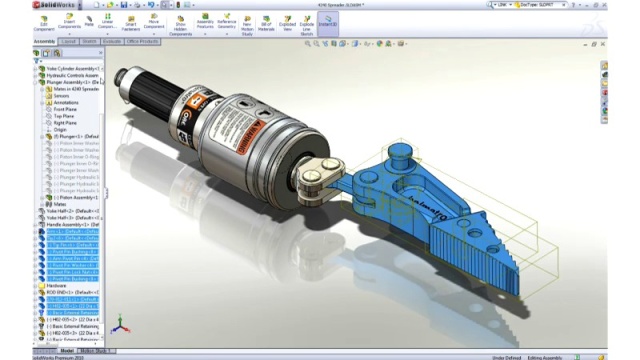
Download SolidWorks 2026 SP3.2 – Advanced CAD Software for Engineering Design
SolidWorks 2026 is an advanced solid modeling CAD and CAE program developed by Dassault Systèmes, continuing its legacy as a leader in engineering and design software. Founded in 1993 and acquired by Dassault Systèmes in 1997, SolidWorks has evolved into a comprehensive suite of tools for 3D modeling, simulation, and manufacturing processes. It is a preferred solution for professionals and students in mechanical engineering, providing robust capabilities for detailed design work and complex project analysis.
Introduction to SolidWorks 2026 and Its Applications
Overview of SolidWorks
SolidWorks originated as a groundbreaking solid modeling CAD application, built upon a parametric feature-based approach. This methodology allows users to create intelligent 3D models where changes made to one feature automatically update related parts of the design. Over the years, its functionality has expanded significantly beyond basic CAD, incorporating advanced computer-aided engineering (CAE) tools for simulation and analysis, as well as features supporting manufacturing workflows. Its widespread adoption across numerous industries, from automotive to aerospace and consumer goods, underscores its versatility and effectiveness in modern product development cycles.
Parametric Design and Modeling Features
Key Modeling Capabilities
At its core, SolidWorks 2026 excels in parametric modeling, enabling users to define design intent through the relationship between different geometric elements. The software leverages the robust Parasolid modeling kernel, a powerful engine renowned for its precision and reliability in handling complex 3D geometry. This integration ensures that users can create intricate parts and assemblies with confidence, benefiting from features like:
- Parametric feature-based modeling for editable and intelligent designs.
- A comprehensive library of standard parts and fasteners.
- Advanced surfacing tools for complex organic shapes.
- Robust assembly capabilities with interference detection and motion analysis.
- Tools for generating detailed manufacturing drawings from 3D models.
Simulation and Analysis Tools Integrated into SolidWorks
Types of Supported Analysis
SolidWorks 2026 enhances product development through integrated simulation software that allows engineers to validate designs virtually, reducing the need for physical prototypes. The inclusion of Finite Element Analysis (FEA) is a cornerstone of its CAE capabilities, enabling users to test designs under various conditions such as stress, strain, and thermal loads. This suite of simulation tools helps in identifying potential design failures early in the development process. Key analysis types include:
- Stress analysis to evaluate structural integrity under load.
- Thermal analysis to understand heat distribution and transfer.
- Buckling analysis to predict structural instability.
- Motion analysis to simulate the behavior of moving assemblies.
- Fluid dynamics simulations for analyzing flow characteristics.
Comparison with Alternative CAD Software
SolidWorks is frequently compared with other leading CAD packages, such as Autodesk Inventor and Siemens Solid Edge, each offering distinct advantages. SolidWorks is often recognized for its intuitive user interface and a deep integration between its modeling and simulation tools, which provides a streamlined workflow for engineers. While competitors may offer comparable core 3D modeling functionalities, SolidWorks’ strength lies in its holistic approach to product design, combining robust parametric design with powerful, accessible simulation capabilities within a unified environment. This integration aids in collaborative engineering design processes and reduces the learning curve for mastering multiple specialized applications.
Real-world Use Cases of SolidWorks in Industry
The practical applications of SolidWorks 2026 span across a wide array of industries, demonstrating its adaptability and power in addressing diverse engineering challenges. Professionals leverage its capabilities for creating highly detailed product designs and performing rigorous analyses critical for product validation and innovation. Notable industry use cases include:
- Automotive Design: Creating detailed 3D models of vehicle components, simulating crash tests, and analyzing powertrain mechanics.
- Aerospace Engineering: Designing complex aircraft parts, analyzing aerodynamic properties, and ensuring structural integrity under extreme conditions.
- Manufacturing Prototyping: Rapidly prototyping new product designs, optimizing manufacturing processes, and creating tooling.
- Consumer Product Development: Designing ergonomic and functional consumer goods, from electronics to home appliances.
- Industrial Machinery: Engineering efficient and durable machinery for various industrial applications.
Frequently Asked Questions
What is SolidWorks primarily used for?
SolidWorks is primarily used for solid modeling, computer-aided design (CAD), and computer-aided engineering (CAE). It is widely utilized for creating 3D models, simulations, and engineering documentation in various industries, including aerospace and automotive, enabling detailed product design and analysis.
How does SolidWorks compare to other CAD software?
SolidWorks is known for its user-friendly interface and robust simulation capabilities, making it a popular choice among engineers. Compared to other CAD software like Autodesk Inventor, SolidWorks offers integrated tools for both modeling and analysis that enhance collaborative workflows and streamline the design validation process.
What are the latest features introduced in SolidWorks 2026?
SolidWorks 2026 introduces enhanced simulation tools and a more refined user interface, aimed at improving efficiency in design processes. This version also incorporates more automated features for assembly modeling, helping to streamline the workflow for engineers and speed up project completion.






Reviews
There are no reviews yet.