

Download Automation Studio 7.0 Professional Edition – Design and Simulate Your Automated Systems
Automation Studio 7.0 Professional Edition, developed by Famic Technologies, is a specialized software suite designed for engineers working in the electrical, automation, and general engineering fields. This comprehensive tool facilitates the design, simulation, and documentation of complex automated systems, enabling professionals to streamline their workflows and enhance project outcomes. Its advanced capabilities cater to the demands of modern automated systems design, from initial concept to final implementation and maintenance.
Overview and Applications in Engineering
Introduction to Automation Studio
Automation Studio is a robust software solution engineered to support the entire lifecycle of automated systems projects. It provides a unified environment for electrical and fluid power design, comprehensive simulation, and detailed documentation. Developed by Famic Technologies, this software is particularly valuable for professionals requiring precise control and validation of their designs before physical implementation.
The primary purpose of Automation Studio is to serve as a central platform for electrical design simulation and the development of automated systems. It caters to a wide array of engineering challenges, providing tools that enhance efficiency and accuracy in project development and maintenance.
Key Applications Across Industries
The versatility of Automation Studio extends across multiple industries that rely heavily on automation and electrical engineering. Its robust feature set makes it an indispensable tool for professionals in various sectors.
- Manufacturing: Used for designing and simulating control systems for production lines, robotics, and automated machinery.
- Electrical Engineering: Supports the creation and testing of electrical schematics, control panels, and power distribution systems.
- Automation & Control Systems: Enables the design and validation of Programmable Logic Controller (PLC) logic, human-machine interfaces (HMI), and complex automation sequences.
- Educational Institutions: Serves as a powerful training tool for students and technicians learning about automation and electrical systems through hands-on simulation.
- Maintenance and Service: Facilitates remote diagnostics and troubleshooting of automated systems via simulation.
Advanced Features of Automation Studio 7.0
Multi-User and Multilingual Capabilities
Automation Studio 7.0 Professional Edition is built with collaboration in mind, incorporating multi-user functionality that allows engineering teams to work concurrently on the same project. This feature significantly enhances project efficiency and communication among team members, regardless of their geographical location.
Furthermore, the software supports multiple languages, breaking down communication barriers and enabling its use in diverse international work environments. This multilingual support is crucial for global engineering firms and educational institutions involving international students or partners.
Virtual Simulation and Fault Detection
A cornerstone of Automation Studio’s capability is its advanced virtual simulation engine. This allows for the dynamic simulation of electrical and fluid power systems directly within the design environment. Engineers can test their designs under various operating conditions, identify potential issues, and optimize performance before deploying physical hardware.
The software’s fault detection features are integrated into its simulation capabilities. Users can intentionally introduce virtual faults into the system to test diagnostic procedures, troubleshoot problems, and train maintenance personnel in a safe, virtual environment. This dynamic virtual tooling is a key differentiator for the software.
Design and Documentation Tools
Project Workspace Enhancements
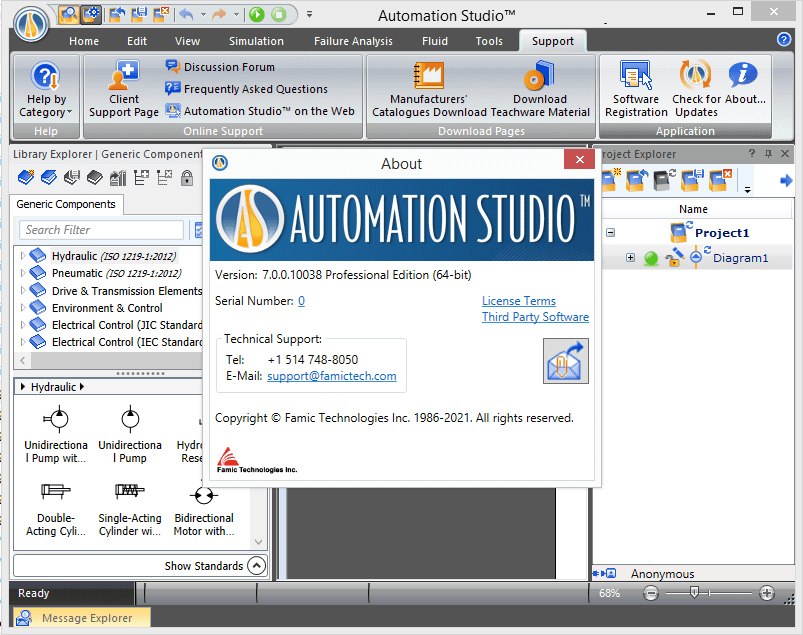
Automation Studio 7.0 introduces enhancements to its project workspace, focusing on improving user experience and workflow efficiency. The interface is designed to provide intuitive access to all design and simulation tools, allowing engineers to navigate complex projects with ease.
The workspace supports a streamlined approach to project management, enabling users to organize project components, manage revisions, and maintain a clear overview of the system architecture. This focus on user experience supports efficient design and simulation tasks.
Documentation Standards and Compliance
Accurate and comprehensive documentation is critical in engineering projects, particularly in sectors governed by strict standards. Automation Studio 7.0 assists users in generating detailed project documentation that adheres to international and industry-specific standards.
The software facilitates the creation of comprehensive documentation packages, including electrical schematics, reports, and technical specifications. This ensures compliance and provides essential information for project stakeholders, clients, and future maintenance teams, supporting the overall integrity of the engineering process.
Integrations and Applications with Other Tools
Automation Studio is designed to integrate with various other engineering tools and platforms, enhancing its utility within broader development ecosystems. While specific API details might vary, the software’s architecture supports interoperability, allowing for seamless data exchange and workflow integration.
This interoperability means that designs and simulation data from Automation Studio can often be imported or exported to other CAD, CAE, or PLM (Product Lifecycle Management) systems. This capability ensures that Famic Technologies’ automation software fits within existing engineering workflows, offering a flexible solution for complex projects.
Real-World Use Cases
Automation Studio finds practical application in numerous real-world scenarios across different sectors, demonstrating its value in professional engineering and training environments.
- Machine Builders: Developing and simulating control systems for custom industrial machinery, ensuring reliable operation and minimizing pre-production testing time.
- System Integrators: Designing integrated automation solutions for clients, using the software to visualize and validate system behavior and interdependencies.
- Manufacturing Plants: Optimizing existing automated processes, troubleshooting operational faults with simulation tools, and training multi-skilled technicians on new equipment.
- Research and Development: Prototyping and testing new automation concepts in a virtual environment before committing to physical prototypes.
- Vocational Training Centers: Providing students with a practical, safe environment to learn core principles of electrical controls, hydraulics, and pneumatics through hands-on simulation.
Conclusion
Automation Studio 7.0 Professional Edition by Famic Technologies offers a powerful, integrated solution for the design, simulation, and documentation of automated systems. Its advanced features, including multi-user collaboration, extensive simulation capabilities, and robust documentation tools, make it an invaluable asset for engineers and technical professionals.
By leveraging Automation Studio, professionals can enhance project efficiency, reduce development costs, and ensure the reliability and safety of their automated systems. The software serves as a critical tool for innovation and operational excellence in the fields of electrical engineering and automation.
Frequently Asked Questions
What is Automation Studio 7.0 used for?
Automation Studio 7.0 is used for designing, simulating, and documenting automated electrical and fluid systems, making it an essential tool for engineers in the automation sector. Its comprehensive features support the entire project lifecycle from concept to maintenance.
Can Automation Studio 7.0 be used for collaborative projects?
Yes, Automation Studio 7.0 features multi-user capabilities that allow teams to work collaboratively on projects and share information effectively with stakeholders. Enhancements in this area support efficient teamwork and project management.
How does Automation Studio assist with troubleshooting and maintenance?
The software includes dynamic simulation tools that help identify and troubleshoot faults, leading to efficient maintenance and improved training environments. Users can replicate operational scenarios and diagnose issues virtually.





Reviews
There are no reviews yet.