

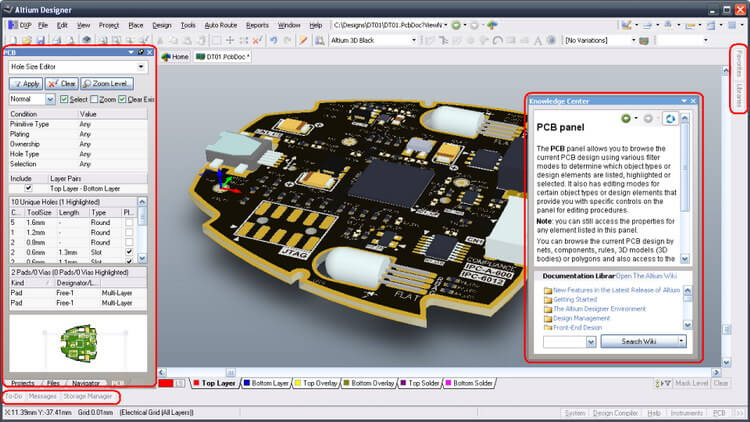
Download Altium Designer 26.10 – Advanced PCB Design Software
Altium Designer is a leading electronic design automation (EDA) software developed by Altium Limited, designed to streamline the process of printed circuit board (PCB) and FPGA development. Evolving from the foundational Protel software, this advanced tool offers a comprehensive suite of functionalities for engineers and designers in high-tech industries. Its current iteration is part of Altium’s broader commitment to collaborative, cloud-based design solutions, providing professionals with robust circuit design tools for complex projects.
Introduction to Altium Designer
History and Evolution
Altium Designer represents decades of innovation in electronic design. Its lineage traces back to Protel, first launched in 1985, which laid the groundwork for modern EDA capabilities. Over the years, Protel evolved into Altium Designer, progressively incorporating advanced features for schematic capture, PCB layout, and design management. This evolution culminated in its integration into unified platforms like Altium Develop and Altium Agile, emphasizing collaborative workflows and cloud-based accessibility for electronic design professionals.
Key Features of Altium Designer
Comprehensive PCB Layout and Design Tools
Altium Designer provides an extensive environment for sophisticated PCB layout. It empowers designers with multi-layer design capabilities, advanced interactive routing features for optimal signal integrity, and precise control over component placement. The software supports both rigid and flexible PCB layouts, ensuring versatility for a wide array of electronic products and facilitating complex design endeavors.
Schematic Capture and Design
The schematic capture capabilities within Altium Designer are tightly integrated with its PCB layout tools. This synergy allows for a seamless transition from logical circuit representation to physical board implementation. Designers can create detailed schematics, define electrical rules, and manage design hierarchy efficiently, ensuring accuracy and consistency throughout the design cycle.
3D Visualization Capabilities
A key differentiator of Altium Designer is its advanced 3D visualization. This feature allows designers to view their PCB designs in a three-dimensional space, aiding in the identification of mechanical conflicts and ensuring proper fit within enclosure designs. The 3D model generated is robust and can be shared with mechanical engineers, fostering better interdisciplinary collaboration.
Applications in Various Industries
Altium Designer is crucial for developing cutting-edge electronic products across numerous sectors. Its advanced features are particularly valuable in industries that demand high reliability and complex functionality. Professionals in automotive electronics, aerospace engineering, telecommunications infrastructure, and advanced consumer electronics rely on Altium Designer for their intricate circuit design needs.
Integration with Other Platforms
Enhancing the design workflow, Altium Designer offers significant integration capabilities. It connects with component distributors via platforms like Octopart, providing real-time access to component data, including availability, lifecycle status, and pricing. Furthermore, its MCAD integration allows for seamless data exchange with mechanical design software, improving the co-design process between electrical and mechanical engineering disciplines.
User Experiences and Real-world Applications
Professionals worldwide leverage Altium Designer for complex electronic design projects that push technological boundaries. For instance, in high-speed digital design for telecommunications, engineers utilize its advanced routing and signal integrity tools to ensure optimal performance. Similarly, aerospace and defense projects depend on its rigorous design controls and component lifecycle management for mission-critical applications.
Conclusion
Altium Designer 26.9 stands as a powerful and integrated solution for modern electronic design. With its comprehensive feature set, intuitive interface, and advanced capabilities like 3D visualization and seamless integration, it empowers engineers to tackle complex PCB and FPGA designs. Exploring Altium Designer is a crucial step for professionals aiming to enhance their design efficiency and product innovation in competitive high-tech markets.
Frequently Asked Questions
What are the main functionalities of Altium Designer?
Altium Designer includes robust PCB layout and design tools, comprehensive schematic capture capabilities, advanced routing options for signal integrity, and sophisticated 3D visualization features. It enables users to efficiently create multi-layer rigid and flexible PCBs, manage design hierarchies, and ensure design rule compliance.
How does Altium Designer integrate with component distributors?
Altium Designer integrates with component distributors through platforms like Octopart. This integration allows designers to access real-time data on electronic components, including their availability, lifecycle status, and pricing, directly within the design environment, which is crucial for modern supply chain management.
In which industries is Altium Designer commonly used?
Altium Designer is widely utilized across various demanding industries such as automotive, aerospace, telecommunications, medical devices, and consumer electronics. These sectors require the precision, advanced design capabilities, and robust component lifecycle management that Altium Designer provides for their critical electronic systems.




Reviews
There are no reviews yet.