

Download Adobe Premiere Pro 2026 – The Ultimate Video Editing Software
Adobe Premiere Pro 2026, developed by Adobe Inc., is a leading video editing application designed for film and video production and multimedia content creation. As part of the Adobe Creative Cloud suite, this software enables professional-grade non-linear video editing, offering advanced tools for a streamlined workflow. Its recent rebranding to “Adobe Premiere” signifies an evolution, reinforcing its position as a versatile and powerful solution for editors.
Introduction to Adobe Premiere Pro
Overview and Key Applications
Adobe Premiere Pro has a long-standing history in the video editing landscape, evolving significantly since its initial launch. The latest iteration, Adobe Premiere Pro 2026, continues this legacy by providing a robust platform for professional video production. It empowers users across various industries, from seasoned filmmakers to digital content creators, to bring their visions to life with high-quality results.
Essential Features and Capabilities
Advanced Video Editing Tools
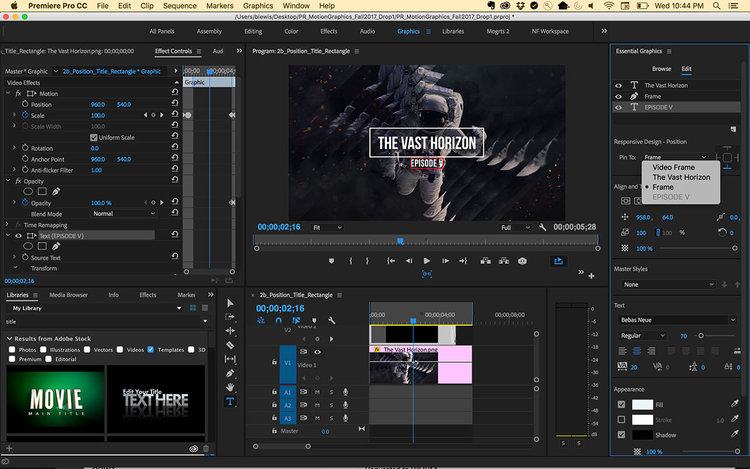
Adobe Premiere Pro 2026 offers a comprehensive suite of tools that facilitate detailed and efficient video post-production. Its core functionality revolves around non-linear editing, allowing for precise control over complex projects.
- Timeline Editing: A flexible timeline interface that supports intricate sequencing and precise trimming of video and audio clips.
- Audio Mixing: Advanced audio mixing capabilities, including support for VST plugins, enabling professional sound design and refinement.
- High-Resolution Support: Compatibility with high-resolution video editing, supporting up to 10,240 × 8,192 pixels for pristine visual quality.
- Multi-Camera Editing: Tools to synchronize and edit footage from multiple camera angles efficiently, ideal for interviews and live events.
Integration with Adobe Creative Cloud
A significant advantage of Adobe Premiere Pro 2026 is its deep integration within the Adobe Creative Cloud ecosystem. This synergy allows for seamless collaboration and a fluid workflow between different Adobe applications.
- Projects created in Premiere Pro can be easily transferred to Adobe After Effects for advanced motion graphics and visual effects.
- Assets edited in Adobe Photoshop, such as graphics or stills, can be directly imported and utilized within Premiere Pro projects.
- Dynamic linking between Premiere Pro and other Creative Cloud apps minimizes rendering times and enhances overall efficiency.
Supported Formats and Compatibility
Adobe Premiere Pro 2026 excels in its broad compatibility with a wide array of video and audio formats, ensuring flexibility for diverse production needs.
- Supports numerous video codecs, including H.264, HEVC, ProRes, and DNxHD.
- Handles a variety of audio formats and offers robust VST plugin support for expanded audio processing.
- Provides flexible export options to common formats suitable for web, broadcast, and professional distribution.
Innovation in Video Editing
Adobe Premiere Pro 2026 incorporates recent advancements designed to enhance editing efficiency and user experience. These innovations reflect the ongoing commitment to staying at the forefront of video post-production technology.
- Performance optimizations contribute to faster rendering and smoother playback, even with demanding high-resolution footage.
- New interface elements and workflow enhancements are introduced to streamline common editing tasks.
- Continued development focuses on AI-powered features that assist in tasks such as transcription and color correction.
Real-World Applications of Adobe Premiere Pro
Professionals across various sectors rely on Adobe Premiere Pro 2026 for its reliability and comprehensive feature set, making it a staple in many production pipelines.
- Film Production: Used for editing feature films, documentaries, and short films, enabling precise narrative construction.
- Marketing and Advertising: Essential for creating engaging commercials, promotional videos, and social media content with fast turnaround times.
- Broadcast Journalism: Employed for editing news segments, live event coverage, and documentary-style reporting in demanding newsroom environments.
- Content Creation: Favored by YouTubers and online creators for editing vlogs, tutorials, and other digital content for various platforms.
Future of Video Editing with Adobe Premiere
The evolution of Adobe Premiere Pro, including the transition to Adobe Premiere, points towards a future focused on intelligent workflows and seamless cross-application integration. As technology advances, the software is poised to incorporate more AI-driven features and further optimize performance for emerging video standards.
Frequently Asked Questions
What are the key features of Adobe Premiere Pro 2026?
Adobe Premiere Pro 2026 features advanced timeline editing, multi-cam editing capabilities, and extensive audio mixing options. It also supports high-resolution video formats and integrates seamlessly with other Adobe products, providing a robust toolset for professional video production.
How does Adobe Premiere Pro 2026 compare to previous versions?
Adobe Premiere Pro 2026 offers enhanced performance with improved editing speed, new interface features for better usability, and updates to support additional video formats compared to prior versions. These advancements aim to deliver a more efficient and intuitive editing experience.
Can Adobe Premiere Pro 2026 work with other Adobe software?
Yes, Adobe Premiere Pro 2026 integrates seamlessly with other Adobe software such as Photoshop and After Effects, allowing for a more streamlined editing workflow and enhanced creative possibilities. This interoperability is a key strength for users invested in the Adobe ecosystem.






Reviews
There are no reviews yet.