

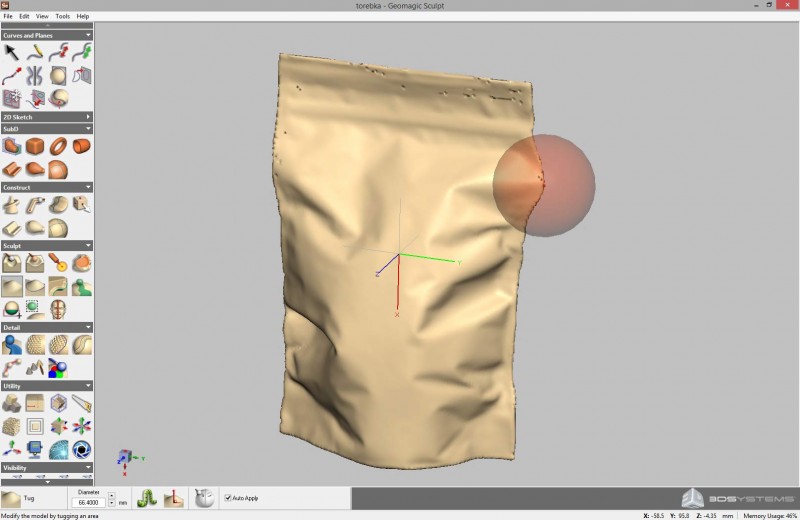
Download Geomagic Sculpt – Leading 3D Sculpting Software for Artistic Design
Geomagic Sculpt download provides users with a powerful platform for digital sculpting, developed by 3D Systems. This specialized 3D sculpting software is designed for professionals in product design, industrial design, animation, and game development, enabling intricate organic 3D design and detailed modeling for complex projects.
Introduction to Geomagic Sculpt
Overview of 3D Sculpting Software
Geomagic Sculpt serves as a robust application within the realm of 3D sculpting software, offering advanced tools for creating and manipulating digital models with a high degree of artistic control. Its capabilities are particularly relevant in industries requiring detailed organic shapes and complex geometries, such as product conceptualization, industrial design, visual effects for film, and character design for video games.
Core Capabilities of Geomagic Sculpt
Innovative Sculpting Tools and Features
Geomagic Sculpt distinguishes itself through a suite of specialized features that facilitate intuitive and precise digital sculpting:
- Virtual Clay Modeling: Utilizes a voxel modeling approach, allowing users to manipulate digital “clay” with a natural feel, similar to traditional sculpting.
- Inlaid Tools: Offers a variety of brushes and tools for pushing, pulling, smoothing, and adding intricate details to models.
- Texture Creation: Supports advanced texture mapping capabilities, enabling the application of detailed surface finishes and patterns.
- Organic Design Focus: Specifically engineered for creating fluid, complex, and organic shapes that are challenging to achieve with traditional polygonal modeling techniques.
Integration and Workflow Enhancements
Efficiency in professional 3D design pipelines is enhanced through Geomagic Sculpt’s robust integration capabilities and file format support. The software is designed to work seamlessly with acquired scan data and other design software, streamlining the workflow from concept to final output.
- 3D Scanning Integration: Easily imports scan data from various 3D scanners, allowing users to refine, modify, or build upon captured real-world objects.
- Extensive File Format Support: Compatible with a wide range of industry-standard 3D file formats, including .stl, .obj, .iges, and .step, facilitating interoperability with other CAD and DCC (Digital Content Creation) applications.
- Data Preparation for Manufacturing: Tools are available to prepare models for downstream processes, including 3D printing and computer-aided manufacturing (CAM).
Applications in Professional Settings
The advanced functionality of Geomagic Sculpt makes it an invaluable tool across several professional creative and engineering fields. Its ability to handle intricate details and organic forms finds extensive application in creating highly realistic and visually compelling digital assets.
- Game Development: Used for creating detailed character models, environmental assets, and props where organic shapes and intricate details are crucial for visual fidelity.
- Animation and Visual Effects: Enables artists to sculpt realistic creatures, dynamic objects, and complex character designs for film and television.
- Product Design: Facilitates rapid ideation and conceptualization of product forms, particularly for ergonomic or visually driven consumer goods where organic aesthetics are desired.
- Jewelry and Footwear Design: Supports the creation of intricate and custom designs for specialized industries that require high levels of detail and uniqueness.
Comparison with Other 3D Sculpting Software
Geomagic Sculpt occupies a distinct niche within the competitive landscape of 3D sculpting software. While many applications offer similar foundational sculpting capabilities, Geomagic Sculpt’s strengths lie in its focused feature set and integration potential.
Compared to general-purpose 3D modeling software that may rely heavily on polygonal mesh manipulation, Geomagic Sculpt excels in providing a more intuitive and efficient experience for organic modeling through its voxel-based approach. Its key differentiator is the seamless integration with 3D scanning technology and advanced tooling for texture mapping, which simplifies workflows for users who frequently work with scan data or require highly detailed surface finishes and complex organic forms that are difficult to achieve with other modeling paradigms.
User Experience and Community Resources
Geomagic Sculpt is designed with a user interface that aims to balance a rich set of advanced features with intuitive accessibility. While the software offers professional-grade capabilities, efforts have been made to ensure it is navigable for users transitioning from other 3D modeling environments.
Users can access a range of community resources to support their learning and workflow. This includes online forums, tutorials, and documentation provided by 3D Systems. Engagement with these resources can help users master the software’s advanced functionalities, troubleshoot challenges, and share best practices for organic 3D design.
Conclusion and Final Thoughts
Geomagic Sculpt stands out as a powerful and specialized 3D sculpting software designed for professionals who require intricate organic modeling capabilities. Its innovative virtual clay modeling, precise detailing tools, and robust integration with 3D scanning technology offer a compelling solution for industries ranging from product design and animation to game development. For users seeking to create complex, organic 3D models with efficiency and artistic control, Geomagic Sculpt presents a valuable option in the field of digital design.
Frequently Asked Questions
What are the key features of Geomagic Sculpt?
Geomagic Sculpt offers advanced 3D sculpting tools like virtual clay modeling, detailed texture creation, and support for a variety of 3D file formats, enabling users to design complex organic shapes effortlessly. Its voxel modeling approach allows for intuitive manipulation of digital material, making it effective for intricate detail work.
How can Geomagic Sculpt assist in 3D printing?
Geomagic Sculpt provides 3D printing analysis tools and can export models in formats compatible with 3D printers, allowing for a seamless transition from digital design to physical prototypes. Features such as watertight model creation and mesh repair assist in ensuring printability.
Is Geomagic Sculpt suitable for beginners in 3D modeling?
While Geomagic Sculpt is packed with powerful features suitable for advanced users, its intuitive interface and core functionalities make it accessible for beginners to start their journey in 3D modeling. The virtual clay approach can be more approachable for those new to digital sculpting than traditional mesh-based methods.








Reviews
There are no reviews yet.