

Download Sciencesoft S3graf 2020.6 – Advanced Reservoir Simulation Software
Sciencesoft S3graf 2020.6 is an advanced reservoir simulation software developed by Sciencesoft, specifically designed for professionals in the Oil & Gas, Water Resources Engineering, and Petroleum Engineering fields. This application focuses on the crucial post-processing stages of reservoir simulations, providing robust tools for data visualization and analysis to enhance productivity and decision-making in complex reservoir engineering projects.
Introduction to Sciencesoft S3graf
Overview and Industry Applications
Sciencesoft S3graf 2020.6 is a specialized software designed to facilitate the comprehensive analysis and visualization of reservoir simulation outputs. Developed by Sciencesoft, it serves as a critical tool for petroleum and reservoir engineers. The software finds its primary applications within the oil and gas industry, aiding in the evaluation of reservoir performance, well productivity, and overall field development strategies. Its capabilities extend to professionals in water resources engineering who may utilize similar simulation data analysis techniques.
Key Features and Functionality
Enhanced Visualization and Analysis
S3graf provides a suite of powerful tools dedicated to the visualization and intricate data analysis of reservoir simulation results. These features are essential for understanding complex geological models and fluid flow dynamics.
- Advanced plotting capabilities for presenting simulation results dynamically.
- Tools for detailed reservoir data analysis, enabling in-depth interpretation of simulation outputs.
- Support for visualizing diverse datasets, including well performance, saturation, pressure, and fluid properties.
- Integration of multiple data sources for a holistic view of reservoir behavior.
Workflow Manager Capabilities
To streamline the simulation post-processing pipeline, S3graf incorporates a Workflow Manager. This component is designed to automate repetitive tasks and standardize analytical procedures.
- Definition and automation of standard reservoir engineering tasks, enhancing efficiency.
- Creation of repeatable workflows for consistent data analysis and reporting.
- Reduced manual intervention in complex simulation post-processing, minimizing error potential.
- Facilitation of collaboration by standardizing analysis methods across project teams.
Supported Simulators and Compatibility
A key strength of Sciencesoft S3graf lies in its broad compatibility with a wide array of industry-standard reservoir simulators. This flexibility ensures that engineers can integrate S3graf into their existing simulation workflows without significant disruption.
- Full compatibility with leading simulators such as Eclipse, CMG (IMEX, GEM, STARS), VIP, Nexus, and UTCHEM.
- Adaptable for diverse reservoir simulation workflows, regardless of the primary simulation engine used.
- Enables users to leverage S3graf’s advanced post-processing capabilities on data generated by various simulation platforms.
Real-world Applications in Reservoir Engineering
In practical reservoir engineering scenarios, Sciencesoft S3graf plays a pivotal role in transforming raw simulation data into actionable insights. Its application enhances the understanding of reservoir behavior and supports critical decision-making processes.
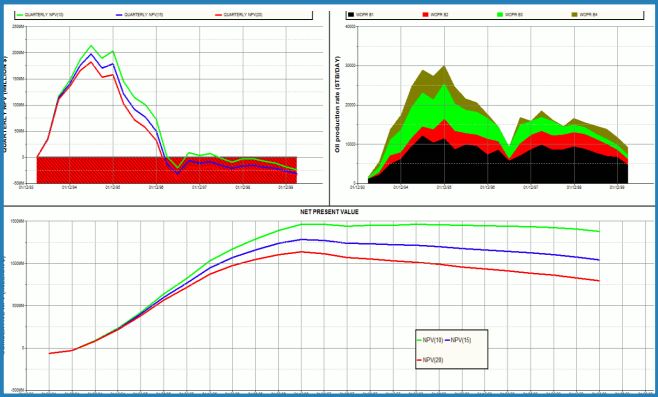
- Analyzing well performance plots to optimize production strategies and identify potential issues.
- Visualizing fluid saturation and pressure distribution to understand reservoir connectivity and depletion patterns.
- Evaluating the impact of different development scenarios through comparative data analysis.
- Supporting the economic assessment of field development plans by providing clear performance metrics.
- Ensuring robust data integrity through systematic post-processing and analysis of simulation results.
Comparative Overview with Other Reservoir Simulation Tools
Market Positioning
Sciencesoft S3graf differentiates itself in the reservoir simulation software market through its dedicated focus on post-processing and visualization, coupled with extensive simulator compatibility. While other tools may offer integrated simulation and post-processing functionalities, S3graf excels in providing specialized, advanced analysis capabilities that can be applied across various simulation outputs.
- Emphasizes unique features like its robust data integration from multiple sources for comprehensive analysis.
- Offers advanced visualization tools that often surpass the native capabilities of core simulators.
- Its Workflow Manager provides a distinct advantage for teams aiming to standardize and automate their analysis procedures.
Conclusion and Next Steps
Sciencesoft S3graf 2020.6 presents itself as a powerful add-on for any reservoir simulation workflow, offering advanced post-processing, visualization, and analysis features. Its broad compatibility with industry simulators and its efficient Workflow Manager make it a valuable asset for petroleum and reservoir engineers seeking to derive maximum insight from their simulation data. For professionals aiming to enhance their reservoir data analysis and well performance evaluation capabilities, downloading Sciencesoft S3graf is a logical step towards optimizing project outcomes.
Frequently Asked Questions
What is Sciencesoft S3graf used for?
Sciencesoft S3graf is primarily used for post-processing reservoir simulations, allowing engineers to visualize and analyze simulation data effectively. It supports various simulators for enhanced versatility in reservoir engineering tasks such as analyzing well performance and reservoir fluid dynamics.
Can S3graf integrate with other reservoir simulators?
Yes, S3graf is compatible with a wide range of simulators including Eclipse, CMG, VIP, Nexus, and UTCHEM, making it adaptable for different reservoir simulation workflows and data formats.
What advantages does the Workflow Manager provide in S3graf?
The Workflow Manager in S3graf allows users to define and automate standard reservoir engineering tasks, improving efficiency and repeatability in data analysis and plotting. This feature helps standardize workflows and reduce manual effort in complex simulation post-processing.





Reviews
There are no reviews yet.