

Download Adobe Substance 3D Stager 3.1 – Professional 3D Scene Rendering Tool
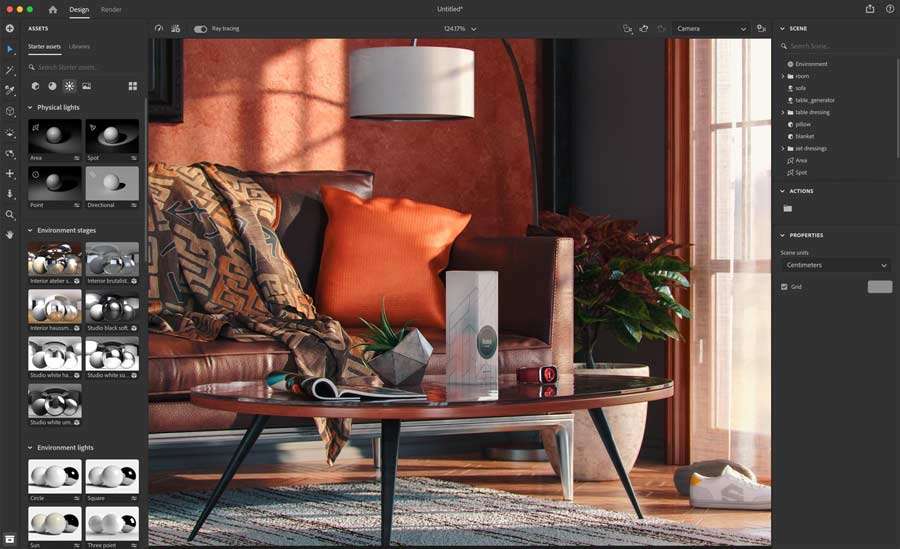
Adobe Substance 3D Stager 3.1 is a professional 3D scene staging and rendering application developed by Adobe Inc., designed to facilitate the creation of high-quality visual content. As part of the comprehensive Adobe Substance 3D suite, Stager enables designers in fields such as graphic design, visual effects, and product visualization to assemble, light, and render complex 3D scenes with remarkable realism and ease.
Introduction to Adobe Substance 3D Stager
Overview and History
Adobe Substance 3D Stager evolved from Adobe’s commitment to providing powerful creative tools for 3D professionals. Integrated into the broader Adobe ecosystem, it benefits from the company’s extensive experience in digital media creation. This software allows users to import existing 3D assets and construct intricate scenes, leveraging advanced tools for lighting and object placement to achieve professional rendering outcomes.
Main Capabilities for Staging and Rendering
Light and Environment Customization
Adobe Substance 3D Stager offers sophisticated tools for lighting 3D scenes. Its environment lighting editor is a key feature, designed to streamline the process of applying realistic and customizable lighting. Users can import image-based lighting (IBL) environments or utilize built-in presets to define the mood and illumination of their scenes, controlling everything from light intensity and color to shadows.
Importing and Exporting File Formats
To ensure broad compatibility within professional workflows, Adobe Substance 3D Stager supports a wide array of import and export file formats. This includes common CAD formats, the Universal Scene Description (USD) format, and the lightweight gLTF. This extensive file format compatibility allows designers to seamlessly bring in 3D models from various sources and export their staged scenes for use in other applications or platforms, enhancing interoperability.
Realistic 3D Scene Creation
Object Interactions and Physics
Creating believable scenes requires realistic object behavior. Adobe Substance 3D Stager incorporates a physics engine that simulates how objects interact with each other and with the scene environment. This capability allows for more natural placement and arrangement of objects, ensuring that elements like stacks of items or objects resting on surfaces behave as they would in the real world, contributing to overall scene authenticity.
Use Cases in Visual Effects and Product Design
The versatile capabilities of Adobe Substance 3D Stager make it an invaluable tool across several industries. In product design, it is used for creating photorealistic mockups and marketing visuals. For visual effects artists, it serves as a platform for assembling and rendering complex 3D elements within specific environments. Architectural visualization professionals also benefit from its ability to stage detailed scenes, demonstrating designs with accurate lighting and object placement.
Integration with Adobe Suite
Seamless integration is a hallmark of the Adobe Substance 3D suite. Substance 3D Stager works in tandem with other tools like Substance 3D Painter, which is used for texturing, and Substance 3D Designer, for creating procedural materials. This interconnected workflow allows artists to move assets between applications fluidly, enabling efficient creation of highly detailed and textured 3D models that are then ready for staging and rendering in Stager.
Conclusion and Recommendations
Adobe Substance 3D Stager 3.1 provides a powerful yet accessible solution for 3D scene staging and rendering. Its intuitive interface, advanced lighting editor, broad file format support, and integration within the Adobe ecosystem make it an essential tool for professionals in visual effects, product visualization, and beyond. For designers looking to enhance their 3D visualization workflows with realistic staging and rendering capabilities, Adobe Substance 3D Stager offers a compelling and efficient platform.
Frequently Asked Questions
What types of files can I import into Adobe Substance 3D Stager?
Adobe Substance 3D Stager supports a variety of file formats including CAD, USD, and gLTF. This diverse compatibility allows for the seamless integration of existing 3D models into your staging and rendering projects, accommodating assets from numerous modeling and design applications.
Can I create realistic lighting scenarios in Adobe Substance 3D Stager?
Yes, Adobe Substance 3D Stager features an advanced environment lighting editor that simplifies the process of setting up complex lighting scenarios. This tool allows users to achieve realistic effects by controlling light intensity, color, shadows, and reflections within their 3D scenes.
How does Adobe Substance 3D Stager integrate with other Adobe tools?
Adobe Substance 3D Stager seamlessly integrates with other Adobe tools such as Substance Painter and Substance Designer, allowing for a smooth workflow in creating and rendering 3D visuals. This interoperability facilitates efficient asset creation, texturing, and final scene assembly within a unified creative environment.





Reviews
There are no reviews yet.