
MATLAB R2026a: Advanced Technical Computing & Model-Based Design Platform
MATLAB R2026a is the latest major release of the world’s leading platform for technical computing and model-based design. Developed by MathWorks, MATLAB combines a high-level programming language with an interactive desktop environment for iterative exploration, algorithm development, and data visualization. This release introduces AI-powered copilots for Simulink and Polyspace, a new Time Series Modeler app for deep learning, interactive web graphics sharing, enhanced Python integration, and significant performance improvements including faster startup (1.3x) and element-wise power operations (3.8x).
R2026a empowers engineers and scientists to express their ideas naturally, write readable code, and seamlessly integrate with Python, C/C++, Java, and .NET libraries. Whether you’re developing autonomous systems, analyzing big data, or teaching computational thinking, MATLAB R2026a delivers the tools and capabilities required for modern engineering and scientific workflows.
???????? Primary Users
This professional technical computing software is designed for:
-
Engineers & Scientists performing numerical analysis, algorithm development, and data visualization.
-
Data Scientists & Analysts conducting exploratory data analysis, machine learning, and predictive modeling.
-
Control & Embedded Systems Engineers designing, simulating, and deploying real-time control systems.
-
Researchers & Academics modeling physical systems, analyzing experimental data, and teaching computational methods.
-
Students & Educators learning programming, numerical methods, and model-based design.
⚡ New Products & Major Features in R2026a
???? AI-Powered Copilots
Simulink Copilot – Provides guidance grounded in your models, team-defined processes, and MathWorks documentation. Generates model explanations, answers questions about model behavior, helps locate relevant blocks and subsystems, isolates issues, and executes standardized tasks for consistent development and verification.
Polyspace Copilot – Offers guidance based on Polyspace analysis results to help engineers interpret static analysis findings, understand issues, and resolve them more efficiently.
???? New Products
| Product | Description |
|---|---|
| MATLAB Course Designer | Create courses, courseware, labs, and assessments using MATLAB and Simulink — ideal for educators |
| Simulink FMU Builder | Create standalone Functional Mockup Units from Simulink models and C/C++ code |
| Wireless Network Toolbox | Model, simulate, analyze, and visualize wireless communication networks |
| Raspberry Pi Blockset | Design, simulate, and deploy applications for Raspberry Pi |
| STM32 Microcontroller Blockset | Design and implement applications for STMicroelectronics STM32 microcontrollers |
| Polyspace as You Code | Identify coding standard violations and software vulnerabilities directly in your IDE as you write C and C++ code |
???? MATLAB Core Enhancements
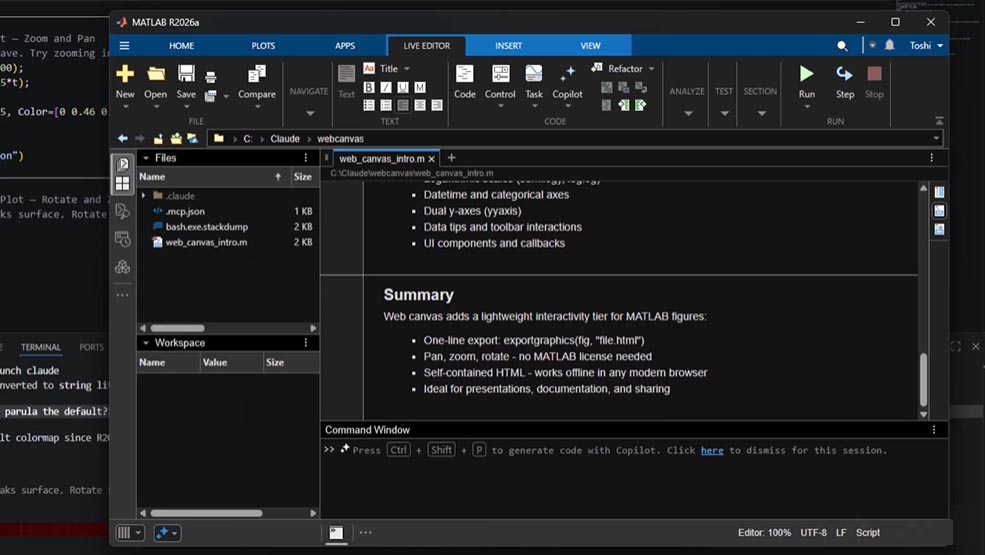
Share Interactive Graphics on the Web – Create HTML files from MATLAB plots and live scripts with axes remaining interactive (pan, zoom, rotate) when opened in any modern web browser — no MATLAB license required.
Time Series Modeler App (Deep Learning Toolbox) – Train models for time series prediction with an intuitive app interface. Run timeSeriesModeler to get started.
raincloudplot Function – New visualization that combines violinplot and swarmchart features: smooth kernel density estimate with individual data points visible for exploratory analysis across groups.
Table Data Plotting – Functions including bar, area, histogram, polarhistogram, geodensityplot, and binscatter now accept table and timetable inputs directly, with automatic axis labels using table variable names.
Improved Axes Toolbar – Persistent toolbar with expand/collapse options, keyboard navigation, screen reader support, and SVG icons.
Linkaxes Flexibility – Multiple calls to linkaxes now preserve previously established links instead of replacing them.
???? Toolbox Enhancements
Automatic Differentiation for ODEs – New JacobianMethod property for solving ordinary differential equations. Setting JacobianMethod="autodiff" can be faster for large stiff systems and more accurate for sensitivity analyses.
Polyspace Updates – New desktop application for unified configuration and results management; custom checkers and full MISRA C/C++ 2023 support; software-sanitizing capabilities in Polyspace Test for dynamic analysis of runtime errors.
Mapping Toolbox – 3D building visualization, image overlays, and raster map capabilities.
Signal Processing Toolbox – New Filter Designer and Filter Analyzer apps; label time-frequency data; extract signal features with enhanced interactive tools.
RF Toolbox – Model RF components using ideal baseband library.
RF PCB Toolbox – Import ODB++ databases; perform finite element and DC electromagnetic analysis.
Econometrics Toolbox – Enhanced Econometrics Modeler for filtering, simulation, forecasting; advanced panel data regression and Bayesian modeling.
???? Performance Improvements
-
Faster MATLAB Startup – Approximately 1.3x faster than R2024b
-
Element-wise Power (x.^3, x.^4) – Approximately 3.8x faster and slightly more accurate
-
Log Function – Approximately 2.8x faster for double precision
-
nufft / nufftn – Up to 330x faster than R2025b for nonuniformly spaced points
-
Deep Learning MLP Training – Approximately 27x faster
-
Quantum Computing Simulation – Approximately 32x faster
-
readlines – Approximately 2.9x faster
???? Python & Interoperability
-
External Language Panel – View, create, and manage Python environments directly from MATLAB
-
Automatic String Conversion – MATLAB strings automatically convert to Python lists or NumPy string arrays
-
JSON Support – Read and write JSON data as tables and timetables
???? Collaboration & Deployment
-
Share Apps from MATLAB Drive – Invite collaborators with view/edit permissions or create shareable links directly from App Designer
-
Live Editor Enhancements – Create multi-level lists; run user-defined code via button controls
???? MATLAB Test Enhancements
-
Generate starter tests, equivalence tests, and tests from command history using MATLAB Copilot
-
Run only tests related to the current file to save time
???? System Requirements
| Component | Minimum | Recommended |
|---|---|---|
| Operating System | Windows 10 (22H2) or Windows 11 (23H2+) | Windows 11 Pro |
| Processor | Any Intel/AMD x86–64 | Four logical cores with AVX2 support |
| RAM | 8 GB | 16 GB |
| Storage | 4.6 GB (MATLAB only) / 5-8 GB (typical) / 25 GB (all products) |





Reviews
There are no reviews yet.