

Download Sweet Home 3D 7.6.8 – Free Interior Design Software
Sweet Home 3D 7.6.8 is a free and open-source interior design software developed by Emmanuel Puybaret. It empowers users to create detailed 2D house plans and visualize them in 3D, serving as a versatile tool for interior design, real estate, and architectural planning. The software is designed to be accessible for homeowners and enthusiasts while offering practical capabilities valuable to professionals in the field.
Overview of Sweet Home 3D
History and Development
Sweet Home 3D originated as a project to provide an accessible and user-friendly solution for interior design. Over time, it has evolved into a comprehensive application supporting a wide array of design tasks. Its development has focused on enhancing the dual 2D and 3D interface and expanding the library of available objects, ensuring continuous improvements for its user base.
Key Features and Capabilities
Intuitive 2D and 3D Interface
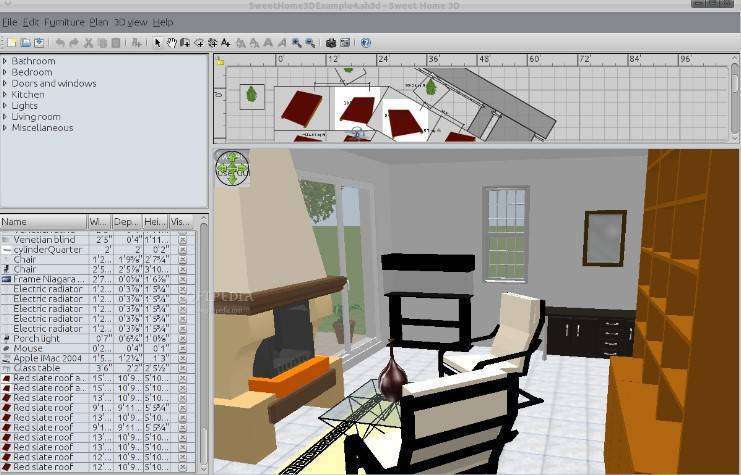
Sweet Home 3D features a unique dual-display interface, allowing users to draw a 2D floor plan and simultaneously view a real-time 3D visualization of their design. This approach simplifies the design process, making it easier to understand spatial relationships and make informed decisions about room layouts and furniture placement. The interface is designed for ease of use, requiring minimal learning curve.
Customizable Furniture and Decor Options
The software offers a vast library of furniture, fixtures, and home appliances that can be easily dragged and dropped into the 2D plan. Users can modify the dimensions, colors, and textures of these objects to match their design requirements. This extensive catalog, combined with the ability to import additional models, provides ample flexibility for personalizing interior and exterior spaces.
Importing and Exporting Options
Sweet Home 3D supports a variety of import and export functionalities, enhancing its utility within broader design workflows. Users can import existing blueprints from scanned images or CAD files to use as a reference for new designs. Furthermore, projects can be exported in multiple formats, including PDF for documentation, SVG for vector graphics, and OBJ for 3D model integration, facilitating collaboration and presentation.
Integration with Other Design Tools
While Sweet Home 3D functions as a standalone application, its export options, particularly to formats like OBJ, allow for integration with other 3D modeling and rendering software. This capability enables users to refine their designs in more specialized applications or incorporate Sweet Home 3D layouts into larger architectural projects, contributing to a more holistic design process.
Applications in Interior Design
Sweet Home 3D serves a diverse user base, from individuals planning home renovations to real estate agents staging properties. Its intuitive nature makes it an excellent choice for homeowners who want to visualize their ideas before committing to changes. Architects and interior designers can leverage its capabilities for quick concept development and client presentations, effectively communicating design visions.
Real-World Project Examples
Professionals and hobbyists have utilized Sweet Home 3D to conceptualize detailed living room redesigns, plan efficient office layouts, and visualize kitchen renovations. For instance, a user might create a precise floor plan of an existing house, then experiment with different wall colors, flooring materials, and furniture arrangements in the 3D view until the desired aesthetic and functionality are achieved. This iterative process aids in visualizing outcomes and making confident design choices.
Comparative Analysis with Similar Products
Compared to commercial interior design software, Sweet Home 3D stands out for its free and open-source model, offering significant value without licensing costs. While professional-grade suites may provide more advanced rendering capabilities or extensive simulation tools, Sweet Home 3D excels in its ease of use and accessibility. Its comprehensive object library and straightforward interface make it a practical choice for users who prioritize efficiency and simplicity in their design tasks.
User Community and Support
Sweet Home 3D benefits from an active user community that contributes to its development and provides support. Users can find assistance through online forums and community channels where they can ask questions, share tips, and discover user-contributed 3D models. This collaborative environment ensures that users have access to resources and peer support for their design projects.
Conclusion
Sweet Home 3D 7.6 offers a robust yet accessible platform for creating and visualizing interior designs. Its intuitive interface, extensive customization options, and flexible import/export features make it a valuable tool for anyone involved in home design, from amateur decorators to practicing professionals. As a free and open-source application, it provides a powerful solution for bringing interior design ideas to life.
Frequently Asked Questions
What type of projects can I create with Sweet Home 3D?
Sweet Home 3D allows users to design a variety of interior spaces including homes, offices, and commercial spaces by providing tools to create both 2D floor plans and 3D visualizations. This versatility makes it suitable for a wide range of architectural and interior decoration projects.
Is Sweet Home 3D suitable for professional use?
While primarily aimed at homeowners and enthusiasts, Sweet Home 3D’s features can be utilized by professionals for basic interior design tasks due to its easy-to-use interface and comprehensive design tools. Its ability to manage floor plans and 3D previews effectively supports preliminary design phases for professionals.
Can I import my own furniture designs into Sweet Home 3D?
Yes, Sweet Home 3D allows users to import custom 3D models that can represent their specific furniture designs, enhancing the personalization of design projects. This feature supports various 3D file formats, enabling users to integrate unique or existing assets into their virtual environments.






Reviews
There are no reviews yet.