

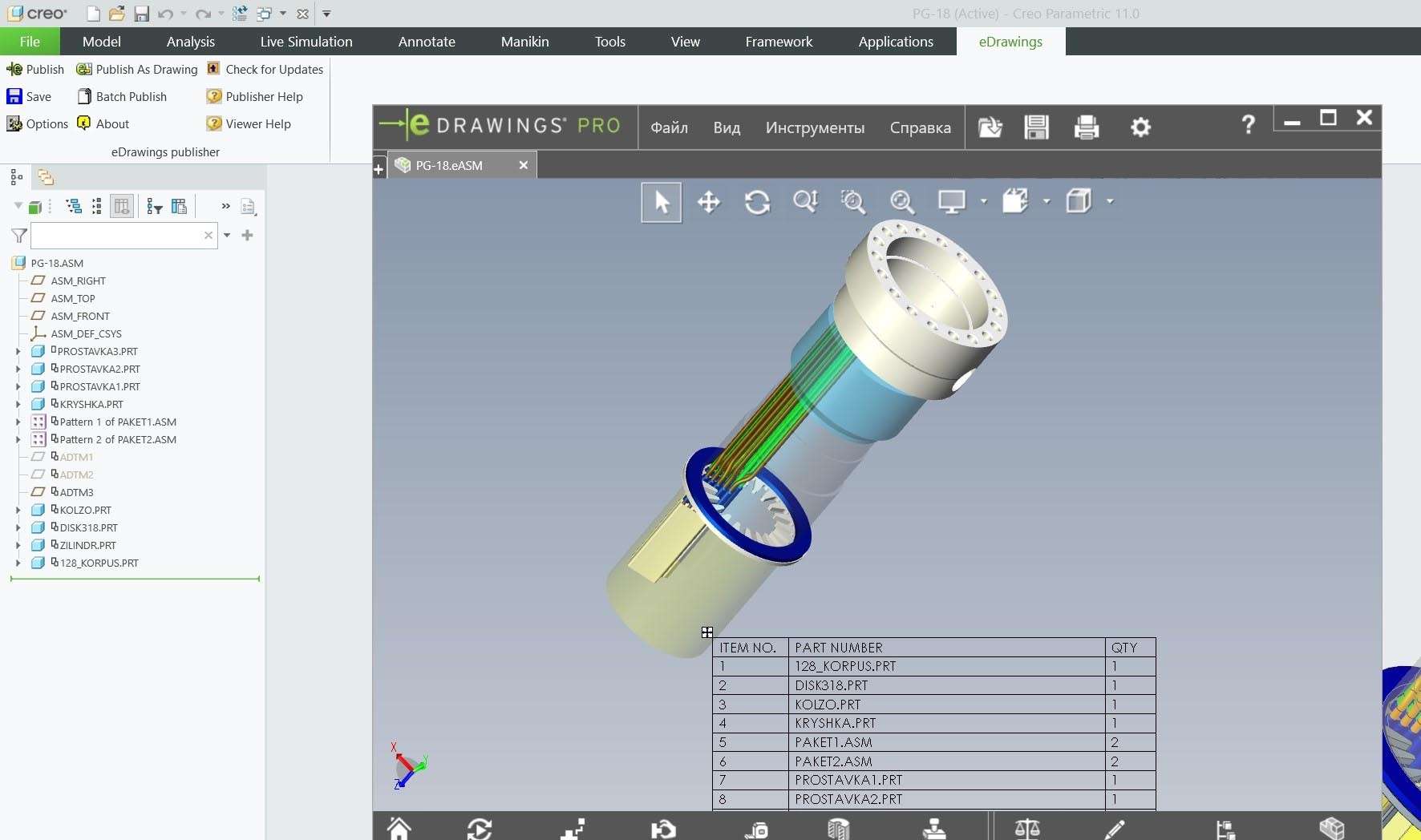
Download eDrawings Pro Suite 2025 – Professional CAD Data Communication Tool
Dassault Systèmes’ eDrawings Pro Suite 2025 is a specialized CAD data communication and visualization tool designed for professionals in mechanical engineering, manufacturing, and product design. It serves as an essential platform for interactive 2D and 3D CAD data visualization, facilitating collaboration and detailed design reviews. This suite empowers users to effectively share, inspect, and present complex CAD information across multidisciplinary teams and stakeholders.
Overview of eDrawings Pro Suite 2025 in Mechanical Design and Manufacturing
eDrawings Pro Suite 2025 is integral to modern engineering workflows, acting as a universal translator for CAD data. It allows seamless visualization and interrogation of complex models, bridging the gap between design intent and manufacturing execution. The software is particularly vital in industries where collaborative product development and precise design review are paramount, ensuring that all parties, whether CAD-proficient or not, can understand and contribute to the design process.
Advanced CAD Viewing and Data Interrogation Capabilities
The Pro Suite offers robust tools for in-depth examination of CAD data, moving beyond simple viewing to provide detailed analytical capabilities.
Universal Compatibility with Major CAD File Formats
eDrawings Pro Suite 2025 supports an extensive library of over 30 CAD file types, ensuring broad interoperability. This includes native CAD formats from leading software such as SOLIDWORKS, CATIA, Creo, NX, and Inventor, alongside common neutral formats like STEP and IGES, and even PDF files. The software meticulously preserves the original color, texture, and assembly structure of these imported designs.
Precision Measurement and Dynamic Sectioning Tools
Users can perform precise linear, angular, radial, and edge-to-edge measurements directly on 3D models and 2D drawings. The dynamic sectioning feature allows for detailed inspection of internal geometries and assembly interferences by enabling users to cut through models with adjustable depth controls, providing critical insights into product structure.
Animation, Exploded Views, and Document Comparison
The suite facilitates a dynamic understanding of product assembly and function through features like animation playback for complex assemblies and interactive exploded views. Furthermore, eDrawings Pro Suite enables users to visually compare two different versions of a part or assembly, highlighting discrepancies and changes to streamline the review process.
Collaboration and Markup Features Enabling Cross-Disciplinary Communication
eDrawings Pro Suite is engineered to foster seamless collaboration by providing intuitive tools for communication and review.
3D Annotations and Markup Tools
The software allows users to embed persistent notes, dimensions, callouts, and other graphical annotations directly onto 2D drawings and 3D models. These markup tools are essential for providing clear feedback, highlighting specific areas for revision, and documenting review comments, thereby enhancing communication between design and manufacturing teams.
Secure Publishing for Sharing and Review
eDrawings Pro Suite enables the secure publishing of highly interactive design files in formats like .eprt, .easm, and .edrw. These published files can be protected with passwords and customized permissions to control printing and saving capabilities. This ensures that sensitive design data can be shared with external partners or stakeholders with confidence in its security and integrity.
Cross-Platform Accessibility Including Mobile and Virtual Reality Applications
eDrawings Pro Suite extends its utility beyond the desktop, offering accessibility across various platforms to support flexible work environments.
The core desktop application is available for Windows and macOS, providing full access to its advanced features. Complementing this, free companion applications for iOS and Android devices allow users to view and perform lightweight markups on the go. For even more immersive design reviews, the suite integrates with virtual reality (VR) tools, enabling stakeholders to experience designs in a three-dimensional, spatially accurate environment.
Latest Enhancements in the 2025 Edition
The 2025 release of eDrawings Pro Suite introduces significant upgrades focused on performance, usability, and integration.
Key enhancements include substantial performance optimizations for faster loading of large and complex assemblies, contributing to a smoother user experience. The user interface has been refined to improve navigation and streamline access to frequently used tools. Advanced measurement features offer greater precision, and integration with Dassault Systèmes’ SOLIDWORKS and the 3DEXPERIENCE platform has been strengthened. Additionally, support for the latest CAD file formats has been updated to ensure compatibility with evolving industry standards.
Real-World Use Cases Illustrating eDrawings Pro Suite’s Value
eDrawings Pro Suite proves its value across numerous practical applications within the product development lifecycle.
- Engineering Design Reviews: Facilitating multidisciplinary team reviews of new designs, allowing designers, engineers, and manufacturing specialists to collaboratively identify potential issues and improvements.
- Manufacturing Instructions: Providing manufacturers with precise 2D and 3D data, including section views and annotations, to accurately interpret designs and produce components correctly.
- Client Presentations: Enabling sales and project managers to present product designs interactively to clients, enhancing understanding and stakeholder buy-in without requiring specialized CAD software knowledge.
- Collaborative Product Development: Supporting distributed teams working on complex projects by allowing them to easily share, review, and mark up design iterations, accelerating the product development cycle.
- Quality Assurance: Allowing quality control personnel to compare manufactured parts against design specifications using measurement and comparison tools to ensure adherence to tolerances.
Frequently Asked Questions
What CAD file formats does eDrawings Pro Suite 2025 support?
eDrawings Pro Suite 2025 supports over 30 major CAD file formats, including native formats like SOLIDWORKS, CATIA V5/V6, Creo, NX, Inventor, AutoCAD DWG/DXF, as well as neutral formats such as STEP, IGES, JT, and PDF. This broad compatibility ensures users can view and interact with almost any CAD model or drawing, maintaining original fidelity.
How does eDrawings Pro Suite improve collaboration between CAD and non-CAD users?
eDrawings Pro Suite enables collaboration by allowing all stakeholders to view, measure, and add markups to 3D models and 2D drawings without requiring native CAD software. The suite supports secure publishing of interactive files with controlled permissions, making design reviews and manufacturing instructions accessible and clear to non-CAD users, thereby improving understanding and reducing errors.
What are the new features introduced in eDrawings Pro Suite 2025?
The 2025 release features enhanced performance for faster load times of large assemblies, an improved user interface with streamlined tool access, advanced measurement improvements, stronger integration with SOLIDWORKS and 3DEXPERIENCE platforms, and updated support for the latest CAD file formats. These updates aim to boost productivity and user experience for design communication.






Reviews
There are no reviews yet.