

Download GrafCet Studio Pro 2.5.0.7 – Specialized GRAFCET Automation Design Software
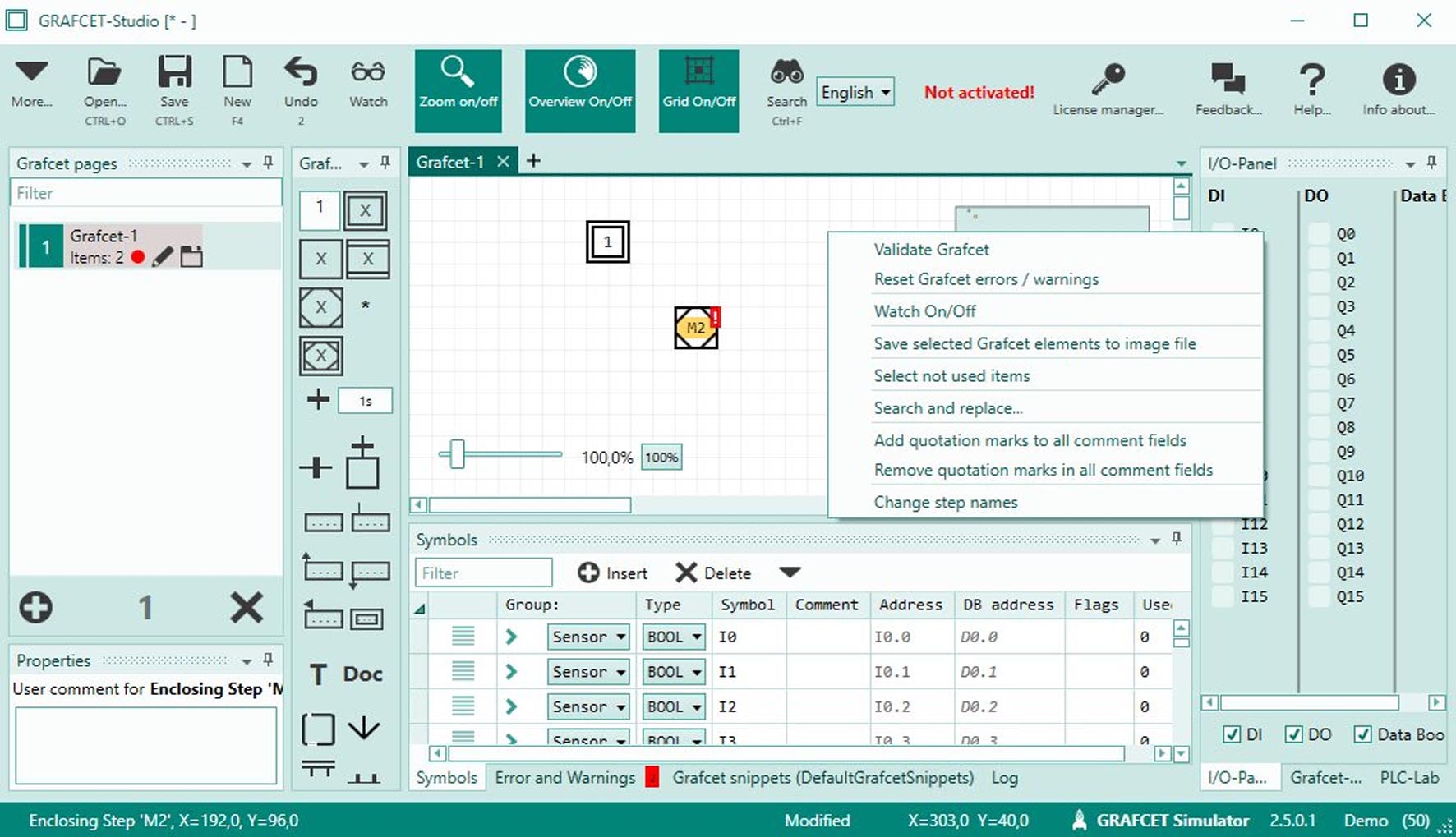
GrafCet Studio Pro 2.5.0.7 is a specialized engineering application designed for the creation, simulation, and documentation of industrial automation sequences. Developed by a company focused on industrial automation software, this tool leverages the GRAFCET (Sequential Function Chart) methodology, standardized under IEC 61131-3. It serves control systems engineers and electrical engineers in fields such as machine automation, process automation, and building automation, providing a unique graphical approach to complex sequential logic. The software bridges the gap between initial process design and executable PLC code.
A Focused Environment for Industrial Sequence Control Logic
GrafCet Studio Pro excels as a domain-specific tool, concentrating on the design of automation sequences strictly adhering to the GRAFCET/SFC standard. This focused approach allows for a more intuitive and structured method for visualizing and implementing machine states and process flows. It plays a crucial role in translating abstract automation concepts into tangible control logic that can be simulated and deployed on various PLC platforms, making it a valuable asset for electrical engineers and automation specialists.
Design and Simulation of Sequential Control Models
Graphical Diagramming with GRAFCET Elements
The software provides a dedicated graphical environment for building automation logic using the established GRAFCET notation. Users can seamlessly drag and drop standard SFC elements, including steps, transitions, conditional transitions, and action blocks. The tool supports advanced architectural patterns like hierarchical structuring with sub-GRAFCETs, enabling the development of modular and manageable control programs for complex automation tasks.
Offline Simulation and Animation
GrafCet Studio Pro incorporates robust offline simulation capabilities, allowing engineers to test and validate their sequence logic without requiring physical PLC hardware. This feature includes manual and scripted triggering of transitions, allowing for detailed step-by-step execution. The animation of active steps and transitions provides immediate visual feedback, aiding in quick identification and debugging of potential logic errors before deployment.
Automated Code Generation for Programmable Logic Controllers
A key feature of GrafCet Studio Pro is its ability to automatically generate PLC code directly from the created graphical GRAFCET diagrams. The software translates the visual sequence logic into programming languages compliant with the IEC 61131-3 standard, such as Structured Text (ST) and Ladder Logic (LD). This vendor-neutral code generation supports integration with a wide array of PLC platforms from manufacturers like Allen-Bradley, Siemens, and Schneider Electric, streamlining the transition from design to implementation.
Project Documentation and Version Management
Efficient project management is supported through the software’s documentation and version control features. GrafCet Studio Pro can automatically generate comprehensive technical documentation, including detailed lists of steps, transitions, and cross-references, simplifying project reviews and maintenance. Integrated version control aids in managing project revisions effectively, ensuring that project history is well-maintained and accessible for industrial automation projects.
Advanced Tools Supporting Automation Project Lifecycle
Supervision Link Integration for Operator Training
The Supervision Link feature allows for the creation of simplified Human-Machine Interface (HMI) screens. This enables engineers to simulate operator interactions with the automated system, serving as a valuable tool for operator training and familiarization with the process logic before the physical system is operational.
Recipe Management for Parameter Sets
For applications requiring varied production runs or batch processing, GrafCet Studio Pro offers recipe management capabilities. This allows users to define and manage different sets of production parameters that can be applied to the control sequence, facilitating flexible and adaptable automation solutions for diverse operational needs.
Industrial Applications and Practical Use Cases
GrafCet Studio Pro is instrumental in various industrial automation scenarios. Practical applications include developing control logic for packaging machinery, managing sequential operations in chemical batch processing plants, and implementing control sequences for elevator systems. Emphasis on the GRAFCET/SFC methodology within these use cases enhances the clarity, modularity, and overall reliability of the automated sequence creation and deployment process.
Frequently Asked Questions
What is GrafCet Studio Pro used for in industrial automation?
GrafCet Studio Pro is used for designing, simulating, and documenting sequential control logic in industrial automation systems. It enables engineers to visually create step-transition diagrams following the GRAFCET/SFC standard and generate PLC code for various platforms.
Which PLC programming languages does GrafCet Studio Pro support for code export?
The software exports automation sequences primarily into Structured Text (ST) and Ladder Logic (LD), both standardized in IEC 61131-3, enabling integration with a wide range of PLC manufacturers such as Allen-Bradley, Siemens, and Schneider Electric.
How does GrafCet Studio Pro assist in debugging automation sequences?
It provides offline simulation and debugging tools including manual triggering of transitions, animation of active steps and transitions, watch windows for monitoring variables, and stepwise execution to validate and troubleshoot logic before deploying to physical PLCs.




Reviews
There are no reviews yet.