

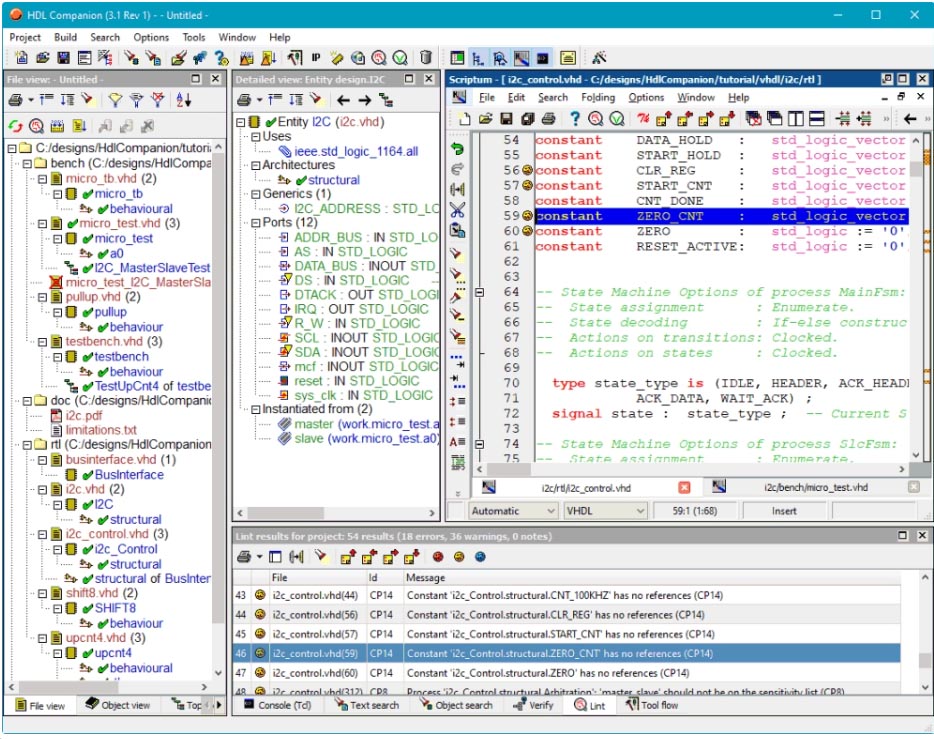
HDL Works Companion 3.4 – Advanced HDL Code Assistant for VHDL and Verilog
HDL Works Companion 3.4 is a specialized VHDL and Verilog code assistant developed by HDL Works, designed to enhance the productivity of digital design engineers. This plugin extends lightweight code editors, such as Notepad++, with intelligent features typically found in heavier Integrated Development Environments (IDEs). It is particularly aimed at professionals in FPGA development, ASIC design, System-on-Chip (SoC) development, and hardware verification, as well as students learning hardware description languages. Version 3.4 introduces enhanced support for modern HDL standards and refined usability features for efficient RTL coding.
Streamlining Digital Hardware Design with Intelligent HDL Coding Assistance
HDL Works Companion bridges the gap between basic text editors and full-fledged IDEs, offering powerful HDL-specific functionalities within a familiar, low-overhead editing environment. This tool empowers digital design engineers, ASIC architects, and hardware verification engineers by providing immediate feedback and sophisticated code manipulation capabilities directly within their preferred editors. The evolution of the software, culminating in version 3.4, addresses the need for updated language standard support and optimized performance, making it an indispensable asset for contemporary digital hardware development workflows.
Advanced HDL Language Support and Real-Time Syntax Feedback
Comprehensive VHDL, Verilog, and SystemVerilog Coverage
The software provides robust support for widely used hardware description languages. It accommodates VHDL standards from the legacy 1987 revision up through the comprehensive VHDL-2019 standard. For Verilog, it covers the Verilog-1995 and Verilog-2001 standards. Additionally, HDL Works Companion includes support for basic but essential SystemVerilog constructs, enabling designers to work effectively across a broad spectrum of digital design projects and technology requirements.
Live Syntax and Semantic Error Checking
HDL Works Companion excels at providing immediate feedback on coding errors. It features real-time syntax highlighting that instantly identifies and flags incorrect syntax as the code is written. Beyond basic syntax, the tool performs semantic issue detection, alerting users to potential design flaws and logical inconsistencies. Crucially, it allows for direct navigation from an error message to its exact location within the code, significantly accelerating the debugging and correction process.
Context-Aware Code Completion and Template-Based Code Generation
Enhanced Autocompletion Features
This HDL code assistant offers intelligent code completion suggestions tailored to the context of VHDL and Verilog development. It provides timely suggestions for entities, component ports, signals, library references, and complex component instantiations. This feature reduces manual typing, minimizes errors from typos, and speeds up the implementation of standard design elements.
Predefined Templates for Common HDL Constructs
To further accelerate the development lifecycle, HDL Works Companion includes a library of predefined templates. These templates cover a wide range of common HDL constructs, from basic structural templates and testbench skeletons to more complex designs such as Finite State Machines (FSMs), counters, shift registers, and memory models (RAM/ROM). This enables rapid generation of verified code structures, adhering to established design patterns.
Visualizing and Navigating Complex HDL Designs
Hierarchy Browsing and Instantiation Tree Views
Navigating intricate HDL codebases is made manageable through advanced browsing features. HDL Works Companion allows users to visualize and traverse the design hierarchy, exploring entity-architecture pairs, understanding component bindings, and tracing package references. This capability is essential for comprehending large, complex designs and managing interdependencies between different modules.
Finite State Machine Extraction and Visualization
A standout feature is the ability to automatically extract Finite State Machines (FSMs) from VHDL or Verilog code. The software generates visual representations, such as state transition diagrams, which clearly illustrate the FSM’s states and transitions. This visualization tool includes verification capabilities to check for completeness and correctness, aiding in the design and debugging of sequential logic.
Code Refactoring, Formatting, and Workspace Management for Efficiency
HDL Works Companion incorporates essential tools for maintaining code quality and readability. Features include automatic code formatting to ensure consistent indentation and alignment, as well as local scope rename refactoring for safely updating signal or variable names across a defined scope. These functionalities help manage code complexity and facilitate collaborative development efforts.
Latest Improvements and New Tools in Version 3.4
Version 3.4 of HDL Works Companion brings notable enhancements to the development workflow. It strengthens support for the latest VHDL-2019 standard, expanding the language features developers can leverage. New template libraries have been introduced, specifically for common challenges like Clock Domain Crossing (CDC) circuits and synchronizers. The update also delivers optimizations for cross-referencing speed, introduces live linting capabilities, adds a dark theme for improved user experience, and includes general performance improvements for increased productivity.
Common Use Cases Across Industries and Education
The capabilities of HDL Works Companion find broad application in various professional and educational settings. In industry, it is crucial for FPGA development and ASIC design, where efficient and error-free RTL coding is paramount. It assists in SoC architecture design by simplifying the management of complex module interactions. For hardware verification engineers, the tool aids in writing and maintaining verification environments. Academically, it serves as an invaluable resource for students learning hardware description languages, offering interactive learning aids through its templates and real-time feedback mechanisms.
Frequently Asked Questions
How does HDL Works Companion improve productivity compared to plain text editors for HDL design?
HDL Works Companion adds real-time syntax checking, context-aware code completion, and design visualization features to lightweight editors, significantly reducing coding errors and speeding up hardware description language development compared to basic text editing.
Which HDL languages and standards are supported by HDL Works Companion 3.4?
Version 3.4 supports a broad range of standards including VHDL from 1987 through 2019, Verilog-1995 and 2001, as well as basic SystemVerilog constructs, allowing users to work with most modern digital hardware design projects.
Can HDL Works Companion help with hardware design education and learning HDL syntax?
Yes, the software offers interactive code templates, real-time syntax checking, and state machine visualization that aid students and educators in understanding HDL design patterns and syntax effectively.






Reviews
There are no reviews yet.