

Download OCCT 17.0 – Comprehensive Hardware Stress Testing and Monitoring Tool
OCCT (OverClock Checking Tool) is a robust Windows-based system utility designed for comprehensive hardware stress testing and real-time monitoring. Developed by the PC hardware community, it is essential for evaluating the stability and reliability of critical components like the CPU, GPU, and power supply unit (PSU) under demanding workloads. This tool is particularly vital for PC hardware enthusiasts, overclockers, system builders, and IT professionals who need to ensure their systems perform optimally and without failure under extreme conditions.
Overview of OCCT and Its Role in PC Hardware Stability Testing
OCCT serves as a critical application for diagnosing and verifying the stability of PC hardware. By subjecting components to intensive testing, it pushes them beyond typical usage scenarios to reveal potential weaknesses or instabilities that could lead to crashes or data corruption. Its integrated monitoring system provides valuable insights into hardware behavior during these tests, making it an indispensable utility for anyone concerned with the long-term reliability and performance of their computer system.
Dedicated Stress Testing Modes for Critical PC Components
CPU Stress Tests Using SSE and AVX Instruction Sets
OCCT’s CPU stress tests are engineered to push the processor to its limits by utilizing modern instruction sets such as SSE (Streaming SIMD Extensions) and AVX (Advanced Vector Extensions). These tests apply complex, computation-intensive workloads that mimic demanding applications, allowing for thorough evaluation of the CPU’s stability, thermal performance, and power delivery under sustained high utilization.
GPU Stress Testing: 3D and VRAM Workloads
The software includes specialized stress tests for graphics cards, encompassing both 3D rendering workloads and VRAM integrity tests. The 3D tests generate intensive graphical demands to assess the GPU’s stability and cooling efficiency. Concurrently, VRAM testing specifically targets the graphics memory, ensuring its reliability under heavy data transfer and processing operations, crucial for preventing graphical artifacts and system failures.
Power Supply Unit (PSU) Testing Under Combined Load
Evaluating the power supply unit is critical, especially for overclocked or high-performance systems. OCCT’s PSU test simulates a combined load by simultaneously stressing the CPU and GPU, creating a significant demand on the PSU. This scenario accurately assesses the power supply’s ability to deliver stable and consistent voltage under peak system load, identifying potential weaknesses in power delivery that could cause system instability.
Real-Time Monitoring and Advanced Error Detection
Beyond stress testing, OCCT offers extensive real-time monitoring capabilities. Users can track key hardware parameters, including CPU and GPU temperatures, clock speeds, voltages, fan speeds, and overall power consumption. This data is invaluable for understanding how hardware components react under stress. Furthermore, OCCT incorporates sophisticated automatic error detection, capable of identifying system crashes, WHEA (Windows Hardware Error Architecture) errors, and subtle graphical anomalies that indicate hardware instability or impending failure.
Customization and Reporting Features for Tailored Testing
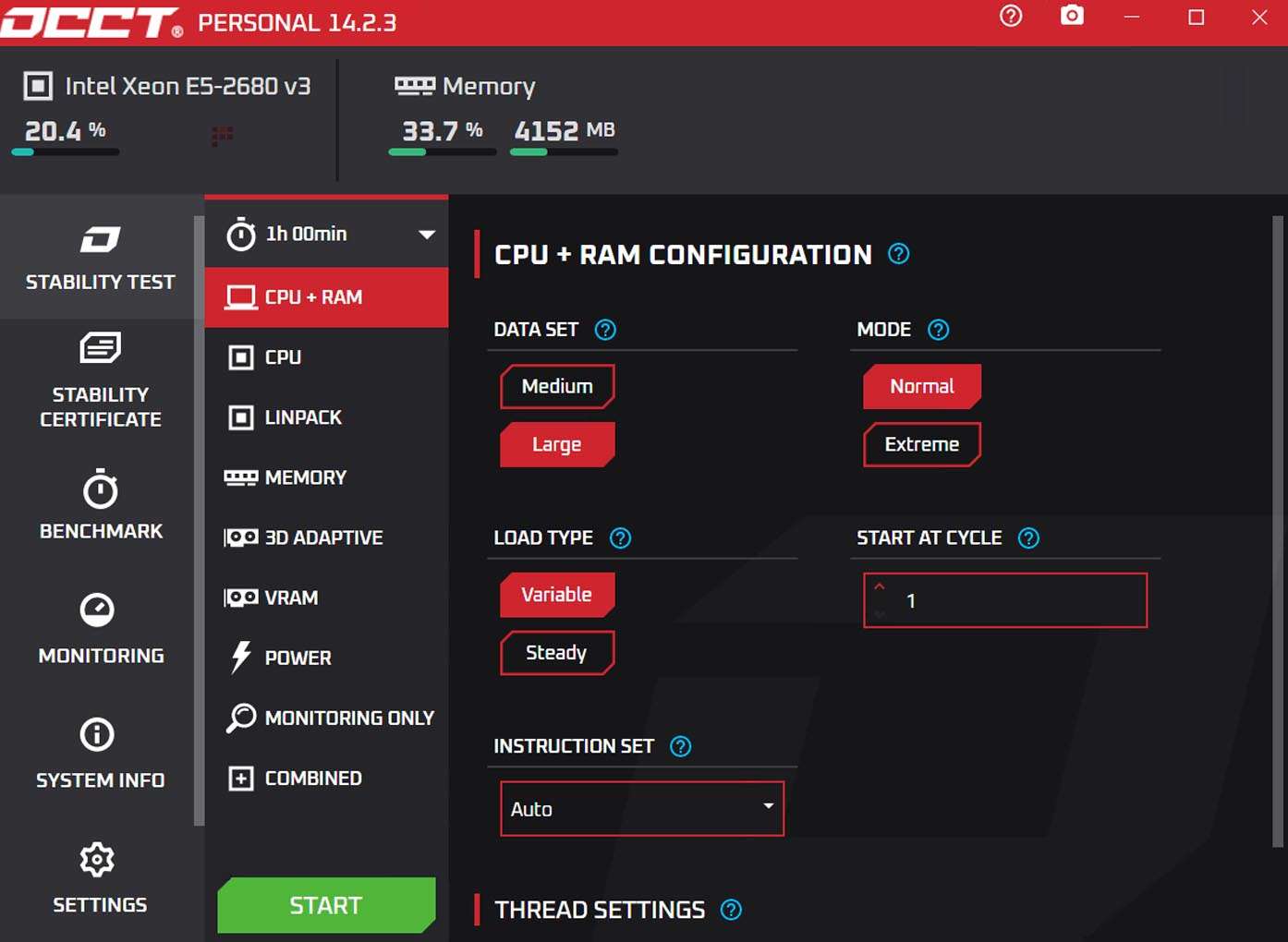
OCCT provides users with a high degree of control over their testing procedures. Test parameters such as duration, load intensity, the number of CPU threads utilized, and the amount of system memory to be used can be customized to suit specific diagnostic needs. The software also features robust logging capabilities, allowing for detailed recording of test results and hardware metrics. These logs can be exported and reviewed, and benchmark functionality provides performance metrics for comparison.
Recent Enhancements in OCCT 15.0.14.99
The latest iteration, OCCT 15.0.14.99, brings notable improvements focused on enhancing its diagnostic precision and user experience. This version includes expanded sensor support for the newest generations of Intel and AMD CPUs and a wider range of NVIDIA and AMD GPUs. Additionally, the PSU testing algorithm has been refined for greater accuracy, and ongoing UI enhancements and optimized error detection algorithms contribute to a more stable and reliable hardware testing experience.
Typical Use Cases for OCCT in PC Hardware Reliability Assurance
- Overclocking Validation: Enthusiasts use OCCT to rigorously test newly applied overclocks, ensuring system stability and preventing potential damage under sustained load.
- Hardware Reviews: PC hardware reviewers rely on OCCT to assess the performance and thermal characteristics of new CPUs, GPUs, and PSUs, providing objective data on component reliability.
- IT Troubleshooting: IT professionals employ OCCT to diagnose intermittent system instability issues, identify failing hardware components, and verify the reliability of upgraded or repaired systems.
- System Builder Assurance: System builders use OCCT as a final quality assurance step to confirm that newly assembled PCs are stable and reliable before delivery to clients.
Compatibility and Technical Requirements
OCCT is designed for modern PC hardware and operates exclusively on 64-bit versions of Windows 10 and Windows 11. It requires a modern x64 processor capable of executing SSE and AVX instruction sets, along with a DirectX 11 compatible graphics card for full functionality. The software also depends on the .NET Framework 4.8 or a later version and interacts with various motherboard sensors for comprehensive monitoring.
Frequently Asked Questions
What components can OCCT stress test and monitor?
OCCT can stress test and monitor critical PC components including CPUs (with SSE and AVX instruction sets), GPUs (3D and VRAM tests), and power supply units under combined load situations. It provides real-time sensor data and error detection to assess hardware stability.
How does OCCT detect errors during stress testing?
OCCT uses advanced error detection algorithms to identify computation errors such as WHEA hardware errors, graphical artifacts during GPU tests, and possible system crashes, allowing users to pinpoint unstable components effectively.
Which hardware and OS platforms are compatible with OCCT?
OCCT supports Windows 10 and 11 (64-bit) operating systems and requires modern x64 processors, DirectX 11 compatible GPUs, and .NET Framework 4.8 or later. It interacts with motherboard sensors for detailed monitoring.




Reviews
There are no reviews yet.