
Download GiliSoft Audio Recorder Pro 15.0 – Advanced Audio Capture and Recording Software
GiliSoft Audio Recorder Pro 15.0 is an advanced audio capture and recording tool developed by GiliSoft International LLC, designed for versatile audio management on Windows systems. This software provides sophisticated features for capturing high-fidelity audio from various sources, making it suitable for professionals in content creation, podcasting, broadcasting, music production, online streaming, journalism, and education. The latest version introduces modern audio interface support, enhanced presets, and significant performance upgrades optimized for Windows 11.
Overview of GiliSoft Audio Recorder Pro and Its Applications
GiliSoft Audio Recorder Pro serves as a comprehensive solution for capturing, managing, and enhancing audio content. It is engineered to record audio from system sound, microphone inputs, and external line-in devices, offering flexibility for a wide range of users. Podcasters can utilize it for high-quality interviews and monologue recordings, musicians for capturing ideas or practice sessions, educators for creating lecture materials, and streamers for archiving live content. Its advanced technologies aim to provide a seamless recording experience for both technical and non-technical users.
Advanced Audio Capture Features and Supported Formats
The software excels in capturing audio from multiple sources simultaneously, allowing users to record system-wide audio, specific application sounds, microphone input, or a combination of these. This flexibility is crucial for various professional workflows, from capturing multi-track podcast interviews to recording complex audio streams. GiliSoft Audio Recorder Pro supports a comprehensive array of output formats essential for professional use, including:
- MP3 for compatibility and moderate compression
- WAV for uncompressed, lossless audio
- FLAC for lossless compression, ideal for archiving
- AAC for efficient, high-quality compressed audio
- WMA and OGG for alternative compression options
Users can also fine-tune recording quality by selecting specific bitrate and sample rate options, ensuring optimal balance between file size and audio fidelity for each recording task.
Modern Technology Integration: WASAPI and Improved Recording Fidelity
Version 15.0 of GiliSoft Audio Recorder Pro integrates the Windows Audio Session API (WASAPI), a critical component for modern audio capture on Windows. WASAPI enables the software to access audio streams directly from specific applications, bypassing the traditional stereo mix and significantly reducing potential interference or quality degradation. This direct capture method results in cleaner, higher-definition audio, which is particularly beneficial for recording game audio, online lectures, or music playback from various sources. The 15.0 release includes performance optimizations and stability enhancements specifically tailored for Windows 11, ensuring a smoother and more reliable recording experience.
Automation and Scheduling Tools for Efficient Audio Management
GiliSoft Audio Recorder Pro incorporates extensive automation and scheduling capabilities designed to streamline audio management and reduce manual intervention. The software’s scheduler allows users to set precise start and stop times for recordings, facilitating the capture of live broadcasts or timed audio events. Additional features include:
- Voice-activated recording (VOR) that starts recording only when sound is detected, saving space and editing time.
- Automatic stop options based on recording duration or silence detection.
- Functionality to split large recordings into smaller, more manageable files based on time intervals or silence.
These tools are invaluable for users who need to capture content regularly without constant supervision.
Audio Enhancement and Post-Recording Management
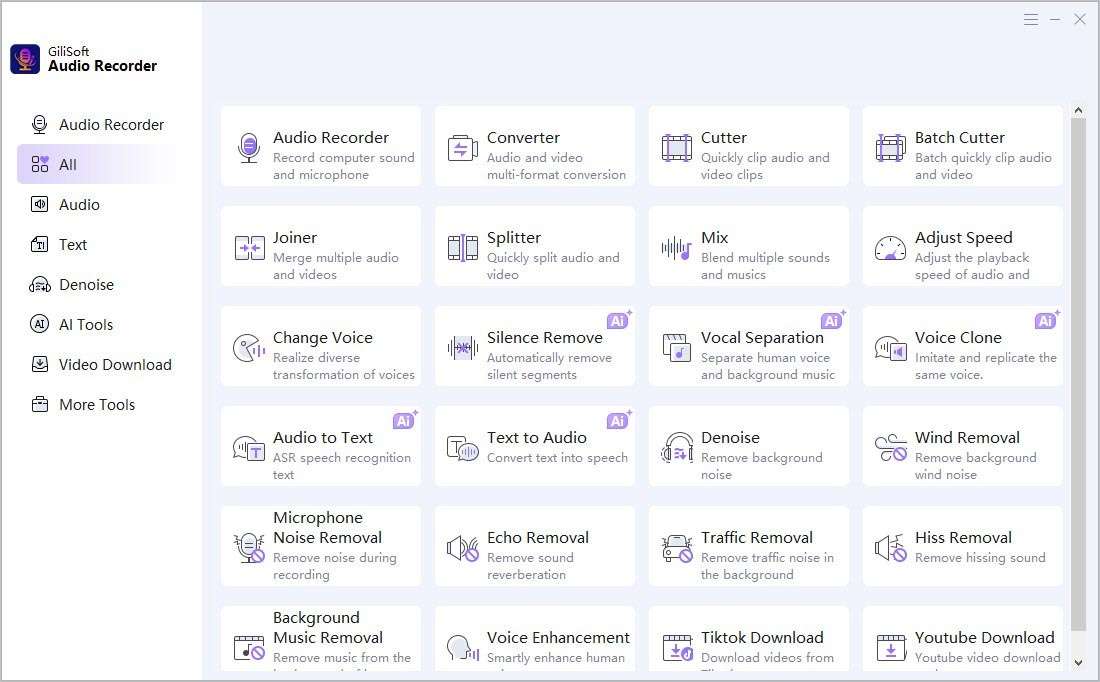
Beyond basic recording, GiliSoft Audio Recorder Pro offers features for immediate audio enhancement and efficient file management. Built-in real-time noise reduction tools help to minimize background distractions during capture, while gain control effects allow users to adjust audio levels dynamically. Post-recording, the software provides basic editing capabilities, such as removing silence sections automatically or manually. Its integrated audio library serves as a central hub for organizing recorded files, complete with support for ID3 tagging to add metadata like artist, album, and genre information, simplifying library management and searchability.
User Interface Improvements and Workflow Enhancements in Version 15.0
The 15.0 version features a redesigned user interface, which is more intuitive and user-friendly, aiming to simplify the recording and management process. Enhancements focus on improving workflow efficiency for both novice and experienced users working with Windows systems. Key improvements include:
- A cleaner, modernized layout that makes features more accessible.
- Introduction of global hotkeys for quick access to essential recording functions without interrupting workflow.
- Streamlined processes for selecting audio sources, setting recording parameters, and managing files.
These updates contribute to a more efficient and productive user experience, especially for demanding audio capture tasks.
Typical Use Cases Across Industries
GiliSoft Audio Recorder Pro finds extensive application across various professional fields. In **podcasting**, it is used for recording interviews, podcasts, and radio shows with high clarity. For **music recording**, it assists musicians in capturing practice sessions, song ideas, or even demo tracks with quality settings appropriate for their needs. **Online interviews** and **voice chat archiving** for journalism or personal records are simplified through direct system audio capture. Content creators on **streaming platforms** can use it to record audio from their streams or associated background music. Furthermore, **educational institutions** can leverage its capabilities for recording lectures, webinars, and online course materials, ensuring clear and accessible audio content.
Frequently Asked Questions
How does GiliSoft Audio Recorder Pro’s WASAPI support improve audio recording quality?
WASAPI support allows the software to capture audio directly from individual applications with minimal interference, which results in higher fidelity recordings compared to traditional stereo mix methods. This enables users to isolate audio sources like music players or browsers for precise capture.
Can GiliSoft Audio Recorder Pro schedule recordings automatically?
Yes, the software offers a robust scheduler that can set recordings to start and stop at specific times or create complex weekly recording plans, making it ideal for capturing live streaming audio or regular broadcasts without manual intervention.
What audio formats and quality options does GiliSoft Audio Recorder Pro support?
The software supports multiple formats including MP3, WAV, WMA, AAC, OGG, and FLAC. Users can customize bitrate and sample rates to balance between audio quality and file size, catering to different professional and personal needs.




Reviews
There are no reviews yet.